Best Free AI Voice Generators

In this story
Start with TTSMaker if you need a downloadable voiceover for a monetized video or client project. Its free web tool offers MP3 and WAV downloads, and its terms allow commercial use of lawfully generated audio. Try QuillBot for a quick MP3 without signing up, ElevenLabs to audition voices for a noncommercial project, or Clipchamp if you want to create and edit the narration in the same video timeline.
Before generating a full script, check whether the tool lets you save the file you need and use it where you intend to publish. A free listening demo, a free download, and a free commercial license solve different problems.
Which kind of AI voice generator do you need?
Text to speech turns a written script into spoken audio using a voice you select. It’s the simplest choice for tutorials, slides, and explainers. Voice cloning uses a recording to imitate a particular speaker. For projects that need a recognizable person’s voice, get permission before uploading a sample and agree on where the result can be used. A stock synthetic voice avoids the need to collect that recording. If you’re handling a client’s script or unpublished product details, use a short dummy passage for the first audition and check the service’s data terms before uploading the real text.
A voice generator makes a track. An AI voice agent listens and responds in real time. If you’re setting up a phone or support workflow, compare AI voice agents. If you still need footage or an editor for a narration track, start with the free AI video maker guide.
Decide how the audio will leave the tool before you settle on a voice. For a presentation or a quick handoff, MP3 is often convenient. If you’re sending clips to an editor for further mixing, choose WAV if the generator and editor support it. Export a short sample first and make sure it opens on the device or editing app you’ll actually use.
Related Contents:
Best Free AI image generators in 2026
Free AI voice generators compared
These are the U.S. web options listed in November 2026. Character and credit limits use different units. A per-conversion cap controls how much text you can submit at once, while a weekly or monthly allowance controls how much you can generate in total.
Tool and best fit | Free access and export | Publishing check |
TTSMaker for a reusable voiceover | 20,000 characters a week for quota-counted voices. MP3 and WAV. | Terms allow commercial use of lawfully generated audio. |
QuillBot for a quick MP3 | No signup. MP3 download. | Check terms for your intended commercial use before relying on it. |
ElevenLabs for voice auditions | 10,000 shared credits a month. Downloadable audio. | Noncommercial only on Free. Public sharing requires attribution. |
Clipchamp for video narration | Free text to speech in the editor. MP4 video or M4A audio-only export. | Check rights for the project’s audio and any stock assets. |
Cartesia for a listening preview | Up to 500 characters in the no-account demo. Use the Playground or API to create project audio. | Cartesia lists a commercial license on paid plans. |
TTSMaker for downloadable audio with commercial rights
Choose a language and stock voice, preview the read, then download the file. The converter also has a per-submission limit, so check the on-screen counter if you’re working with a long script. Some voices are marked as exempt from the weekly quota. Save the file locally after generation because hosted downloads can expire. The license covers the generated audio within the terms. It leaves you responsible for clearing your script and other material you supply. TTSMaker converter and output terms.
QuillBot for a no-account MP3
Paste the text, choose a voice and tone, then preview and download an MP3. QuillBot uses voice and tone presets in place of separate speed and pitch sliders. It’s a good fit for a scratch track or a slide narration you can time by rewriting the copy. Check the terms for your use before relying on the output for advertising, paid client work, or a monetized channel. QuillBot AI voice generator.
Cartesia for comparing how a sentence sounds
The public demo is useful for hearing a tricky name, a short sentence, or an accent. If you need an actual file, start in the Playground or use the API and check the plan’s publishing rights. Cartesia’s demo and download FAQ.
Canva for narration inside an existing design
If your presentation or social video is already in Canva, its AI Voice tool offers a selection of free voices and accepts up to 1,000 characters per conversion. Use it to time a short read against a slide or scene. That figure is the size of a single input, so check your account’s usage allowance separately before starting a long project. If your editor needs a separate audio file, test the export before building the rest of the design. Canva AI Voice FAQs.
ElevenLabs and Clipchamp for different editing workflows
ElevenLabs for auditioning voices
Free gives you 10,000 monthly credits shared across eligible tools, and the number of characters you can generate depends on the model. If you publish free-plan speech noncommercially, include “elevenlabs.io” or “11.ai” in the title as required by the help center. If the project becomes commercial, regenerate the narration under an eligible commercial plan or replace it with a track you’re licensed to use. Buying a subscription later does not give an old free-plan track commercial rights. See the ElevenLabs credit allowance, the publishing rules and our ElevenLabs plan comparison.
Clipchamp for narration that needs to match footage
In the editor, open Record & create, select Text to speech, and add a voice clip to the timeline. Adjust pace or pitch, then split the script across several clips if you hit the text limit or need to time lines to separate scenes. Microsoft Support lists M4A for audio-only exports and MP4 for video. If a client or publishing workflow asks for MP3, check the extension before handing over the file. Clipchamp text-to-speech controls and export formats.
If an exported file opens in your browser but your editor rejects it, check the file format in the editor’s import settings. Convert a copy to a supported format if the license permits. Renaming an M4A file to MP3 changes the label without converting the audio.
How to audition a voice before using your quota
Test the hardest line from your real script, including any names, dates, numbers, or acronyms. Try “Meet Priya at 8:05 a.m. on May 3. The USB-C adapter costs $18.50. Wait two seconds, then select Continue.” Keep the words the same across voices, and change one setting at a time when you fine-tune the delivery.
Listen for pronunciation, pauses, and pace. If the voice runs through a product name or number, try spelling it as you want it spoken and preview that line again. Keep the on-screen text unchanged if the spoken spelling looks odd in captions. If a cue like “wait two seconds” should be silent, put the gap on the timeline instead of pasting that cue into the narration. For this kind of timing work, see our comparison of AI video editing tools.
How much narration can you make for free?
Budget for attempts as well as finished files. Suppose you’re preparing six shorts, each with a 900-character script. If you render each script three times, the total is 16,200 characters. At eight shorts, the same process takes 21,600 characters, which is 1,600 over TTSMaker’s standard weekly allowance for quota-counted voices. The example assumes each attempt uses the full script and counts toward the allowance.
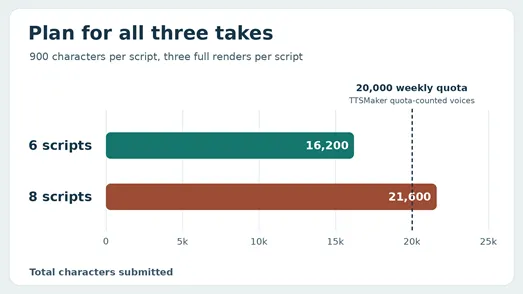
To save allowance, audition two voices with the same short passage. Once you pick one, generate by scene and redo only the scene with the problem. Keep the voice, model, and pace settings the same across the project. Leave room for fixes after hearing the narration with music or watching it alongside the footage.
Can you use a free AI voiceover on YouTube?
Yes, if your generator grants the rights your project needs and your video meets YouTube’s rules. For a monetized tutorial, a sponsored video, or client work, start with a tool that explicitly allows commercial use on the plan you’re using. Keep a copy of the applicable terms and a note of when and where you generated the final track.
YouTube’s disclosure guidance distinguishes ordinary editing from realistic synthetic content that could mislead viewers. Its examples say cloning your own voice for a voiceover or dub doesn’t require disclosure, while making it sound as though someone gave advice they never gave does. Check the current examples for your situation. The platform also applies its separate monetization policies to the finished video and channel. YouTube disclosure guidance and channel monetization policies.
What if the voice sounds good but won’t fit the edit?
For a 30-second clip, a planned pace of 150 words per minute gives you about 75 words before allowing for pauses. Time the actual export, especially when your copy contains numbers or acronyms that take longer to say. Trim the script before speeding up the whole track. Remove repeated phrases, split a long sentence, or move a detail to on-screen text. Leave short gaps at scene changes and listen again with the final music level. Export a short section with its captions to check the timing, then save the full narration separately so you can replace it without rebuilding the video.
Keep reading


How to Get Your Business on ChatGPT
Claim or add your business in ChatGPT Business Hub, complete verification, and use Insights to see how customers discover your business.


How Quantum Dots Turn Size Into Color
Quantum dots are tiny regions of semiconductor that confine electrons in all three dimensions. In a TV, they typically take the form of nanocrystals just a few...


Organoid Intelligence Explained
Organoid intelligence is a field of research that connects lab-grown neural tissue to electronics and software. Researchers use the resulting systems to study h...