How to Get Your Business on ChatGPT

In this story

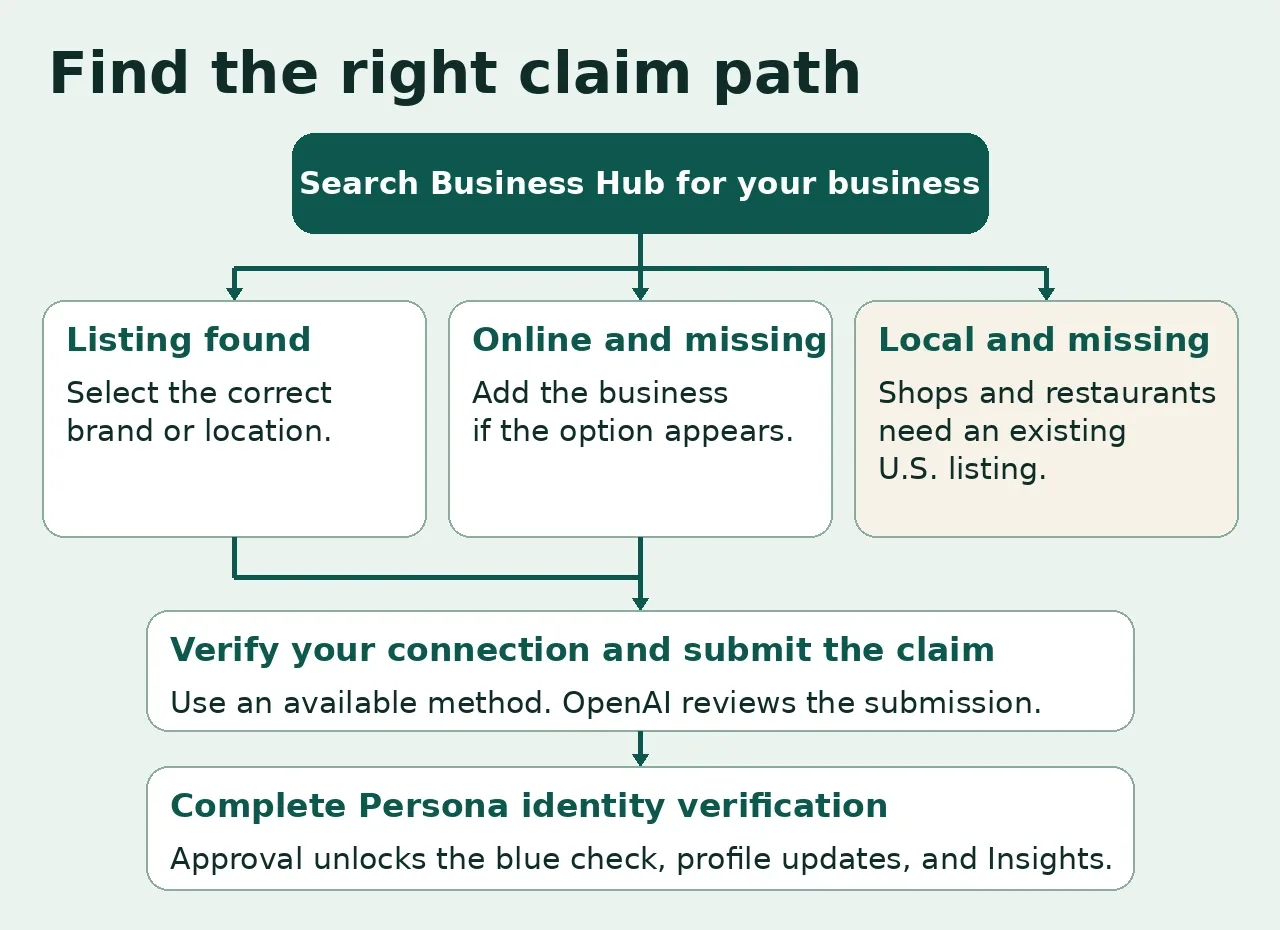
If you’re wondering how to get your business on ChatGPT, start with its Business Hub listing. Sign in to ChatGPT Business Hub, search for your business, and use one of the verification options shown. After OpenAI approves your claim, complete identity verification with Persona to get the blue check, publish profile updates, and access available insights. Eligible online businesses may be able to add a missing profile. Local shops and restaurants can currently claim only an existing U.S. listing.
Who can add or claim a business on ChatGPT?
OpenAI launched Businesses in ChatGPT in beta on November 10, 2026. The Business Hub is where an owner or authorized representative manages the profile customers can open when the business appears in an answer. Eligibility depends on your business type, location, and available verification methods. OpenAI’s launch announcement and Business Hub setup guide.
| Your business | Where to start |
|---|---|
| U.S. shop or restaurant | Search for the exact location. You can claim it if the listing already exists and Business Hub offers verification. |
| Online store | Search for your brand. If it’s missing, look for an option to add it. If you use Shopify, check whether the Shopify verification option appears. |
| Online service business | Check for a listing or an option to add it. Eligible U.S. online service businesses with a website can also qualify for a Business Agent. |
| Physical location outside the U.S. | For local shops and restaurants, the current claim path is limited to existing U.S. listings. |
How to register or claim your business in ChatGPT Business Hub
1. Open Business Hub and find the right listing
Sign in with the ChatGPT account that should manage the profile. Open Business Hub from the sidebar or go directly to the official Business Hub. Search the business name and compare the website, address, or city before picking a result. If you run three locations with the same name, confirm the location you’re claiming. The main brand claim doesn’t cover its individual branches.
For a missing online business, follow the creation prompts if Business Hub offers them. Use the business name customers recognize, its official website, the closest accurate category, and public contact details where requested. If you work for an agency, have the business use its own account for the claim and invite you through Business Hub where available. OpenAI’s account and access guidance.
2. Choose a verification method you can complete
Business phone. Receive a text or automated call at the listed number. If it routes through a phone menu your staff cannot bypass, choose another method if offered.
Business email. Request a code at the business email shown. Make sure someone authorized can access that inbox.
Website domain. Add the TXT record Business Hub supplies to your domain’s DNS. Use the walkthrough below if your provider asks for a different version of the hostname.
Shopify store. If the option appears, review the permissions and sign in to the Shopify store that matches the business you’re claiming.
OpenAI emails you a decision or asks for more information. Check the inbox associated with your managing account before restarting a pending claim. Review time varies. OpenAI’s verification instructions.
3. Complete Persona verification for the blue check
When Business Hub prompts you, open the Persona verification flow. You may be asked for government-issued identification, business registration details, and evidence you can represent the business. If you do this later, open your profile in the Business tab and find the Persona verification task in the overview.
The blue check appears after OpenAI approves your Persona verification. If you used Persona to create a new profile, approval can publish it automatically. Review public contact details, branding, and business information before submitting. OpenAI says only unpublished drafts can be deleted through setup. OpenAI’s Persona and profile publishing guidance.
4. Update the facts customers use to decide
Open your verified profile and check the website, description, category, logo, and relevant policies. Lead with specifics you can keep current. A bike shop could write, “Repairs commuter and road bikes in Portland. Walk-ins are accepted for flat tires. Tune-ups require an appointment.” Put the same details on the relevant page of your site. OpenAI reviews profile updates and can also draw on other sources when generating answers. OpenAI’s business information policy.
How to verify your ChatGPT business domain with a TXT record
In Business Hub, choose Website domain if it’s offered. Copy the record type, host, and value shown.
Find the provider that manages your domain’s authoritative DNS. If you bought the domain at one company and use another company’s nameservers, log in to the DNS provider.
Add a new TXT record. Paste the verification value exactly. Use the host format your DNS provider expects and leave existing records in place.
Check the exact hostname in public DNS. If the expected TXT value appears, go back to Business Hub and select Verify domain. Follow any remaining prompts to submit the claim.
Watch for a doubled domain. If the requested name is claim.shop.example.com and your provider automatically appends the example.com zone, you would enter claim.shop. A provider that expects the full hostname would use claim.shop.example.com. If ChatGPT asks for the root of the zone, many providers represent it as @. The names here are examples. Use the exact record shown in your account. Cloudflare’s DNS record guide.
Check before editing again. If you have dig, run the following commands after substituting your domain and the exact TXT hostname. You can also use the Google Public DNS lookup and check its TXT results for the hostname.
dig +short NS example.com
dig @8.8.8.8 +short TXT claim.shop.example.com
If public DNS returns the expected value, retry in Business Hub. If it returns nothing, check the DNS provider and full hostname. If the authoritative nameserver already shows the record but the public resolver doesn’t, give cached results time to expire. A missing record in one lookup doesn’t by itself tell you which part failed. Google Public DNS troubleshooting.
ChatGPT Business Hub troubleshooting cheat sheet
| What you see | What to do next |
|---|---|
| Your U.S. shop or restaurant is missing | Try the exact storefront name and check the address of nearby matches. The beta currently requires an existing listing for this business type. |
| Someone already claimed the profile | Use the profile’s three-dot menu and select Dispute ownership. Have your authorization documents ready. If you see Contact support, use it to request access to the locked listing. |
| DNS shows your value, but the claim is pending | Confirm you selected Verify domain and finished the remaining prompts. Once submitted, check your inbox for OpenAI’s decision or request for information. |
| Claim approved, blue check missing | Check Persona status in the profile overview. If verification failed, match the name, address, and any requested registration details to official records before using Try again if offered. |
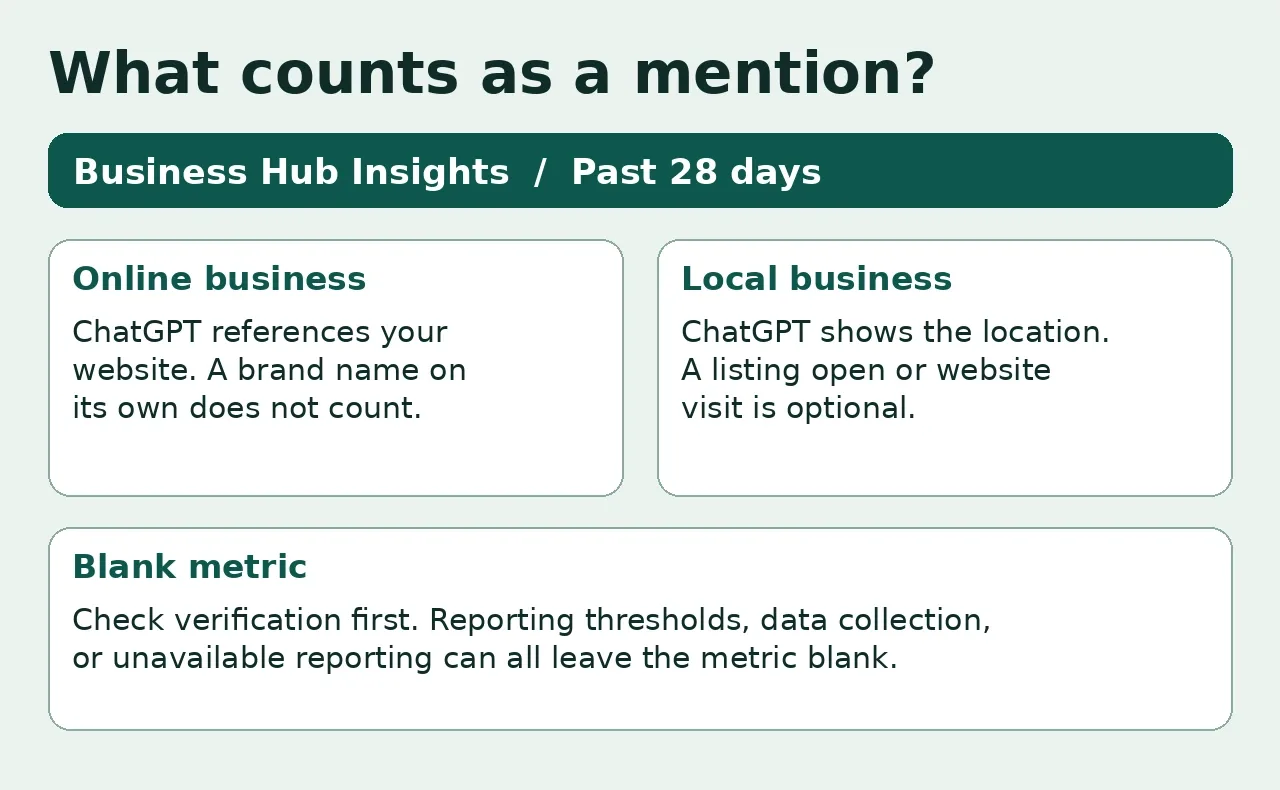
| Insights is blank | Check that Persona is approved. A blank can reflect the reporting threshold, data still being collected, or unavailable reporting. Contact support if it persists. |
| An answer still shows your old hours | Check whether the Business Hub update was published. Update your public hours page and check major listings for stale hours. Re-test with a fresh chat that names the exact location. |
If you contact support, include the business name, the step that failed, and the exact error. Remove personal information from screenshots. OpenAI Support.
How to check if your business shows up in ChatGPT
After your profile update is published, run two checks in separate new chats. First, search for your business by name and city or website. Then try a question a customer might ask before they know your brand. A bike shop could try “Which bike shops in Portland accept walk-ins for flat-tire repairs?”
For each answer, record the date, the exact question, whether ChatGPT named your business, and which URL it linked to. A branded search helps you spot wrong details. The second check helps you see which sources ChatGPT uses for a broader recommendation. If an answer cites a stale page you control, update that page and check again later. These are spot checks. Use Business Hub Insights to track reported activity over time. OpenAI’s guidance on how business profiles appear.
How to read mentions, website clicks, and discovery topics
Open Insights in your verified business profile. The dashboard reports aggregate activity over the past 28 days. For an online business, a mention counts when ChatGPT references its website. An answer that names the brand alone may leave that count unchanged. For a local business, the location appearing as a result can count even if the user never opens the listing. Website clicks track click-throughs, and discovery topics group recurring themes. The dashboard does not share individual prompts or customer chats. OpenAI’s metric definitions.
Turn a discovery topic into a website fix. Suppose your store keeps appearing under a topic about espresso machine compatibility. Pick a product page that gets those questions and add the supported models, incompatible models, and how to identify the model number. Record the date and the exact URL you changed. When you next compare two complete 28-day periods, review website clicks and the topics reported. Use any movement as a signal to investigate alongside your site analytics. A change in counts can have several causes.
How to add products or launch a Business Agent
Retailers can connect a Shopify feed or submit a CSV product feed that follows OpenAI’s specification. For a hosted CSV, submit the direct feed-file URL. Before uploading, spot-check a discounted item, an out-of-stock variant, and a product with multiple sizes. For each, open the product URL and compare the price, currency, and availability with the feed. That catches discrepancies a check of a single in-stock product can miss. OpenAI’s product feed specification and Shopify’s ChatGPT channel guide.
Business Agents are a separate feature for eligible U.S. ecommerce and online service businesses. If you see the option, preview the agent with three questions you already know the answers to. Try a sale-item return, an incompatible product, and a request to check an order. Fix incorrect answers before selecting Publish. The agent can explain policies and link to your website, where customers can complete purchases, book services, or check orders. OpenAI’s Business Agent setup guide and eligibility policy.
Frequently asked questions
Do I need ChatGPT Enterprise or an Ads account?
You can claim an eligible business without an Enterprise agreement or an Ads account. Publishing a Business Agent is also optional. OpenAI’s setup FAQ.
Is ChatGPT Business Hub part of the ChatGPT Business subscription?
Business Hub manages your public business profile and its insights. The ChatGPT Business subscription is a workspace for teams. If you’re comparing AI subscriptions for your team, see our AI tools and pricing comparison.
Will claiming my business make it rank higher in ChatGPT?
Claiming gives you a way to submit accurate business information. The blue check indicates verification, and ChatGPT continues to make independent recommendations. OpenAI does not guarantee better placement or more sales. OpenAI’s guidance on what a claim changes.
Keep reading


How Quantum Dots Turn Size Into Color
Quantum dots are tiny regions of semiconductor that confine electrons in all three dimensions. In a TV, they typically take the form of nanocrystals just a few...


Organoid Intelligence Explained
Organoid intelligence is a field of research that connects lab-grown neural tissue to electronics and software. Researchers use the resulting systems to study h...


Quantum Computing Basics for Beginners
A quantum computer uses qubits to represent information. Its gates change how likely different outcomes are when you measure the qubits. Some algorithms use tho...