What Are the Best AI Marketing Tools for Small Businesses?

In this story

The best AI marketing tools for small businesses depend on the task. Start with ChatGPT for plans and drafts, Canva for graphics, or Descript for spoken video. Then consider Creatify for product ads and Anyword for ad-copy tests. Choose one clear job before adding a paid plan.
A solo marketer does not need all ten tools. Instead, find the work that takes the most time each week. Test one tool with your own brief, and count the time you spend fixing its output.

Best AI Marketing Tools Compared: Features, Prices, and Trials
| Tool | Best use | Free route or monthly price | Evidence reviewed |
|---|---|---|---|
| ChatGPT | Plans and first drafts | Free plan | Published writing test |
| Canva | Graphics | Free plan; limits apply | Integration test |
| Descript | Spoken recordings | Free; Hobbyist $24/person | Hands-on reviews |
| Tesseract | Agent-assisted edits | Free local engine; AI costs may apply | Creator project |
| Spyglass | Competitor research | Paid; confirm offer | Provider documentation |
| AdKit | Paid-ad workflows | $29; seven-day trial | Sponsored hands-on report |
| Gojiberry | B2B leads | From $99; trial advertised | Named user report |
| Creatify | Product video ads | Free; Standard $15 | Seller test; affiliate access |
| Claude | Draft review and briefs | Free; Pro $20 | Writing comparison |
| Anyword | Ad-copy variants | $49; seven-day trial | Published copy tests |
Prices above use monthly billing in US dollars, before tax. However, free plans, trials, and paid plans offer different limits. Check the provider links below for the current terms. Ad spend, staff time, and outside AI usage can add to the total.
How we chose these AI marketing tools: We reviewed provider pages and published accounts that describe tasks, results, and flaws. We attribute those experiences to their authors. WhatTheTech did not run these tests. Also, sponsored reports and affiliate access are flagged where known. A single report cannot predict your results.
1. ChatGPT for Plans and First Drafts
ChatGPT can help turn customer notes and product facts into a useful brief. For example, ask it to group buyer concerns, draft an email, or plan a small launch.
In Analyst.ai’s published writing test, ChatGPT added no unsupported claims in six sparse-brief pieces. However, some outputs missed requirements or included internal notes. The test used a small sample and one run per condition, so it does not prove general accuracy.
Try it: Supply real interview notes and ask for five buyer concerns, each backed by a source passage. Then check each claim. Among AI marketing tools for broad writing tasks, start with the assistant you already have.
2. Canva for Marketing Graphics
Canva suits social posts, slide decks, and simple ads. First, create a design you like. Then reuse its layout so your posts look like they belong to the same brand.
Ayush Singhal tested Canva’s ChatGPT integration with a paid Canva account. He reported some useful narrow edits, but resizing broke text layouts. His account of the integration test concerns that setup, not every feature in Canva’s editor.
Try it: Make one post with free assets and export it in the size you need. Check text, crops, and contrast. For more precise image work, compare our AI photo editing tools.
3. Descript for Interviews and Webinars
Descript suits content built around speech. You edit words in a transcript, and the matching recording changes too. As a result, finding one useful answer can be easier than searching a long timeline.
Memeburn’s hands-on review reported useful transcript edits but less natural results with longer generated voice passages. Also, The Podcast Host’s older review warned that text-led work can distract from listening.
Try it: Cut a five-minute interview into one clear clip. Then listen to the full edit. Check meaning, pauses, and captions. Descript pricing lists Free and Hobbyist at $24 per person monthly. Compare other AI video editing tools if your needs differ.
4. Tesseract for Agent-Assisted Video Edits
Tesseract gives a compatible AI agent creative tools. It suits people who want to direct edits through prompts and can spend time checking the result.
Ryan Haigh made a 74-second promo with Tesseract and Claude Code. However, his documented project involved his own assets, art direction, and about eight hours of changes. That is useful context when a demo suggests a prompt does all the work.
Try it: Request a 15-second cut, one title, and captions. Review the chosen scene before export. The local engine is free, but connected AI may cost extra. For a simpler brief, use our video script template.
5. Spyglass for Competitor Creative Research
Spyglass links ads, creators, social content, and landing pages in a research workflow. For example, you could compare an ad’s promise with the page that follows the click.
We found provider documentation for Spyglass, but not enough detailed outside testing to claim a proven edge. So, check coverage in your own niche before buying. Public ad data cannot reveal a brand’s full costs or profit.
Try it: Search five real rivals and check fresh ads, working page links, and relevant creators. Confirm pricing and any trial directly. When judging AI marketing tools for research, useful coverage matters more than a large claimed database.
6. AdKit for Paid-Ad Workflows
AdKit combines ad research with connected campaign tools. It makes most sense when you already run ads and repeat the same account tasks.
Yeonji at VerifiedTools reported $14.15 spent, 162 clicks, and no free trials in a four-day test. The hands-on report also noted delivery and currency-display issues. However, the reviewer disclosed paid coverage, and this small test cannot prove sales impact.
Try it: Ask for a seven-day report, then compare its spend and results with the ad platform. AdKit’s table lists Single Project at $29 monthly with a seven-day trial. AI marketing tools that act on live accounts still need clear permissions and review.
7. Gojiberry for B2B Leads
Gojiberry uses buyer criteria and activity signals to find B2B prospects. However, its reach depends on whether your buyers leave signals it can detect.
Natalia Nogacka praised setup and automation in a logistics-client test in Poland. Yet she reported few leads and linked that result to low LinkedIn activity in the target market. Her published experience did not establish sales or booked-meeting results.
Try it: Check 20 leads by hand. Does each fit your target buyer, and does the signal help you write a relevant message? Gojiberry advertises prices from $99 monthly and a trial. Confirm seats, credits, and renewal terms first.
8. Creatify for Affordable Product Video Ads
Creatify offers a low-cost way to test product videos. Its pricing page lists Standard at $15 monthly. Meanwhile, the Free plan guide describes 10 monthly credits with watermarks.
Dave at DTDF Digitals ran out of free credits during an Ad Agent test. After receiving Pro access from Creatify’s affiliate team, he made an ad and fixed errors in hands and product use. His seller test discloses both affiliate links and supplied access. The job and fixes used about 50 credits.
Try it: Start with a standard 15-second Video Ad or Avatar Video. Those tools can fit two clips into 10 credits; Agent work may need more. For AI marketing tools that show a product in use, inspect every shot. Our free AI video maker guide covers other routes.
9. Claude for Copy Review and Creative Briefs
Claude offers another way to review a draft or turn supplied notes into a brief. Its plans include Free and Pro at $20 monthly. So, try Free before paying for a second assistant.
Eddie Ochieng compared three writing tasks on the free tiers of Claude and ChatGPT. Claude better matched his voice sample, while ChatGPT gave his preferred fresh draft and edit. Read the writing comparison. It does not establish an advantage in ad-data analysis.
Try it: Give both tools the same page and brand samples. Ask for three fixes with reasons, then compare the work left to do. For overlapping AI marketing tools, one paid plan may be enough.
10. Anyword for Ad-Copy Variants
Anyword adds guided templates and prediction scores to copy work. Starter costs $49 monthly. Also, its seven-day trial allows 2,500 words. There is no permanent free plan.
Andrew Marketing’s test liked its ad descriptions after an improvement step. However, Rafael Abellan’s trial found long-form work needed more depth. Both used fictional briefs; neither proved a lift in sales.
Try it: Rewrite one real ad in three directions and compare it with your current assistant. Check facts, length, and editing time. A prediction score can help choose ideas to test. It cannot prove that the ad will win. Keep AI marketing tools only when they improve the work you do often.
Which Free AI Tools for Marketing Are Worth Trying?
Start with one small task. Free AI marketing tools can help, but a free account does not promise unlimited AI or a clean export.
| Option | Task to test | Limit to check |
|---|---|---|
| ChatGPT or Claude | Draft an email | Usage and model access |
| Canva | Make a social graphic | Paid assets and AI limits |
| Descript | Edit a short recording | Export and AI limits |
| Tesseract | Cut existing footage | Connected AI costs |
| Creatify | Test a short video ad | 10 credits and watermarks |
Anyword offers a trial, not a free plan. Therefore, use its word allowance on a real brief before it ends. For AI marketing tools with credits, check the cost before each new attempt.
How Much Do AI Marketing Tools Cost for a Small Business?
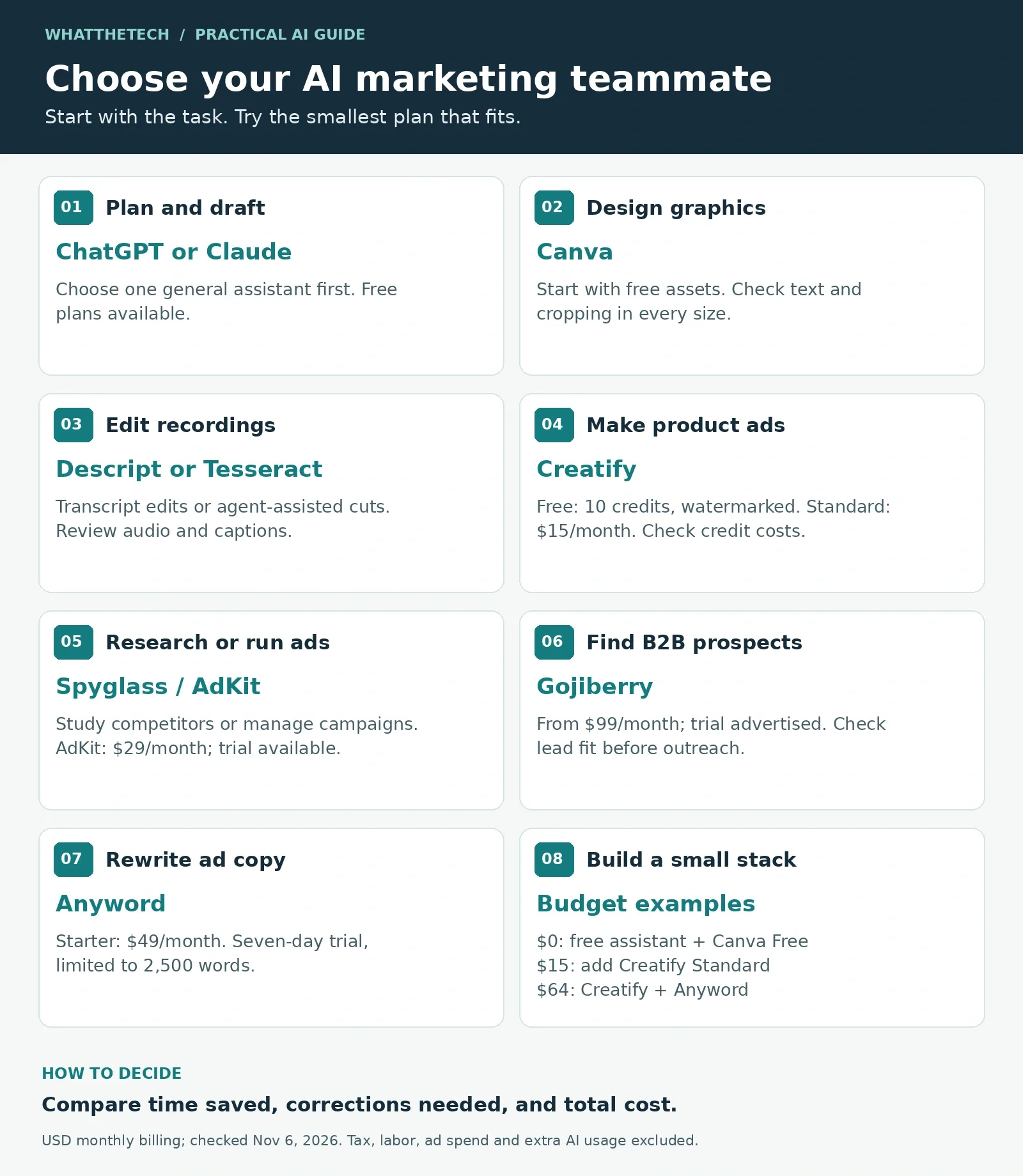
These are sample budgets, not equal feature bundles. They exclude tax, staff time, ad spend, and separate AI charges. First, decide which AI marketing tools solve your main task.
| Sample stack | Monthly cost | Use |
|---|---|---|
| Free assistant + Canva Free | $0 | Drafts and simple graphics within limits |
| Free assistant + Creatify Standard | $15 | Limited product-video work |
| Free assistant + Anyword Starter | $49 | Regular ad-copy work |
| Creatify Standard + Anyword Starter | $64 | Video and copy |
| The $64 stack + AdKit Single Project | $93 | Add paid-ad workflows |
Avoid buying every plan at once. Instead, add one when the task recurs and the cost makes sense. A higher output count alone does not show better marketing.
How Do You Choose AI Marketing Tools for Your Business?
First, define one result: an approved email, a short clip, or 20 useful leads. Next, use the same inputs in each trial. Then record time spent, credits used, and fixes needed.
For video, check the real product, sound, captions, and downloaded file. For copy, check every claim against your brief. Also, keep the source notes so another person can review the work.
Finally, keep the tool only if it makes that task better at a fair cost. The best AI marketing tools are the ones your team can use well each week.
Frequently Asked Questions
Which AI marketing tools should a small business try first?
Start with a free general assistant such as ChatGPT or Claude, plus Canva if you need graphics. Add a specialist tool when video, ads, or lead research becomes a regular task.
Can you use AI marketing tools for free?
Several tools offer free plans, but their AI use, export options, or assets may have limits. Anyword offers a time-limited trial rather than a permanent free plan.
Is Creatify a full replacement for a video team?
No. It offers a cheaper route into some video-ad tasks. Product accuracy, creative choices, and repeated fixes can still require human work.
Do published user tests predict my results?
No. They can reveal useful workflows and flaws, but results depend on your brief, audience, offer, product version, and setup.
Keep reading


How to Get Your Business on ChatGPT
Claim or add your business in ChatGPT Business Hub, complete verification, and use Insights to see how customers discover your business.


Claude Fable 5.2: Pricing, Access, and Opus 5.5 Test
Find out how to access Claude Fable 5.2, what it costs, and how it performed against Opus 5.5 on a Python settings migration.
Best Free AI Voice Generators
Start with TTSMaker if you need a downloadable voiceover for a monetized video or client project. Its free web tool offers MP3 and WAV downloads, and its terms...