Video Script Template for Shorts, Reels, and Tutorials
Copy a practical video script template with spoken lines and visual notes. Use short examples, clear open-loop answers, and a recording checklist.


In this story
A useful video script template plans three things: what you say, what viewers see, and what they should do next. Start with a hook, give one clear lesson, then close with a relevant action. For a longer short, add brief context and questions that the next scene answers.
Use the worksheets below for software demos, quick tips, or short tutorials. Copy one into your own document and replace the prompts. You can work in a plain text file; the plan matters more than the app.
Copy this video script template
First, fill in this short brief. It helps you choose what to show before you spend time on the opening line.
Viewer: Who needs this, and what do they already know?
Outcome: After watching, they can [do one useful task].
Proof: I can show [a real action, result, or comparison].
Runtime: My target is [15, 30, or 60 seconds].
Next step: I want them to [take one relevant action].
Next, copy the video script template below. Use the middle column for spoken words and the last column for filming notes. Keep those notes out of your voiceover.
| Block | What to say | What to show |
|---|---|---|
| 1. Hook | [Name a problem or reveal a result.] | [The problem or result in the first shot.] |
| 2. Lead | [Give the minimum context needed.] | [The task or a brief comparison.] |
| 3. Value | [Give the first useful action.] | [The action taking place.] |
| 4. Open loop | [Ask a specific question about the next step.] | [The detail that needs an answer.] |
| 5. Answer and value | [Answer that question and advance the task.] | [The answer or a clear example.] |
| 6. Open loop | [Raise the final obstacle or check.] | [The remaining problem.] |
| 7. Final payoff | [Resolve it and complete the promise.] | [The finished result and proof.] |
| 8. Call to action | [Ask for one useful next step.] | [The action or its destination.] |
This is an eight-block video script template because the last value section also supplies the final payoff. However, you can merge blocks or remove both questions. A short demonstration often needs only a hook, one action, and a close.
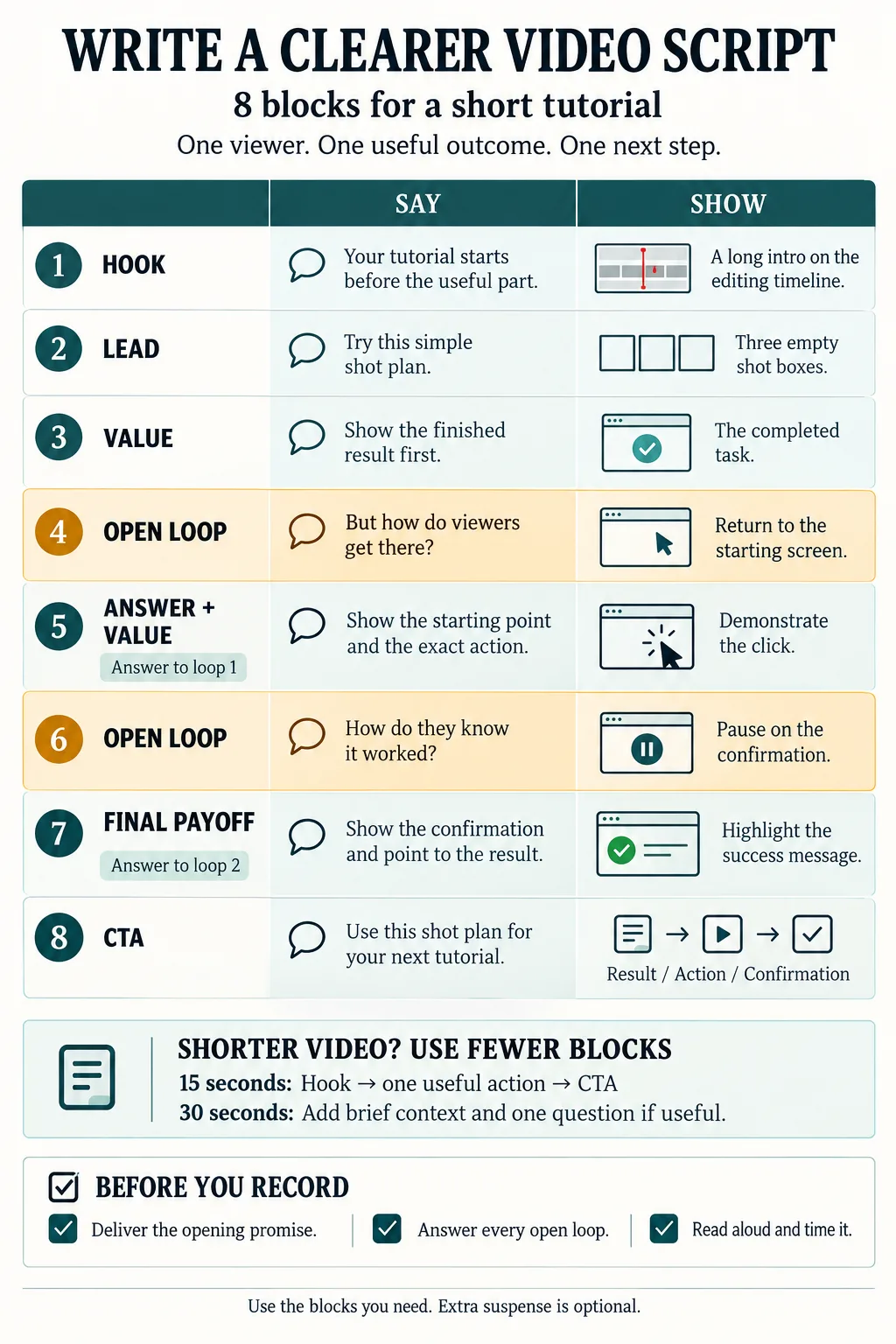 Use the spoken and visual columns together. The highlighted questions lead to answers in the next scene.
Choose one useful outcome
Before writing, replace a broad topic with a task. “Photo management” is broad. “Show how one album helps you find a group of photos” gives you a result you can film.
For example, use our guide to organizing photos on a Mac to choose one workflow. Then show its starting point, one action, and the result. Keep the wider setup for a longer tutorial.
Similarly, a video based on editing a PDF on a Mac could cover one task. Choose adding a note or moving a page rather than promising to explain every editing feature.
A focused video script template makes that scope easier to hold. If a new point solves a different problem, save it for another clip.
Write a hook and lead that earn their place
Make the first line specific
Start with something the viewer can recognize or inspect. For example, “Your tutorial starts before the useful part” pairs well with a long intro on an editing timeline.
Alternatively, show the finished result first. A clear before-and-after can explain the promise without a dramatic claim. Avoid guarantees about views, sales, or saved time unless you have evidence for them.
In its advertising guidance, TikTok’s Creative Codes recommends a hook, body, and close. Our expanded worksheet adds detail for tutorials. It is a writing aid to test, rather than a platform rule.
Keep the lead short
Then use one line to connect the opening to the first action. “Try this three-shot plan” may give enough context. A biography or long topic summary would delay the useful part.
However, there is no magic ten-second mark after which viewers stop leaving. Each section still needs to help them. So move the first useful moment forward before adding suspense.
Use open loops with clear answers
An open loop leaves a relevant question briefly unresolved. For example, after showing a result, ask how viewers can reach it. Then demonstrate the path.
Instead of “That’s not the craziest part,” name the detail that matters. “How do you know the change saved?” gives the next scene a clear job.
| Question | Answer in the next scene |
|---|---|
| How do viewers reach this result? | Show the starting screen and the exact action. |
| How do they know it worked? | Show the saved state or confirmation. |
| What if the button is hard to find? | Use a close-up before the click. |
In this video script template, each loop ends before another begins. As a result, you can check the answers while editing. If a question adds delay without helping the lesson, cut it.
Match your video script template to the runtime
Use these word budgets as planning estimates. They assume 120–150 spoken words per minute; they are not performance targets. Also, pauses and silent demonstrations take time.
| Runtime | Estimated spoken words | Starting structure |
|---|---|---|
| 15 seconds | 30–38 | Hook, one action, CTA |
| 30 seconds | 60–75 | Hook, short lead, value, payoff, CTA |
| 60 seconds | 120–150 | Use all eight blocks only if needed |
For example, reserve ten seconds of a minute for silent footage. That leaves 50 seconds for speech, or about 100–125 words at the assumed pace. Then time your own read with the actions included.
A 15-second script example
This short video script template needs no extra question. Its visible change supplies the reason to keep watching.
Hook: “Your project update is missing the next step.”
Value: “Replace ‘work is progressing’ with what changed, what’s blocked, and who acts next.”
CTA: “Use those three lines in your next update.”
Show the vague update first, then replace it with the three-line version. The script has 29 spoken words. Allow roughly 12–15 seconds at the assumed pace, before extra pauses.
A 30-second script example
Next, try this complete script for a software tutorial. It has 56 spoken words, or about 22–28 seconds before extra pauses. These are original examples, not tested claims about reach.
| Beat | Spoken script | Visual |
|---|---|---|
| Hook | Your tutorial starts before the useful part. | A long intro on the editing timeline. |
| Lead | Here’s a simpler way to plan it. | Move the result to the opening shot. |
| Value | Show the finished result first. Then explain the one action that creates it. | The result, then the relevant click. |
| Question | But what if viewers can’t find the button? | The full interface. |
| Payoff | Zoom in before you click, and keep the cursor still long enough to follow. | A close-up and deliberate click. |
| CTA | Save this three-shot plan: result, action, close-up. | The three shot names. |
For a longer version, return to the eight-block video script template. Add a final check after the action, then show the confirmation. Do not stretch the same tip just to fill a minute.
Turn the draft into a clear recording plan
First, underline the promise. Next, circle the line that delivers it. Finally, note what viewers will see at that moment. If one of those parts is missing, revise before recording.
Also, keep the spoken lines natural. Read them aloud and replace words you would never use in conversation. If the screen already explains a step, you may need fewer words.
For a team workflow, store the video script template beside the footage and notes. Our guide to startup tools and practical workflows can help you place content work in a wider system. Start with the tools you already use.
Use AI for options and edits
AI can help draft hooks or trim a long sentence. However, give it your real facts and footage notes. Ask it to flag gaps rather than invent proof.
Write a [runtime]-second script for [viewer] about [one task]. Use only these facts: [verified facts]. Available footage: [shots]. Return spoken lines beside visual notes. Add up to two questions only when the next scene answers them. End with [one CTA]. Flag unsupported claims and give three alternative hooks.
Then check each fact and try the steps yourself. Also, count the spoken words and time the script. A plausible draft can still describe the wrong button or an unavailable feature.
Check what viewers do after publication
After posting, inspect viewing behavior alongside your chosen action. YouTube’s metric definitions distinguish early engagement from average viewing duration. For Shorts, average duration and percentage viewed use engaged views and their watch time.
So use each platform’s definitions when comparing clips. Similar topics and runtimes give you a more useful comparison than unrelated posts.
| What you observe | What to test next |
|---|---|
| Viewers leave near the opening. | Show the result sooner or make the promise more specific. |
| A drop follows the lead. | Cut setup and move the first action forward. |
| A drop follows a question. | Ask a clearer question or answer it sooner. |
| Viewers stay but rarely act. | Check the destination and try a simpler CTA. |
These are hypotheses, not diagnoses. Organic posts can reach different audiences, so two uploads do not form a controlled test. Instead, change one main element and look for a pattern across several similar clips.
Use the final recording checklist
Before filming, review your video script template against these checks:
The opening promises one useful result.
The first action arrives without extra setup.
Every question has an answer before the close.
The footage shows the key action clearly.
The facts and steps match what you can demonstrate.
The spoken lines fit a timed read without rushing.
The CTA asks for one action with a working destination.
Finally, copy the video script template into your next draft. Choose one task you can show, fill in both columns, and record a timed practice take. Revise the part that feels unclear before you add more effects or transitions.
Video script template questions
What is a video script template?
A video script template is a reusable plan for spoken lines, visual directions, and the next action. Fill in the audience, outcome, and proof first, then write the scenes.
What is the best structure for a short video?
Start with a hook, deliver one useful lesson, then give a relevant next step. Add context and open loops only when they help explain the task.
How many words fit in a 30-second video?
At an assumed pace of 120–150 words per minute, allow about 60–75 spoken words. Leave room for pauses and silent demonstrations, then time a read in your own voice.
Do open loops guarantee more views?
No. An open loop can connect a question to a useful answer, but it cannot guarantee reach or retention. Remove it if it delays the lesson.
Can AI write a video script?
AI can draft openings, shorten lines, and suggest visual notes from your brief. Check its facts, test the steps, and time the spoken script before recording.
Keep reading


AI Agent Companies in 2026: 24 Companies, Platforms, and Startups to Know
Last updated: August 20, 2026AI agent companies now include everything from cloud platforms that help developers build agents to specialized companies selling r...


Growth Navigate Startup Tools: The Practical Stack Founders Need to Grow Smarter
growth navigate startup tools are the systems, software, frameworks, and daily workflows that help founders move from messy early traction to organized, measura...