Why Is ChatGPT So Slow? Fix Typing Lag and Slow Replies

In this story

A service issue, a long chat, browser lag, an unstable connection, or a demanding task can slow ChatGPT down. If you’re asking “why is ChatGPT so slow?” after several chats suddenly stalled, check OpenAI Status first. If only one thread lags, try the same short prompt in a fresh chat with the same model.
Where Does ChatGPT Start to Lag?
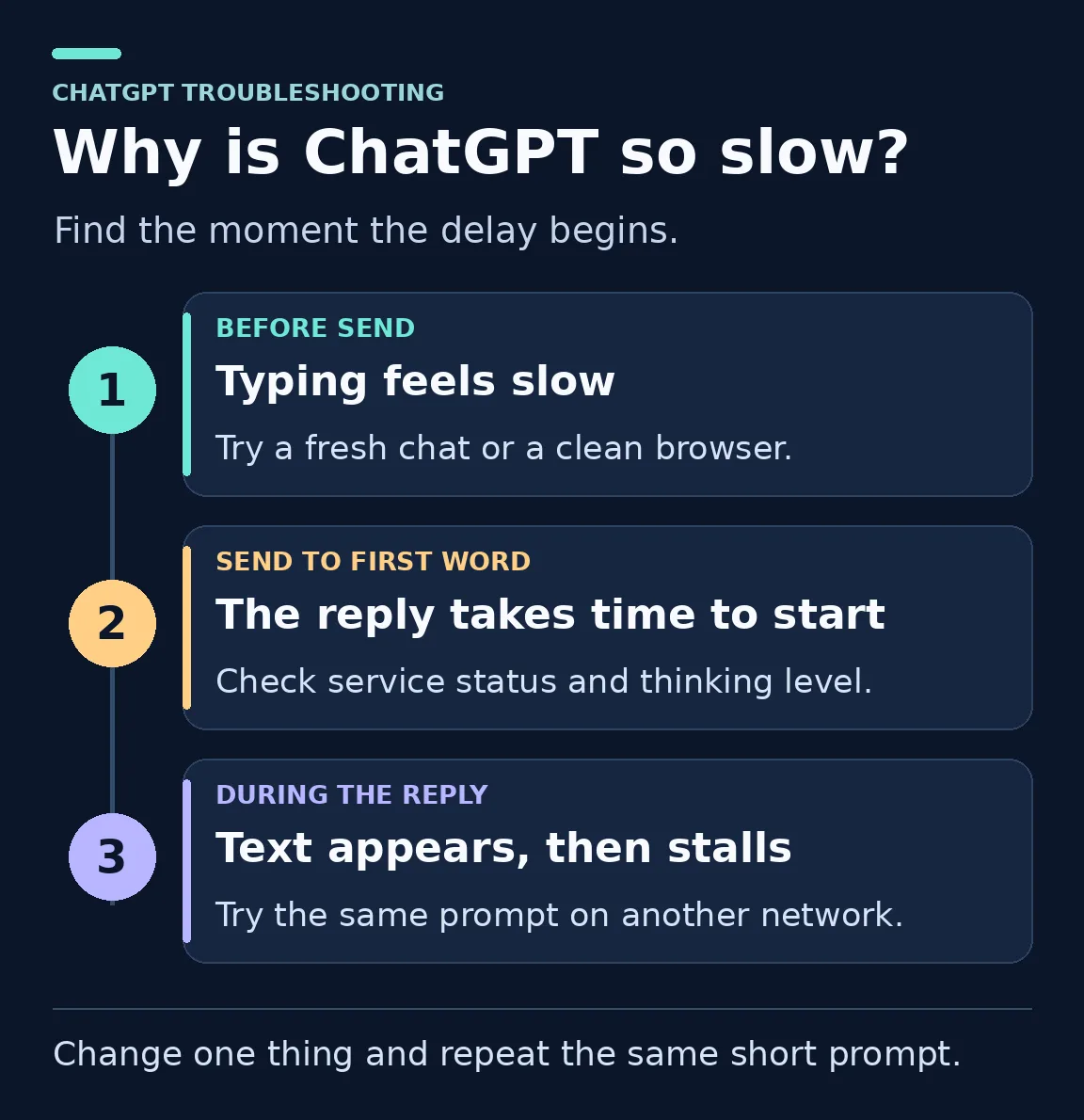
Find the symptom closest to yours. Use the first check to narrow down where the problem starts.
| What you notice | What to try first | What to check next |
|---|---|---|
| Typing and scrolling lag before you send | Type in a fresh chat in the same app. | If it feels smooth, move your work out of the old chat. |
| The first word takes a long time | Send a short text prompt without files or search. | If it starts quickly, check the thinking level and tools used by your original task. |
| The answer starts quickly but takes a long time to finish | Ask for a shorter answer. | If words keep appearing and the short reply ends sooner, the answer length is part of the wait. |
| The answer starts, then freezes | Try the same short prompt on a second network. | If the stalls follow one network, check the connection or ask IT. |
| Only a file upload or search gets stuck | Send a plain text message. | If text works, check the affected feature on OpenAI Status. |
| Simple chats fail on more than one device | Check the ChatGPT Conversations status. | If there is no matching incident, compare devices on different networks. |
Why Is ChatGPT So Slow Today?
On OpenAI Status, look under ChatGPT for the feature that is slow. Check Conversations for ordinary replies and Search or File uploads when only those tasks stall. If an active incident matches what you see, wait for a recovery update. The page reports service-wide metrics, so individual models and plans can behave differently. OpenAI Status
For example, on May 21, 2026, OpenAI flagged slow replies and errors in ChatGPT 5.5 Thinking under Conversations. The status log moved from identification to resolution in 77 minutes. Look for the affected feature or model in the report. OpenAI’s incident record
If an ordinary reply shows a spinner with no progress, OpenAI suggests waiting 30 to 60 seconds. Then use Stop generating and retry once. If it stalls again, run the test below. OpenAI’s steps for stuck replies
Why Is My ChatGPT So Slow? Test Two Chats
Open the slow conversation and a fresh chat. Keep the account, model, thinking level, browser or app, and network the same.
Type the same short prompt in both. Try Copy this text exactly. The library opens at nine. The blue notebook is on the desk. Notice whether the letters appear as you type.
Start a timer when your message appears. Note when the first reply text and the full reply appear. If the results vary, repeat in reverse order with another fresh chat.
Use this timing log
Browser or app, model, and thinking level ______
Slow chat — first word ___ s, finished ___ s
Fresh chat — first word ___ s, finished ___ s
If typing or replies are consistently slow in just the old chat, try your work in a fresh one. If both chats are slow, test one change at a time, such as a different browser or network. OpenAI’s guide to slow replies
Fresh Chat vs. Longer Chat in Our Test
On November 7, 2026, we tested signed-out ChatGPT in Chrome at its default settings. Each run copied the same 92-word paragraph. The longer thread already contained a 1,540-word fictional note.
| Run | Prior exchanges | First reply text | Full reply visible |
|---|---|---|---|
| Fresh chat, run 1 | 0 | 1.5 s | 2.6 s |
| Fresh chat, run 2 | 0 | 1.0 s | 2.1 s |
| Longer chat, run 1 | 2 | 1.5 s | 3.0 s |
| Longer chat, run 2 | 3 | 1.6 s | 3.0 s |
We timed from when the prompt appeared until the first answer text and then the full reply with its controls. Screen observations were up to about 0.3 seconds apart during the replies. The longer runs came first in this one-session test.
Why Do Long ChatGPT Conversations Get Slow?
In a long chat, the page may take more time to load and display earlier messages. If opening, scrolling, or typing in that thread feels slow before you send anything, check the page or app first.
One Chrome user on Windows reported that long threads became hard to open and sometimes left the page frozen. OpenAI Support suggested comparing the same conversation in a private window with extensions disabled. If only the old thread lags in both windows, try moving your work to a fresh chat. OpenAI Developer Community bug report
Move your work without starting over
If the old chat can still respond, ask it for a short handoff. Then check the handoff against your notes before you paste it into a fresh chat.
Write a handoff for a new chat in 200 words or less. Include the goal, decisions we made, facts I supplied, constraints, files I still need, and the next task. Flag any open questions.
If the old chat will not respond, copy the last useful answer and the key instructions yourself. Reattach any files the new chat needs. Then ask it to pick up at the next task.
If you want to keep more history, look for Branch in new chat in an earlier message’s menu on the web. Choose a point before the slowdown started. If the branch still lags, use a blank chat and the short handoff. OpenAI’s notes on branching chats
How Can You Make ChatGPT Respond Faster?
For a short rewrite or list, try Instant or a lower thinking level if available. Ask for a shorter answer when you only need the main points. OpenAI’s guide to Chat models and thinking settings
Test plain text before adding files or search. If Deep Research is running, check its progress panel. Deep Research progress
OpenAI lists faster replies and priority access as Plus benefits. Test your browser or app first if typing lags. ChatGPT Plus benefits
How Do Model, Effort, and Speed Affect ChatGPT Work?
In Work, 6.1 Sol with Max effort and Standard speed gives Sol more time to reason at the baseline speed. For a quick edit, try 6.1 Sol with Medium effort and Standard speed if available. Choices vary by app, plan, and workspace.
Model
| Work model | When to choose it |
|---|---|
| 6.1 Sol | Research, writing, or coding that needs several steps. |
| 6.1 Terra | Fast drafting, reading screenshots, or working in apps. |
| 6 Astra | Hard decisions and work that needs careful judgment. |
| 6 Luna | Routine summaries, sorting, and pulling out facts. |
| 6 Sol | Coding or tasks that use tools, if this earlier Sol version appears. |
See the Work model guide and the GPT-6 Sol description.
Effort
Light suits small edits. Medium gives the model time for some planning. Try High for complex work and Extra High when the analysis needs more depth. Max gives the model more time on one task. Ultra can split work among subagents where supported.
Speed
Standard is the baseline. Fast speeds up supported models and uses included allowance at 2.5 times the Standard rate. Ultrafast is available for Astra and 6.1 Sol on Pro $500 and eligible Enterprise or Edu plans. It uses included allowance at eight times the Standard rate. Work can also spend time waiting for tools and approvals. OpenAI’s speed guide
How Do You Fix ChatGPT Typing Lag in a Browser?
Type a few words in a notes app. If that feels normal but ChatGPT lags in several chats, check your browser. First, copy any unsent message and reload the tab. Then close tabs you no longer need.
Try a private window. Sign in to the same account and test a fresh chat. Check whether any extensions are allowed to run in that window.
Test extensions one at a time. If the private window is faster, try turning off a tool that changes the page, such as a writing assistant or content blocker. Reload and test after each change. Turn the extension back on if it makes no difference.
Compare another browser. Use the same device, network, and short prompt. If only one browser lags, update it and check its stored site data.
Clear the site data for ChatGPT
If a clean browser session works, clear ChatGPT’s stored site data. Save unsent text first and be ready to sign in again.
Chrome. Open Settings → Privacy and security → Third-party cookies → See all site data and permissions. Search for chatgpt.com and delete that entry. Chrome’s guide to deleting cookies for one site
Safari on Mac. Open Safari → Settings → Privacy → Manage Website Data. Select chatgpt.com and choose Remove. Safari’s guide to removing site data
After you sign back in, run the same short test. If the issue comes back when you enable one extension, check whether that extension can stay off just for ChatGPT.
What If ChatGPT Is Slow on Wi-Fi or a VPN?
Keep your device and browser the same. Try the short test on your normal Wi-Fi and then on a trusted second connection, such as your phone’s hotspot. A typical speed test measures the route to a test server. Your ChatGPT test shows whether the delay follows your usual network. For more on why delay and download speed differ, see how fiber internet and latency work.
If you use a personal VPN, compare the same test with it connected and briefly disconnected on a trusted network. Reconnect it after the test. A VPN or proxy can change the path your requests take. See how proxies and VPNs route traffic.
If ChatGPT only stalls on a work or school network, send the test results to IT. Some ChatGPT features use a WebSocket, a connection that stays open for updates. A network filter can interrupt it. IT can check the route and any filters using OpenAI’s network guidance.
What If ChatGPT Is Slow on Your Phone or Desktop App?
On the same device and network, open ChatGPT in a browser and sign in to the same account. If the web version works and the app lags, close and reopen the app. Then install any available update and test again.
On an iPhone or Android phone, compare Wi-Fi with mobile data if you can. If only the app still freezes after you update it, save your work and reinstall it from the official store. OpenAI’s mobile troubleshooting guide
If the Mac desktop app freezes and you cannot close it normally, reopen it after a force quit. Save any text you can still access first. Follow this guide to force quit a frozen app on Mac.
When Should You Contact OpenAI Support?
If a simple prompt still stalls across browsers, devices, and networks, contact Support. Include what you tried and where the delay starts. This gives Support a way to repeat the problem.
ChatGPT is slow [as I type / before the first word / during the reply]. It happened at [date, time, and time zone] on [device, browser or app version]. I used [model and thinking level]. A new chat on [network] took [time] to start and [time] to finish. I also tried [second browser or network] with [result].
Add the conversation ID or URL if it helps. If Support asks for a HAR file, use a harmless prompt to repeat the issue. A HAR records browser requests and timings. Review it for private details before sending it through the OpenAI Support chat.
Questions about ChatGPT slowness
Is ChatGPT slow right now?
Check OpenAI Status for incidents that affect the ChatGPT feature you are using. If there is no matching incident, send a short prompt in a new chat with the same model and test a second network if it still stalls.
Does ChatGPT get slower the longer a conversation gets?
A long conversation can become slow to scroll, type in, or use. Try the same short prompt in a new chat. If the new chat is faster, carry over your key instructions, files, and next task.
Why is my ChatGPT so slow when typing?
If letters lag before you send, test a fresh chat and a private browser window. A fresh chat helps isolate a slow thread, and a private window helps narrow down browser extensions or stored site data.
What should I do if ChatGPT is stuck thinking?
If an ordinary reply stops making progress, give it 30 to 60 seconds. Then stop it and retry once. If it stalls again, try a short text prompt in a fresh chat and check for a matching service incident.
Will clearing my browser cache make ChatGPT faster?
It may help if a private window works better than your normal session. Save unsent text and clear the stored site data for ChatGPT. Then sign back in and repeat the same short test.
Does ChatGPT Plus respond faster?
OpenAI lists faster responses and priority access during busy periods as Plus benefits. If your delay starts while you type or affects only one app, check the chat, browser, or app first.
Keep reading


How to Get Your Business on ChatGPT
Claim or add your business in ChatGPT Business Hub, complete verification, and use Insights to see how customers discover your business.


How Quantum Dots Turn Size Into Color
Quantum dots are tiny regions of semiconductor that confine electrons in all three dimensions. In a TV, they typically take the form of nanocrystals just a few...


Organoid Intelligence Explained
Organoid intelligence is a field of research that connects lab-grown neural tissue to electronics and software. Researchers use the resulting systems to study h...