Proxy vs VPN Key Differences and When to Use Each
A proxy forwards connections for the apps configured to use it. A virtual private network, or VPN, encrypts traffic routed between your device and a VPN server....

In this story
A proxy forwards connections for the apps configured to use it. A virtual private network, or VPN, encrypts traffic routed between your device and a VPN server. Both can change the public IP address a website sees, but they differ in coverage, configuration, and how the connection is protected.
For privacy across a browser and other apps, a properly configured device VPN is usually the more practical choice. For routing one particular app or meeting an organization’s proxy requirements, a proxy can be enough. Two qualifications matter: some proxies use encryption, and a VPN does not automatically cover every app or make you anonymous.
Proxy vs VPN at a glance
This comparison concerns a typical personal forward proxy and a device VPN used for internet browsing. Managed corporate networks and specialized configurations can work differently.
Question | Forward proxy | Device VPN |
What traffic uses it | Apps that support and use its configuration | Traffic selected by the VPN’s routes and app rules |
Is the connection encrypted | Depends on proxy transport and the app’s own encryption | Traffic inside the VPN tunnel is encrypted to the VPN server |
What IP does a website see | Usually the proxy’s; some proxies disclose the original IP | Usually the VPN exit server’s for traffic inside the tunnel |
Are other apps included | Not automatically | Often, with a full-tunnel setup; exclusions can bypass it |
What happens if it fails | Depends on app configuration and fallback rules | Depends on reconnection and kill-switch settings |
Which is faster | Depends on server, route, load, and configuration | Also depends on server, route, load, and configuration |
related content:
VPN for Android
The useful question is not simply whether the tool changes your IP. Ask which connections it handles and what protects each part of their journey.
How a proxy and a VPN actually work
What is a proxy
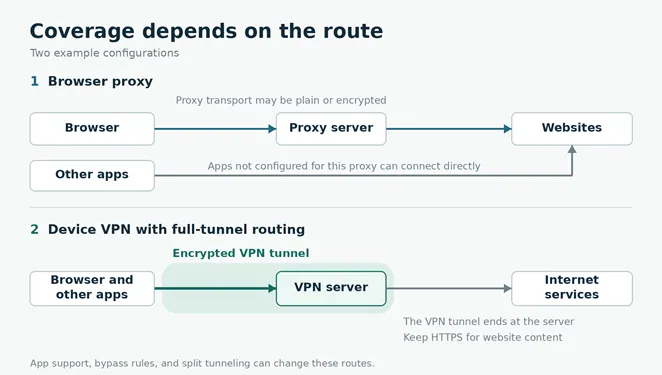
A forward proxy is an intermediary that makes connections on a client’s behalf. For example, you configure a browser to send requests through a proxy instead of connecting directly to websites. A separate email or gaming app may continue using its normal connection.
That coverage depends on configuration. Some apps use operating-system proxy settings, some have their own settings, and others do not support the proxy you selected. An organization can also enforce proxy routing through its network.
MDN’s proxy documentation explains the intermediary role and an important IP-address exception: proxies can pass the original client’s address in forwarding headers. A proxy is therefore not automatically an anonymous connection.
What is a VPN
A VPN creates an encrypted tunnel to another network endpoint. In a consumer internet VPN, that endpoint forwards your routed internet traffic onward. The VPN tunnel protects the device-to-server segment; the website connection still needs its own protection, such as HTTPS.
A full-tunnel configuration is intended to route ordinary internet traffic through the VPN. Split tunneling deliberately sends selected apps or destinations elsewhere. The routing rules determine which connections actually enter the tunnel.
Our guide to what a VPN does covers its wider privacy benefits and limitations. For this comparison, the key distinction is whether you need to configure individual apps or route traffic through a device-level tunnel.
Do proxies encrypt your traffic
“Proxies do not encrypt” is an oversimplification. Separate these two questions:
1. Is the connection from your app to the proxy encrypted?
2. Is the connection carrying your website content encrypted through to the website?
The answers can differ. These are the main cases worth understanding.
An HTTP proxy can carry an HTTPS website
With a standard HTTP CONNECT proxy, a browser can establish a tunnel and then negotiate Transport Layer Security, or TLS, with an HTTPS website through it. The website content remains encrypted even though the proxy connection itself may not have a separate encrypted transport. The proxy still knows the tunnel’s destination host and port.
This is the behavior described in the HTTP standard’s CONNECT specification. It does not mean the proxy protects unrelated apps or hides every connection detail from the local network.
An HTTPS proxy encrypts the connection to the proxy
Here, HTTPS describes the transport between your app and the proxy. The curl project’s HTTPS-proxy documentation distinguishes that encrypted transport from plain HTTP and typical SOCKS connections.
A settings field labeled “HTTPS proxy” can be ambiguous: it may mean a proxy used for HTTPS websites rather than an encrypted connection to the proxy itself. Verify what the particular app supports.
Also distinguish a CONNECT tunnel from a web-proxy site where you paste a URL. If that service retrieves and rewrites the page for you, it is handling the content. HTTPS to the web-proxy site does not establish a private connection between your browser and the original website.
SOCKS5 does not automatically mean an encrypted tunnel
SOCKS5 is a proxy protocol used by compatible applications. A username and password authenticate access; they do not, by themselves, encrypt the traffic. The SOCKS username-and-password standard explicitly warns that this authentication method sends the password in cleartext.
If privacy on the connection to the proxy matters, verify the additional protection the service and client actually use. Do not infer it from “SOCKS5,” “private,” or “premium” in a product name.
Which should you use
Choose a VPN when you need broader device coverage
A device VPN is a sensible fit when you want a browser, messaging app, and other supported internet traffic routed through one encrypted connection. Check split-tunneling exclusions, DNS handling, and what happens if the tunnel disconnects before relying on that coverage.
For a phone, use the provider’s actual device app rather than assuming a browser extension does the same job. Our Android VPN setup guide explains the relevant system controls and app exceptions.
If you decide you need a service, compare privacy evidence, supported devices, renewal terms, and cancellation conditions using our VPN services comparison. A longer subscription makes sense only after the app works for your intended tasks.
Choose a proxy when the task is specific
A proxy can be appropriate when a particular application needs a particular route, when a test requires a known proxy endpoint, or when your organization supplies proxy settings for access or filtering. You do not necessarily need to reroute the rest of the device for those jobs.
Get the server address, port, protocol, and credentials from a trusted administrator or provider. Confirm whether the app resolves domain names locally or through the proxy, and whether any destinations bypass it. Follow workplace policy rather than replacing a managed configuration with an unknown service.
Paying for a proxy does not establish its security properties. Evaluate the actual transport, operator, logging policy, and app support. Likewise, a free service needs a credible explanation of who operates it and how it is funded.
You may need neither for ordinary browsing
If you do not need another exit IP, an organization’s gateway, or reduced visibility for your network provider, you may not need either tool. The FTC explains that widespread website encryption makes public Wi-Fi usually safe.
Keep HTTPS, software updates, and strong account security in place regardless. Neither a proxy nor a VPN makes a phishing page trustworthy or protects an account after you give a scammer its password.
Check what your connection actually covers
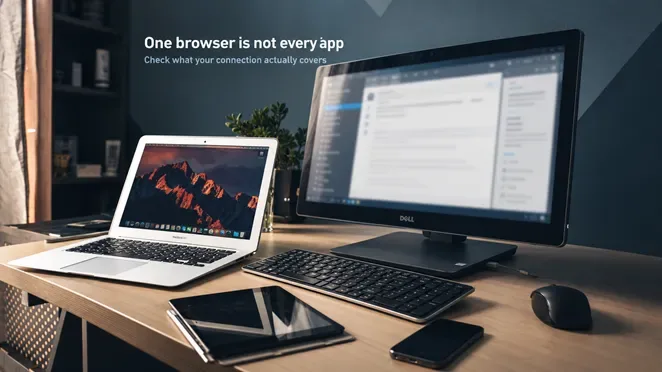
Before changing settings, identify the intended outcome: only one browser should use the proxy, or ordinary device traffic should use the VPN. Record the existing configuration so you can restore it. On a managed device, ask the administrator before testing or changing anything.
Use a trusted network and avoid sensitive activity while deliberately checking direct connections.
1. Record a baseline in each browser. With your optional personal proxy and VPN off, check the public IP in the browsers you intend to compare. Note IPv4 and IPv6 separately when available. Do not assume different browsers always use identical IP versions.
2. Enable the tool in its intended scope. For a browser-only proxy, change that browser’s settings while leaving a second browser unchanged. For a device VPN, connect its app and review exclusions. Close and reopen the browsers to establish fresh connections.
3. Compare each browser with its own baseline. With a browser-only proxy, the configured browser should use the proxy’s exit address while the untouched browser should retain its direct route, assuming no other proxy or VPN is active. With a full-tunnel VPN, both should normally use the VPN route.
4. Inspect DNS and exceptions. Domain Name System, or DNS, lookups translate names into network addresses. A changed browser IP does not establish where those lookups went. Check the client’s documentation and any “no proxy” or split-tunneling rules. The curl SOCKS documentation shows that even SOCKS5 clients can resolve names locally or send them to the proxy.
5. Check failure behavior. Use the provider’s documented disconnection test and try a fresh, harmless page. If you require traffic to stop when the tunnel fails, verify the applicable kill-switch setting. A page that keeps loading may indicate direct fallback, but inspect the actual configuration before drawing a conclusion.
Treat this as a scope check, not a complete leak audit. Two browsers do not prove that your email, video calls, operating-system services, or every IP protocol follow the same path. Check an important application separately using its diagnostics or the provider’s supported method.
If one browser behaves unexpectedly, look for an extension controlling its connection, a system proxy, an automatic configuration file, or bypass rules. Firefox’s connection settings documentation lists these mechanisms and shows how they can coexist.
What neither tool can promise
Changing your public IP does not erase your identity. Account logins, cookies, device fingerprinting, and location permissions can still connect activity to you. The operator of your proxy or VPN also becomes part of the trust chain.
For properly secured HTTPS traffic, a forwarding intermediary normally cannot read the encrypted page contents. That protection changes if the intermediary terminates the website’s TLS connection, as can happen with authorized corporate inspection or a service that fetches pages on your behalf. Do not dismiss certificate warnings or install an unknown root certificate just to make a proxy work.
The Electronic Frontier Foundation’s VPN guidance explains the broader point: a VPN can reduce certain kinds of network visibility, but it does not provide complete anonymity. Choose the operator and configuration according to the problem you actually need to solve.
Frequently asked questions
Is a browser VPN extension the same as a VPN app
Not necessarily. Some products route only browser connections, while others control an installed device app. For example, Proton’s extension documentation explicitly says its standalone extension protects traffic inside the browser. Check the specific product’s coverage instead of relying on its name or toolbar icon.
Can you use a proxy and a VPN together
Yes, with compatible software and routing. If a browser’s proxy connection travels inside the VPN tunnel, the browser reaches the proxy through the VPN and the website generally sees the proxy’s exit IP. This introduces another operator and more troubleshooting. Use both when a specific requirement calls for that route, rather than assuming an extra hop automatically adds useful privacy.
Is a reverse proxy an alternative to a personal VPN
Usually they address different jobs. A reverse proxy sits in front of a website or application server to handle incoming requests. It can provide caching, load balancing, or access control. It does not, by itself, reroute and protect the visitor’s other internet connections.
Choose the tool by scope first, then verify encryption and failure behavior. That is a more useful basis for the decision than whether a product calls itself a proxy or a VPN.
Keep reading


VPN for iPhone How to Choose and Set It Up
For a free VPN for iPhone, Proton VPN Free is a sensible starting point for everyday browsing because it has no data cap. Consider NordVPN if you want a paid se...


WireGuard vs OpenVPN Which Protocol Should You Use
Start with WireGuard for everyday browsing, streaming, and mobile use. Choose OpenVPN when you need TCP fallback, compatibility with an existing setup, or more...


Best VPN for Mac: Free and Paid Options
Compare four free and paid Mac VPN options, check macOS compatibility and renewal costs, and follow practical setup and connection checks.