VPN for iPhone How to Choose and Set It Up
For a free VPN for iPhone, Proton VPN Free is a sensible starting point for everyday browsing because it has no data cap. Consider NordVPN if you want a paid se...

In this story
For a free VPN for iPhone, Proton VPN Free is a sensible starting point for everyday browsing because it has no data cap. Consider NordVPN if you want a paid service with selectable locations, or Mullvad if you prefer straightforward monthly pricing. Install the provider’s official app, approve its VPN configuration, and check the connection on both Wi-Fi and cellular data.
A VPN adds privacy for traffic routed through its server. It does not make an iPhone anonymous, remove viruses, or guarantee that every connection is protected in every circumstance.
What is a VPN on iPhone
VPN means virtual private network. A typical personal VPN app creates an encrypted connection between your iPhone and a VPN server. Websites receiving traffic through that server generally see its public IP address instead of your usual public IP.
This can reduce what the local network can observe and change your apparent IP-based location. HTTPS still matters because the VPN tunnel ends at the VPN server. Signing into an account, sharing your location, or accepting cookies can still identify you.
Our explanation of what a VPN does covers these boundaries. Think of the VPN as a connection tool, rather than a complete phone-security package.
related content:
Which iPhone VPN should you choose
Option | A useful fit | Main limitation |
Proton VPN Free | Everyday browsing without a data allowance | One connection; automatic free-server selection and restricted server changes |
NordVPN | Paid use with selectable server locations and several devices | Introductory prices require upfront payment; renewal costs differ |
Mullvad | Predictable monthly spending without a long introductory term | €5 monthly; check your required streaming services before paying |
Start with the feature you actually need. If you do not need a particular country or paid extras, try the free option before committing to a long subscription. These recommendations do not imply a speed or battery test performed on your phone.
Proton VPN Free for everyday use
Proton’s free iPhone offering has no data cap or ads. It is useful for browsing and occasional public Wi-Fi without rationing a monthly allowance.
The free plan automatically selects a server. Changing servers is restricted, with randomized selection and a cooldown, so it is less suitable if you need to choose a particular country. Paid plans add server choice and streaming coverage. Do not buy a plan simply because a free app shows an upgrade screen.
Proton’s current iOS app requires iOS 17 or later. Its iPhone setup guide also describes the installation process. Check compatibility in the App Store before subscribing on an older phone.
NordVPN for paid location choice
NordVPN is worth considering if you want to choose server locations and use one subscription across several devices. Its iOS app supports iPhone and iPad; check the current App Store requirements and the features available on iOS rather than assuming desktop features transfer.
Nord’s pricing page advertises Basic at $94.23 for the first 27 months, a $3.49 monthly equivalent, with an advertised $139.08 annual renewal. That is an upfront purchase, not a $3.49 monthly payment. Prices checked October 27, 2026; location, promotions, taxes, and App Store billing can change the offer.
Test the services you use before keeping a long-term subscription. No VPN can promise permanent access to every streaming library.
Mullvad for monthly flexibility
Mullvad’s standard price is €5 per month including VAT, whether you buy one month or a longer period. Two months therefore cost €10 before any card conversion fees. US customers should check the actual dollar charge at payment.
Mullvad offers an iOS app, making it an option when you want a simple purchasing model. Choose it for that fit rather than assuming that privacy features guarantee access to a specific streaming service. Verify current iOS compatibility and the features you need before purchasing time.
Does iPhone have a built-in VPN
iPhone has settings and networking support for VPN connections, but those settings do not supply a free VPN server or subscription. Manual setup still requires configuration details from a VPN provider or your workplace.
For a personal service, its official app is usually the simpler approach. For a work or school connection, use the administrator’s instructions. Managed profiles may be required for access to organizational systems.
Is iCloud Private Relay the same as a VPN
Private Relay is an iCloud+ feature designed primarily to protect Safari browsing privacy. Apple uses two relays so no single party sees both your identity and the websites you visit. Its coverage also includes DNS requests; describing it simply as a VPN for every app is misleading.
It does not provide the same server-location selection as a commercial VPN. If your main goal is Safari privacy and you already have iCloud+, review Apple’s Private Relay explanation before buying another service. If you need other applications routed through a chosen VPN endpoint, compare a dedicated VPN app instead.
How to set up a VPN on iPhone
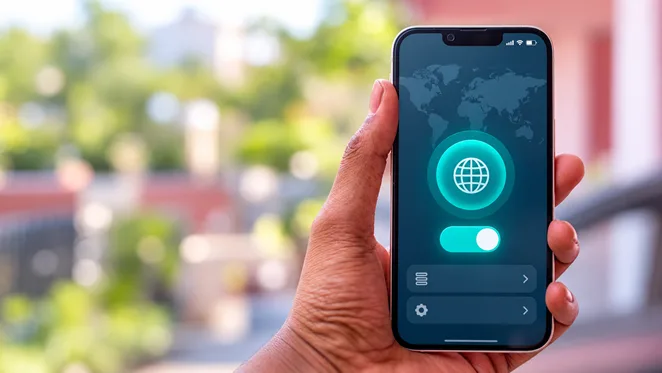
Edited real photograph with an illustrative VPN screen, rather than an exact app or Apple interface.
1. Install the official app. Follow the provider’s own App Store link and verify the developer. A generic app name containing “VPN for iPhone” does not identify a particular trusted provider.
2. Choose the plan deliberately. Create an account if required, or use guest mode where supported. Read any trial’s billing period, renewal charge, and cancellation conditions before accepting it.
3. Allow the VPN configuration. Follow the app’s connection prompts. iOS may ask permission to add a VPN configuration and require device authentication. Approve only the app you intentionally installed.
4. Connect to a suitable server. Begin with the recommended or nearby location. A distant country can add latency; use it when that location is part of your goal.
5. Review connection controls. Check auto-connect, reconnect, and kill-switch settings. The names and behavior differ by provider. Leave optional routing exceptions off until you know why you need them.
6. Verify the result. Compare your public IP before and after connecting. Then open the apps you actually use and repeat after switching from Wi-Fi to cellular data.
You can inspect installed VPN configurations under Settings > General > VPN & Device Management > VPN. If the path differs on your iOS version, search Settings for “VPN.” A manual Add VPN Configuration screen is not a shortcut to free service: you still need valid server and authentication details.
On a managed phone, ask the administrator before changing or deleting profiles. Removing organizational settings can interrupt access.
Check the connection before relying on it
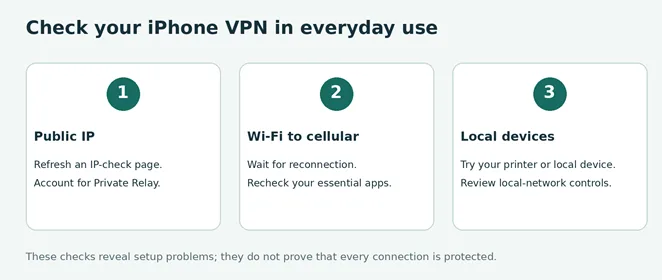
A VPN indicator confirms a connection state, but it cannot prove that every application and every network transition is leak-free.
Compare public IP addresses. Connect and refresh an IP-check page. The address should reflect the VPN route. If Private Relay is also active, Safari’s IP can already differ from your normal connection, making a simple before-and-after comparison harder to interpret.
Switch networks. Move from Wi-Fi to cellular, wait for reconnection, and check again. Try the apps you need, including calls or video meetings. A stable connection matters more than a small speed-test advantage.
Check local access. Test a printer or another local device if you use one. Some protection settings deliberately restrict the local network.
For example, Proton documents that some Apple-service DNS requests can bypass its VPN even with the kill switch enabled, and that enabling the kill switch prevents local-network access. Its kill-switch guidance is more informative than a blanket claim that the app protects every packet. Other providers’ behavior must be checked separately.
A browser test is a useful diagnostic, not a comprehensive security audit. Use the provider’s current iOS documentation for any privacy requirement that depends on continuous coverage.
How to turn off a VPN on iPhone
Open the VPN app and tap Disconnect. You can also inspect the VPN connection in Settings and turn its status off.
If it reconnects immediately, check the app’s auto-connect settings and the VPN configuration’s Connect On Demand option, if present. Change the behavior at its source rather than repeatedly tapping the status switch. Work-managed or always-on configurations may require an administrator.
Disconnecting is different from removing a configuration, uninstalling the app, or canceling a subscription. Review your Apple subscriptions if you purchased through the App Store; purchases made directly from a provider must generally be managed through that provider. Deleting an app alone is not a reliable way to stop renewal charges.
If your iPhone VPN is not working
No internet after connecting
When safe to do so, disconnect and confirm the underlying Wi-Fi or cellular connection works. On hotel or café Wi-Fi, finish the network’s sign-in page before reconnecting. Then try a nearby server, update the app, and restart the phone.
Change one variable at a time. If the app offers another supported protocol, try it rather than copying desktop configuration advice into iOS settings.
Only one app or website fails
Try a different server and check whether the service restricts VPN connections. For banking or a sensitive account, use the service’s official app and support guidance rather than repeatedly attempting unusual locations.
Another VPN, DNS filter, or security app can affect networking. Apple’s network troubleshooting guidance recommends checking VPN and third-party security software. Avoid removing unfamiliar management profiles or resetting every network setting as the first step.
The VPN keeps disconnecting or drains the battery
Compare the same activity with and without the VPN. Poor cellular signal, a distant server, and repeated connection attempts can complicate the result. Check Settings > Battery for app activity and contact the provider if the issue persists.
A single battery percentage or speed test does not establish that one provider is universally more efficient. Keep the service that behaves reliably during your normal use.
What an iPhone VPN will not fix
A VPN cannot make a scam trustworthy, secure a stolen account by itself, or perform a desktop-style malware scan of your iPhone. Our guide to antivirus for iPhone explains the different roles of security apps and Apple’s protections.
Coverage also depends on configuration. A browser proxy, an iOS VPN app, and a work-managed per-app VPN can route different traffic. Our proxy versus VPN comparison explains why the label alone is insufficient.
Choose a VPN for a clear connection or privacy need, keep iOS updated, and protect your accounts with strong credentials and two-factor authentication. Those measures work together.
Keep reading


WireGuard vs OpenVPN Which Protocol Should You Use
Start with WireGuard for everyday browsing, streaming, and mobile use. Choose OpenVPN when you need TCP fallback, compatibility with an existing setup, or more...
Best VPN for Mac: Free and Paid Options
Compare four free and paid Mac VPN options, check macOS compatibility and renewal costs, and follow practical setup and connection checks.

Apple Cybersecurity & Privacy Anti Virus
Best Antivirus for iPhone: Free and Paid Security Options
Compare Apple’s built-in protections with Avast One, Bitdefender, and Norton. Learn what iPhone security apps can do, their limits, and which features you may need.