WireGuard vs OpenVPN Which Protocol Should You Use
Start with WireGuard for everyday browsing, streaming, and mobile use. Choose OpenVPN when you need TCP fallback, compatibility with an existing setup, or more...

In this story
Start with WireGuard for everyday browsing, streaming, and mobile use. Choose OpenVPN when you need TCP fallback, compatibility with an existing setup, or more configurable remote-access controls. Both can protect a VPN connection when implemented and configured correctly. Neither wins every speed test or makes a VPN provider trustworthy by itself.
If your VPN app’s automatic mode already works well, there may be no reason to change it. A manual choice becomes useful when you are diagnosing slow performance, connection failures, or a specific device requirement.
WireGuard and OpenVPN compared
Question | WireGuard | OpenVPN |
Transport | Native protocol uses UDP | Supports UDP and TCP |
Typical starting point | Everyday use and mobile connections | Existing deployments and TCP fallback |
Cryptography | Fixed modern suite, including ChaCha20-Poly1305 | Configurable; modern deployments can use AES-GCM and other supported ciphers |
Network changes | Designed to update a peer’s network endpoint | Reconnection behavior depends on client and configuration |
Administration | Public-key peers; provisioning belongs to another layer | Certificate and authentication options support more elaborate deployments |
Main qualification | No native TCP mode or built-in obfuscation | More configuration complexity; performance depends on implementation |
These are protocol differences. Kill switches, DNS handling, split tunneling, account systems, and logging practices also depend on the application and service.
read more:
What the protocols actually do
A VPN protocol defines how devices establish and protect a tunnel. It is separate from the company selling a VPN subscription. You can use these technologies through a commercial service or deploy a tunnel yourself.
WireGuard associates peers’ public keys with allowed tunnel addresses and sends encrypted IP packets over UDP. Its official overview describes this design and its ability to roam between network endpoints. Key distribution and configuration management are intentionally left to other layers.
OpenVPN offers a larger set of choices, including TCP or UDP transport, TLS-based security, and different authentication and networking arrangements. The OpenVPN manual documents that flexibility. A familiar profile supplied by your employer can be a better reason to use OpenVPN than a generic performance ranking.
For the wider privacy picture, see our explanation of what a VPN does. The tunnel protects traffic routed through it; it does not remove malware or prevent you from submitting a password to a phishing page.
WireGuard vs OpenVPN speed
WireGuard is a useful first choice
WireGuard’s streamlined design makes it a sensible starting point when throughput and efficient operation matter. That is particularly useful on a phone or a router with limited processing power. But the outcome still depends on the device, software implementation, server load, route, and available connection speed.
A faster download does not automatically mean a better video call or gaming session. Check latency and packet loss while the connection is busy, rather than choosing solely by the largest Mbps number.
In its March 2026 controlled comparison, RTINGS measured higher download throughput with WireGuard than with either OpenVPN mode. It also observed higher loaded latency with WireGuard, and ten OpenVPN UDP tests failed, leaving a smaller sample for that mode. Those results describe that setup, not a universal multiplier for every VPN.
Modern OpenVPN can narrow the gap
Older claims that OpenVPN always moves every packet through a slow userspace path are incomplete. Data Channel Offload, or DCO, can move data-channel processing into the operating-system kernel on supported combinations of clients and servers.
For example, OpenVPN Connect’s DCO documentation describes support in its Windows client with a compatible service. Availability differs by platform and configuration. Do not assume a comparison of an older OpenVPN client applies to a current deployment with offload enabled.
For a router, look for results for the exact model and firmware. The fact that a router supports both protocols does not tell you how fast either will run.
OpenVPN UDP vs TCP on restricted networks
For normal performance testing, compare WireGuard with OpenVPN UDP first. OpenVPN TCP serves a different practical purpose: it can provide a fallback when a network blocks or interferes with UDP.
OpenVPN TCP on port 443 may work on a network that allows web-like outbound connections. However, using the same port as HTTPS does not make OpenVPN indistinguishable from browser traffic. A firewall using deeper inspection may still recognize and block it.
Native WireGuard has no TCP mode. Its known-limitations page also explains that obfuscation belongs above the protocol. A provider may add a wrapper or a separate stealth mode; that is an additional implementation, not a feature of ordinary WireGuard.
Running TCP application traffic inside a TCP VPN tunnel can create interacting retransmission and congestion-control behavior. This can hurt performance, especially on a lossy connection. It is not a reason to avoid OpenVPN TCP when it is the option that connects.
First finish any hotel or café Wi-Fi sign-in page. If neither protocol works until that portal is completed, the portal was the immediate obstacle.
Which is more secure
Both protocols can support strong protection. Security depends on current software, safe settings, correct server authentication, protected keys, and the surrounding service.
WireGuard’s protocol specification describes its cryptographic primitives and authenticated key exchange. A fixed suite reduces choices administrators must make. It does not guarantee that an implementation, operating system, or VPN application has no vulnerabilities.
OpenVPN’s flexibility is useful where organizations need particular certificate, authentication, or network arrangements. It also creates more settings to maintain. Use current profiles and supported software rather than enabling outdated compatibility options simply to make a connection work.
A shorter codebase is easier to inspect in principle, but line counts are not a security score. Comparisons may count different implementations or dependencies. “Newer,” “older,” and “AES-256” are also insufficient on their own to establish which complete system is safer.
Privacy is broader than protocol choice
WireGuard’s peer configuration does not mean it must keep a permanent browsing-history log. Conversely, choosing OpenVPN does not prove that a service keeps no logs. Review the operator’s collection practices, account design, retention, and independent evidence separately.
For a self-hosted tunnel, changing protocols does not make your hosting company disappear from the trust chain. Your home ISP or cloud provider still carries the connection. You also become responsible for patching, key management, routing, and access removal.
Choose by the problem you need to solve
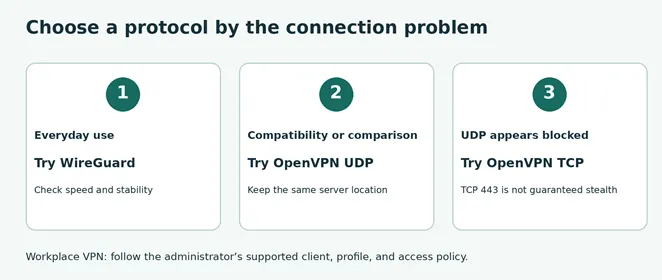
For an ordinary commercial VPN connection, try WireGuard and keep it if the connection is stable. Use OpenVPN UDP as a comparison or compatibility alternative. Try OpenVPN TCP when UDP is the apparent obstacle and the service supports it.
For a workplace connection, use the profile and client your administrator supports. A personal protocol preference is not a substitute for required authentication or access policy.
If you manage your own remote-access service, consider how users receive credentials, how lost devices are revoked, and how access is restricted. A WireGuard-based management platform may add these capabilities around the tunnel; assess the complete product rather than attributing every feature to the protocol.
On a phone, test reconnection after moving between Wi-Fi and cellular service. Our VPN for Android guide covers application setup and Android’s connection controls.
Run a fair comparison on your own connection

Edited photograph with an illustrative protocol-selection screen, rather than an exact VPN interface.
This is a repeatable procedure you can use; the example below is hypothetical.
1. Keep the comparison consistent. Use the same device, network, VPN provider, and server location. Use the same server endpoint where the provider permits it. Otherwise, remember that different servers can affect the result.
2. Measure a baseline. With the VPN disconnected, when safe to do so, check download, upload, and latency. Pause unrelated downloads and cloud backups.
3. Try both UDP options. Test WireGuard and OpenVPN UDP three times each, alternating their order. Record the middle result for each set rather than the best result.
4. Test your actual task. Join a call, stream a video, or transfer a representative file. Check for stalling and latency while another download runs.
5. Check transitions and protection. Test sleep and wake or a network change. Review your public IP and the app’s DNS and kill-switch behavior. A protocol change can affect the controls available.
6. Use TCP as a fallback test. If UDP fails, try the supported OpenVPN TCP option. Record whether it connects and whether performance is sufficient.
For example, suppose your baseline is 300 Mbps, WireGuard’s middle result is 240 Mbps, and OpenVPN UDP’s is 210 Mbps. WireGuard retains 80% of baseline throughput; OpenVPN UDP retains 70%. That is a 10-percentage-point difference in retained throughput, not a 10% speed advantage. WireGuard is about 14.3% faster than OpenVPN UDP in this example: (240 − 210) ÷ 210 × 100.
If both comfortably handle your task but one repeatedly disconnects, stability matters more than the difference in download speed. These checks help select a configuration; they are not a comprehensive security audit.
Troubleshoot before blaming the protocol
A failed WireGuard handshake can involve a blocked UDP path, the wrong endpoint, a key mismatch, or firewall rules. An OpenVPN connection can fail because of authentication, certificate, transport, or server problems. One failed attempt does not identify the cause.
If the tunnel connects but websites do not load, inspect DNS and routing before repeatedly reinstalling the app. If only large transfers stall, ask the provider whether an MTU adjustment is appropriate. Change one variable at a time.
Both protocols can be configured for full or split tunneling. Selecting WireGuard does not automatically route every application through it, and selecting OpenVPN does not automatically supply a kill switch. Our proxy versus VPN guide explains why coverage depends on configuration.
For most readers, the practical choice is the protocol that connects reliably, provides sufficient performance, and works with the app’s protection features. Keep OpenVPN available when its transport or compatibility advantages solve a problem; use WireGuard when its simpler approach meets your needs.
Keep reading


VPN for iPhone How to Choose and Set It Up
For a free VPN for iPhone, Proton VPN Free is a sensible starting point for everyday browsing because it has no data cap. Consider NordVPN if you want a paid se...


Best VPN for Mac: Free and Paid Options
Compare four free and paid Mac VPN options, check macOS compatibility and renewal costs, and follow practical setup and connection checks.


Apple Cybersecurity & Privacy Anti Virus
Best Antivirus for iPhone: Free and Paid Security Options
Compare Apple’s built-in protections with Avast One, Bitdefender, and Norton. Learn what iPhone security apps can do, their limits, and which features you may need.