Best VPN for Mac: Free and Paid Options
Compare four free and paid Mac VPN options, check macOS compatibility and renewal costs, and follow practical setup and connection checks.

In this story
The best VPN for Mac depends on your needs. NordVPN is a sensible paid choice for general use. Choose Proton VPN Free for everyday protection without a data cap, Surfshark for a household with many devices, or Mullvad for predictable monthly pricing.
The important Mac details are the macOS version supported, the app edition you install, and what happens when the connection changes. A feature advertised for Windows may work differently on your Mac.
Best VPN for Mac: free and paid options at a glance
| VPN | Best fit | Price and main consideration |
|---|---|---|
| NordVPN | General paid use; up to 10 simultaneous devices | Basic: $94.23 for 27 months; advertised renewal $139.08/year. App Store and website editions differ. |
| Proton VPN Free | Everyday browsing without a data allowance | Free; one connection. Automatic server selection and restricted server changes. |
| Surfshark | Households with many devices | Starter: $67.23 for 27 months. Unlimited simultaneous connections; renewal becomes annual. |
| Mullvad | Flexible monthly spending | €5/month including VAT. Current Mac app requires macOS 15 or later. |
Prices checked October 26, 2026. Promotions, taxes, renewal rates, and App Store billing can differ. Confirm the total charge before purchasing.
Which VPN should you choose for your Mac?
NordVPN for a general paid option
NordVPN offers a practical combination of automatic connection controls, several protocols, and coverage for up to ten devices. Its Basic pricing separates the introductory charge from renewal. The advertised $3.49 monthly equivalent means paying $94.23 upfront, rather than paying $3.49 each month.
Choose the Mac edition deliberately. NordVPN currently requires macOS 14 or later. Its website edition offers an App Kill Switch and custom DNS; the App Store edition offers VPN bypass prevention and updates through Apple. An App Kill Switch closes selected applications and should not be confused with blocking every connection from the device. Consult NordVPN’s edition comparison before installing.
Basic is sufficient if you only need the VPN. Additional antivirus or identity features depend on the plan and do not make every Mac app edition equivalent.
Proton VPN Free for unlimited everyday use
Proton VPN Free is the best starting point here if you want a free VPN for Mac without a monthly data allowance. Its free service has no ads and permits one device connection at a time.
The trade-off is control. Proton automatically selects a free server; subsequent changes are randomized and subject to a cooldown. It is a poor fit if your main requirement is choosing a particular country for streaming. Proton explains these restrictions in its free-server guide.
There is also a Mac-specific privacy qualification. Proton documents possible IP exposure while switching servers, some Apple-service DNS requests bypassing the VPN, and loss of local-network access with its kill switch enabled. Read its kill-switch limitations if continuous protection or printer access is essential. The current Mac app requires macOS 14 or later; older app versions are available for some earlier releases.
Surfshark for multiple devices
Surfshark’s unlimited simultaneous connections make it useful when one subscription must cover several Macs, phones, and tablets. Its pricing page lists Starter at $67.23 for the first 27 months. The two-year subscription becomes annually billed after the initial term; confirm the renewal amount rather than assuming the introductory rate continues.
Surfshark also supports Bypasser on Mac for selected apps and websites. Its macOS instructions state that this feature is unavailable on Big Sur. Check the app’s current requirements against your Mac before buying.
Start with the VPN tier unless you need the extra tools. Unlimited device connections are useful; an unused security bundle adds little value.
Mullvad for predictable monthly pricing
Mullvad suits users who want to avoid a long introductory contract. Its flat rate is €5 per month including VAT, whether you buy one month or a year. Twelve months therefore cost €60. Your US card’s dollar charge depends on conversion and any issuer fees.
Compatibility deserves attention: Mullvad’s current Mac download requires macOS Sequoia 15 or later. Check Apple menu > About This Mac before paying. Its app includes split tunneling and a kill switch, but do not assume every app can be excluded successfully. In particular, Safari and other WebKit apps have documented split-tunneling limitations.
Choose Mullvad for its straightforward purchasing model rather than a promise that every streaming service will work.
What a VPN adds to Mac security
A VPN encrypts traffic routed between your Mac and the VPN server and usually changes the public IP address destinations see. HTTPS still protects website content beyond that tunnel. A VPN does not remove malware, prevent every phishing attempt, or hide your identity from services you sign in to.
Our guide to what a VPN does explains the privacy boundaries. A browser extension may cover only browser traffic; the desktop app is the appropriate starting point when you want other applications routed through the VPN. See our proxy versus VPN comparison for the difference in coverage.
How to set up a VPN on Mac
 Edited café photograph with an illustrative VPN screen, rather than an exact provider interface.
Check compatibility. Open About This Mac and compare your macOS version with the provider’s current download requirements. Update macOS where supported.
Install the official app. Download from the provider’s website or its verified App Store listing. For NordVPN, select the edition whose controls you need.
Approve the requested VPN configuration. Follow the app’s setup prompts. On a managed work Mac, ask IT before installing another VPN or network extension.
Connect and configure protection. Start with the automatic or recommended protocol and a nearby server. Enable auto-connect and review the kill-switch description. Leave split tunneling off initially so you have fewer routing exceptions to troubleshoot.
Check the result. Compare your public IP before and after connecting, then test the applications you actually use.
macOS includes VPN configuration settings, but those settings do not supply a free commercial VPN service. Manual configuration requires server details and credentials from a provider or your organization. Apple’s VPN setup instructions describe that process.
Check your Mac VPN before relying on it
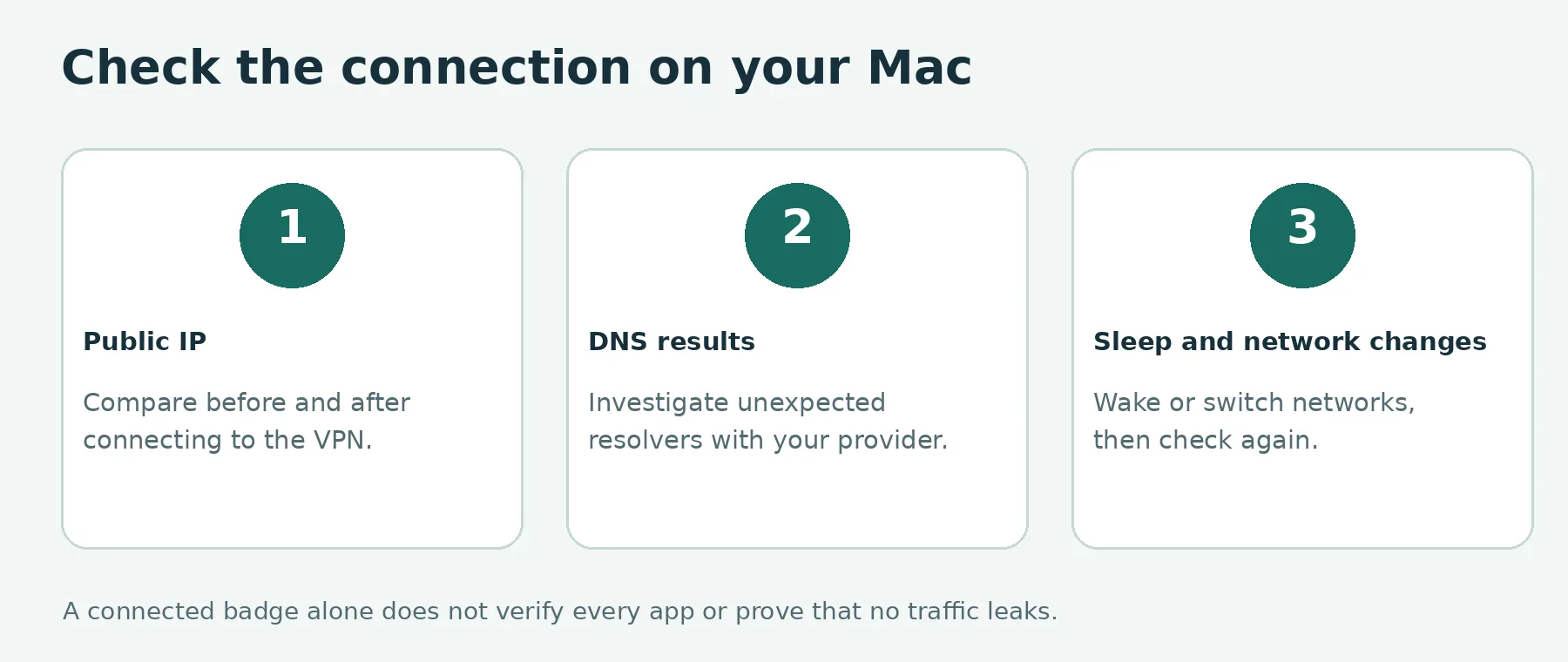 Check public IP, DNS results, and behavior after sleep or a network change. A connected badge alone cannot verify every app.
A connected indicator is useful, but it does not establish that every app and every network transition behaves as intended.
Check your public IP. Record it with the VPN disconnected, connect, and reload an IP-check page. The address should reflect the VPN route. If you use split tunneling, check from both the included and excluded browser. A browser result cannot verify every background application.
Review DNS results. Run a DNS-leak check and investigate unexpected resolvers using the provider’s documentation. Resolver names alone do not prove a leak, and a single successful test cannot establish that no connection ever bypasses the VPN.
Repeat after sleep and a network change. Put your Mac to sleep, wake it, and check the app state and public IP again. If practical, switch between Wi-Fi and a phone hotspot and repeat. Pause sensitive work until the connection is restored.
Check local devices. Try your printer, network storage, or other local service. If access fails, inspect local-network visibility and kill-switch settings. Enable local access only on networks you trust.
Clicking Disconnect is not a universal kill-switch test: some clients intentionally allow internet access after a deliberate disconnection. Check the documented behavior of your exact edition. These checks reveal configuration problems; they are not a complete security audit.
If your Mac VPN will not connect
First confirm the internet works without the VPN, when it is safe to do so. On public Wi-Fi, you may need to finish the network’s sign-in page before reconnecting.
Next, update the VPN app, try a nearby server, and switch to another protocol offered by that app. Change one setting at a time. Avoid running competing VPN clients simultaneously; workplace clients and other network filters may require IT support.
If websites work but a printer does not, investigate local-network restrictions rather than reinstalling everything. If only one website fails, try another server and check whether the service restricts VPN access. Streaming availability can change, so test your own subscriptions before committing to a long plan.
For comparisons across devices and longer-term costs, consult our best VPN services guide.
Is iCloud Private Relay enough for Safari?
If your goal is mainly Safari browsing privacy and you already pay for iCloud+, Private Relay may cover that need. Apple explains that it sends Safari browsing requests through two relays so no single party sees both your identity and the sites you visit.
It is not a replacement for a general VPN when you need other apps covered or want to choose a VPN server location. Check Apple’s Private Relay explanation before buying a second service solely for Safari. Choose the tool that addresses your actual traffic and privacy needs.
Frequently asked questions
What is the best VPN for Mac?
NordVPN is a sensible paid option for general use. Proton VPN Free suits everyday browsing without a data cap, Surfshark suits households with many devices, and Mullvad suits users who prefer predictable monthly pricing. Check your macOS version and the exact app edition before choosing.
What is the best free VPN for Mac in this comparison?
Proton VPN Free is the best starting point here for everyday use without a monthly data cap. It allows one connection and automatically selects a free server, with randomized changes and a cooldown. It is less suitable when you need to choose a specific country.
Does a Mac have a built-in VPN?
macOS includes VPN configuration settings, but those settings do not provide a free commercial VPN service. Manual setup requires server information and credentials from a provider or your organization.
Is iCloud Private Relay the same as a VPN?
Private Relay may suit Safari browsing privacy if you already have iCloud+. It does not replace a general VPN when you need other applications covered or want to choose a VPN server location.
How do I check whether my Mac VPN is working?
Compare your public IP before and after connecting, review DNS-check results using your provider’s documentation, and repeat after sleep or a network change. Test the applications and local devices you actually use. These checks can reveal configuration problems but are not a complete security audit.
Keep reading

VPN for iPhone How to Choose and Set It Up
For a free VPN for iPhone, Proton VPN Free is a sensible starting point for everyday browsing because it has no data cap. Consider NordVPN if you want a paid se...

WireGuard vs OpenVPN Which Protocol Should You Use
Start with WireGuard for everyday browsing, streaming, and mobile use. Choose OpenVPN when you need TCP fallback, compatibility with an existing setup, or more...

Apple Cybersecurity & Privacy Anti Virus
Best Antivirus for iPhone: Free and Paid Security Options
Compare Apple’s built-in protections with Avast One, Bitdefender, and Norton. Learn what iPhone security apps can do, their limits, and which features you may need.