Klap AI Review (2026): Pricing, Free Trial and API

In this story

This Klap AI review finds Klap worth trying if you turn podcasts, talking-head videos or interviews into Shorts and Reels every week. It gives you captioned, vertical candidates to review, and the free trial lets you see what it makes from one of your own recordings. Basic starts at $29 month to month. You’ll need a paid plan to download or post a clip. Klap plans and trial terms Affiliate disclosure: We may earn a commission when you subscribe through our Klap affiliate link.
For developers, Klap is our first pick when you need self-serve access and pricing you can model per upload. Generating three shorts from each of 2,000 videos and exporting the one you keep costs $3,760 at published rates. OpusClip is a stronger fit if signed webhooks or source videos over five hours are requirements. Klap’s video clipping API
How we reviewed it. WhatTheTech checked current plans and developer documentation, considered product information from Klap’s cofounder, and reviewed a published third-party clip benchmark. The screenshots come from Klap.
Klap AI review: How does it work?
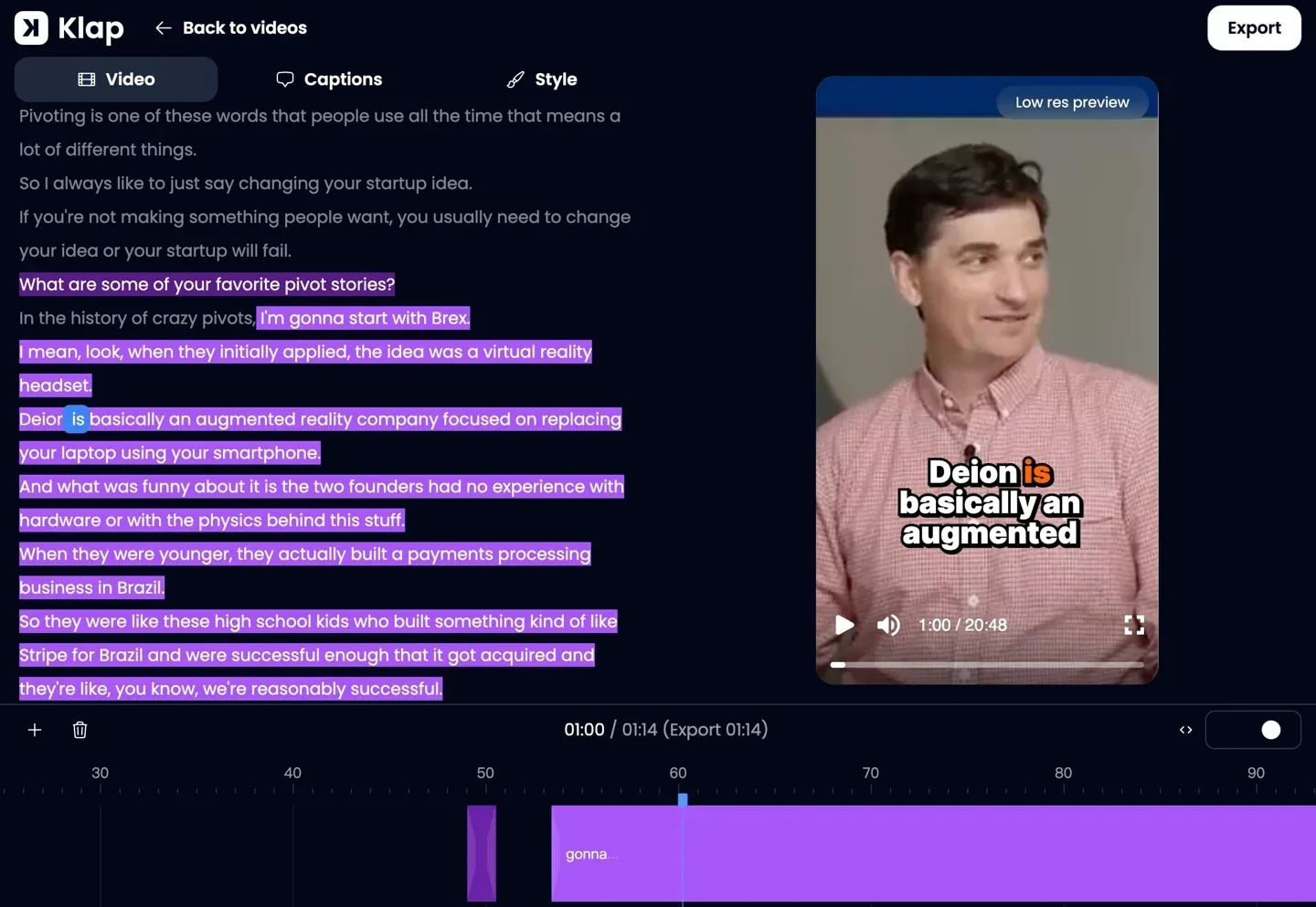
Klap finds moments in a long recording, cuts them into vertical clips and adds animated captions. Paste a link from YouTube, Twitch, Vimeo, Loom, Google Drive or Dropbox, or upload a video file. You can preview the suggested clips, revise the cut or captions, and then download or schedule the ones you keep on a paid plan. How Klap works
The cofounder described three editing decisions Klap makes for you. It can cut pauses or slow passages within a clip, follow the active speaker as the conversation shifts, and change the layout to preserve things like a gameplay webcam overlay. Klap also assigns each clip a virality score. Use it to sort a batch for review, then judge each short on whether it makes sense to someone who never saw the full episode. Klap advertises caption support for 99+ languages and reports that more than 3.5 million creators have made more than 8.5 million clips as of November 2026. Those usage figures come from Klap. Klap product overview · Klap company figures
Klap vs OpusClip | What happened on the same videos?
In October 2026, Scrutator ran a tutorial, a two-person interview and a screen demo through each tool twice. The tester graded each output on whether it could be published as delivered or needed an edit. These figures come from the browser apps. Scrutator’s test and run logs
| Tool | Clips generated | Publishable as delivered | Needed an edit | Rejected |
|---|---|---|---|---|
| Klap | 41 | 21 (51%) | 20 | 0 |
| OpusClip | 77 | 27 (35%) | 47 | 3 |
Klap gave the reviewer a smaller pile to sort through and a higher share they could use immediately. OpusClip still delivered six more publishable clips. Klap’s results were strongest on the single-speaker tutorial, where 18 of 20 clips were ready to post. The interview and screen demo needed more work, particularly on trimming and framing. The benchmark used three short sources and one grader, with tests on different dates. If you edit hour-long debates or detailed screen recordings, make that footage your trial case.
Who benefits most from Klap?
Podcasters and interview channels can turn a weekly recording into a batch of Shorts and Reels without hunting through the timeline for every candidate. Start with an episode that has two speakers, since that gives you a useful check on framing when they interrupt or react to each other.
Webinar and course teams can clip a clear answer, a worked example or a product demo. Review slides and screen shares in the vertical crop before posting. A clip can be well captioned and still lose the visual detail that makes it useful.
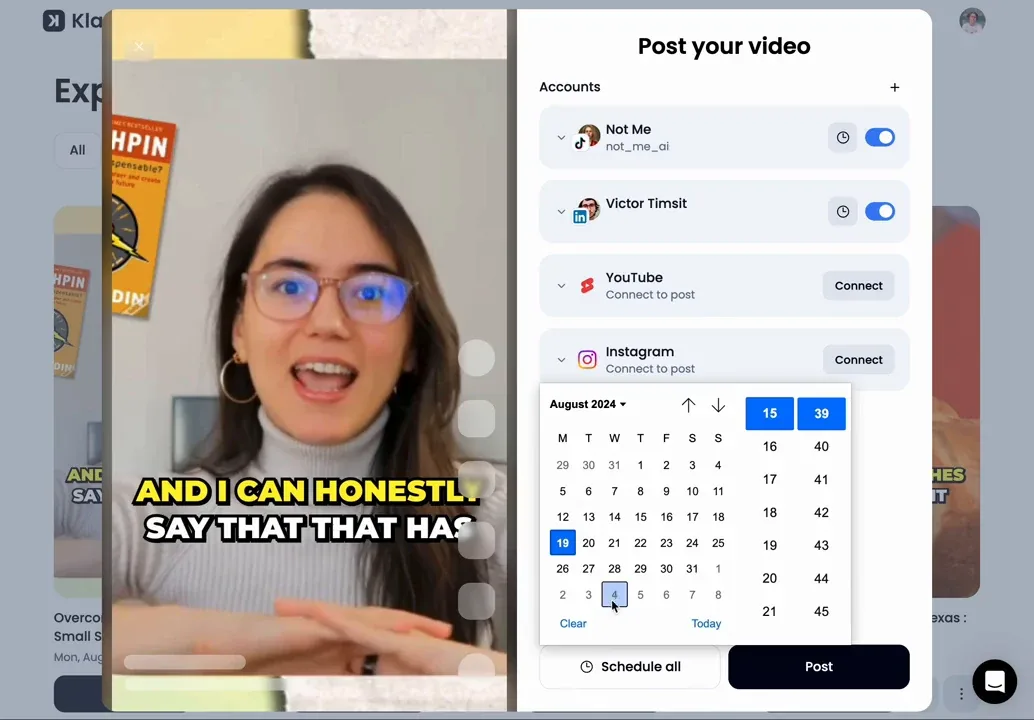
Agencies and social teams can use one calendar to schedule clips to TikTok, YouTube, Instagram, Facebook and LinkedIn. The cofounder says LinkedIn publishing is for personal profiles and that Klap’s automatic mode can post one, two or three clips per day at times it selects. If a client approves every public post, use manual scheduling after sign-off. Klap’s scheduler
Developers and product teams can give customers an upload-to-clips workflow. The API is especially interesting if you want long videos analyzed, a few candidates generated, and only selected clips rendered.
Gameplay, sports and streams are worth testing with your own footage. A clip with several subjects or an important scoreboard can be harder to frame than an interview. If your work depends on frame-level edits, precise graphics placement or music cues, a timeline editor is a better fit for the finishing work. AI video editing tools by task
Klap AI review: Pricing and free trial
| Klap app plan | Billed monthly | Billed annually | Clips per month on monthly billing |
|---|---|---|---|
| Basic | $29 | $174 per year | 100 |
| Pro | $79 | $474 per year | 300 |
| Pro+ | $189 | $1,134 per year | 1,000 |
Prices are in US dollars and were checked November 15, 2026. Annual plans make the year’s clip allowance available upfront. The app counts clips when it generates them, so a batch of eight uses eight clips even if you keep only two. The app pricing page lists a three-hour source-video limit. Current Klap pricing
Start with Basic if you publish weekly. If Klap generates eight candidates from each of four episodes, you’ll use 32 of your 100 monthly clips. If you publish three from each episode, the $29 bill works out to $2.42 per published clip, before editing time. Use your own trial yield to decide whether you need Pro. Klap pricing and allowances
How to test Klap before paying
Use an episode you already want to repurpose. Eligible new accounts can preview and edit clips from one video without entering a credit card. Check the first five candidates against the same four questions. Klap trial and export terms
| Check | What to look for |
|---|---|
| Opening | Can a new viewer tell what the clip is about in the first few seconds? |
| Cut | Does the clip complete a thought? Play it without the question or setup that came before it. |
| Framing | Keep an eye on speaker switches and any edge of a slide, chart or demo the viewer needs to see. |
| Captions | Verify names, acronyms and numbers against the source. |
Mark each clip as ready, fixable or skip. Time the review and fixes, then divide those minutes by the number you’d publish. Compare that with cutting a short manually. If you need a downloadable file before paying, check the free tiers in our free AI video maker guide and AI video editing comparison.
Klap AI review: API options for developers
The billing unit matters as much as the starting price. Klap charges by operation, while OpusClip and Vizard meter source processing time through credits. We compared public documentation and pricing, checked November 15, 2026. Use the same videos and count the same deliverable when comparing costs.
| API | Access and price | Inputs and outputs | Completion | Best fit |
|---|---|---|---|---|
| Klap | Self-serve, usage-based. $0.44 per input, $0.32 per generated short, $0.48 per export. One-video web trial is separate. | Supported video links or a hosted video file, with captioned short projects and separate MP4 rendering. | Poll task and export status. | Best overall for teams prioritizing self-serve, per-operation billing. |
| OpusClip | Limited API access starts on Pro Beta ($29/month on monthly billing). Max and Business also support the API. One credit per processing minute with a 10-credit API minimum per project. Free web plan available. | Supported video links or files uploaded via an upload URL, with captioned clips and HD exports. | Signed project webhooks and status endpoints. | Teams that need webhooks, longer inputs or are already using OpusClip. |
| Vizard | API key on paid Creator and Business plans. One credit per source minute. Check the current plan price and credit tier at checkout. Free web plan available. | Supported video links or remote files, with clip metadata and downloadable clips. | Webhooks or polling. | Teams that prefer a subscription and already track source minutes. |
Sources for API access and billing: Klap API pricing · OpusClip project and plan limits · Vizard API billing · Vizard webhook setup
Klap API
Klap’s clearest advantage is that you can open an account, create an API key from the API dashboard and pay for the operations you use. The API’s video-to-shorts endpoint accepts up to five hours of source footage, according to its technical docs. You can cap the number of generated shorts and pass speaker names, brands or jargon as transcription context. That gives you a way to control costs and improve the first caption pass. Klap task documentation
OpusClip API
OpusClip fits teams that want a signed completion webhook and documented concurrency limits. Its public guide lists up to four simultaneous projects on Pro Beta and Max, and up to 50 on Business. It also supports inputs up to ten hours and 30 GB. If you are estimating costs for lots of short sources, model the 10-credit minimum for each project. OpusClip’s programmatic video guide
Vizard API
Vizard makes sense when the people approving clips already work inside Vizard. API projects appear in the same workspace, and the paid plan’s upload minutes cover API submissions. At 2,000 videos averaging 30 minutes each, you would use 60,000 source minutes a month. Vizard asks teams above 10,000 monthly minutes to contact it for a high-volume solution. Vizard API pricing and limits
What does Klap’s API cost for 2,000 videos a month?
Multiply the number of input videos by $0.44, generated shorts by $0.32 and export jobs by $0.48. The monthly total changes substantially depending on how many candidates you generate and how many you render.
| Per input video | Cost per input | Monthly cost at 2,000 inputs |
|---|---|---|
| Generate one short, export it | $1.24 | $2,480 |
| Generate three shorts, export one | $1.88 | $3,760 |
| Generate three shorts, export all three | $2.84 | $5,680 |
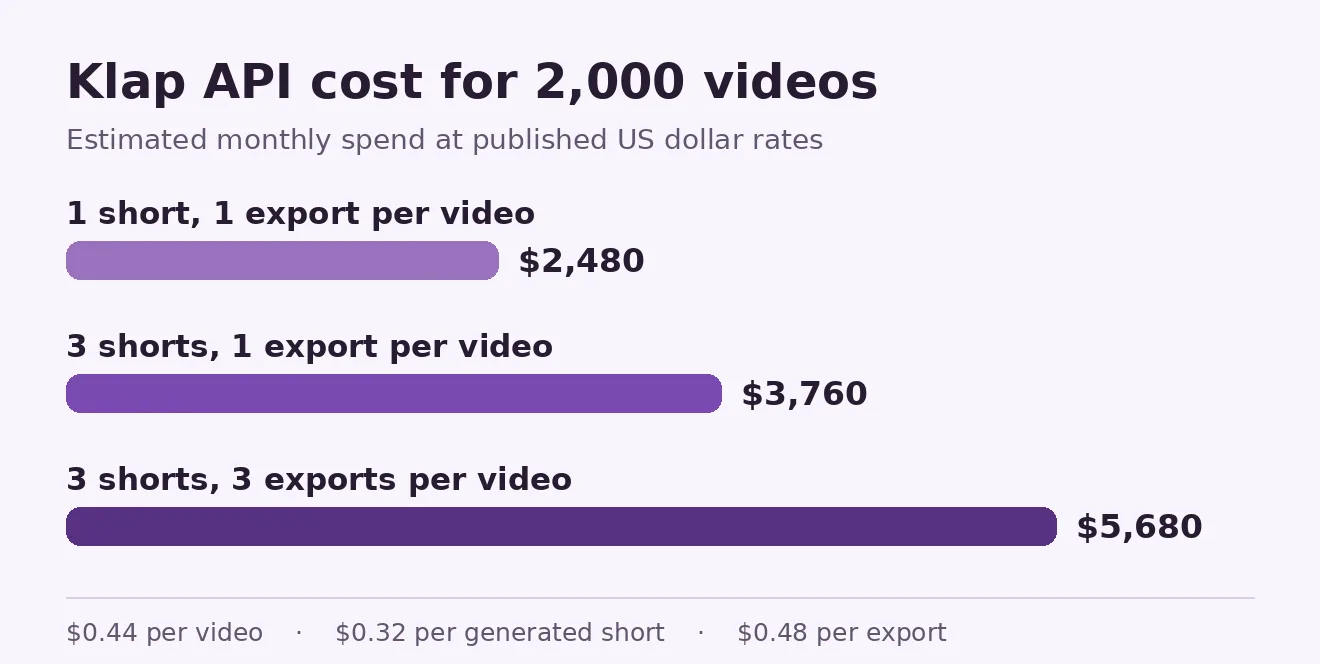
Illustrative costs in USD at Klap’s published rates. Each export shown is rendered once. Storage, taxes and any additional jobs are outside the calculation. Klap API billing units
At three candidates per video, exporting only the chosen clip saves $1,920 per month versus rendering all three. Use those figures for budgeting, then confirm concurrency, any account limits and peak processing times before promising turnaround to customers. For the pilot, measure the API bill per clip a customer actually keeps, the time until the MP4 is available, and the share of jobs that fail. Include your shortest uploads and longest panel recordings. They stress different parts of the pipeline.
How to generate and export one short with Klap’s API
The API workflow submits a video URL, waits for processing, lists the shorts and renders one to MP4. API operations can incur charges. For a local file, upload it to your storage first and pass a link that stays valid while Klap ingests it. Task endpoint · Projects endpoint · Export endpoint
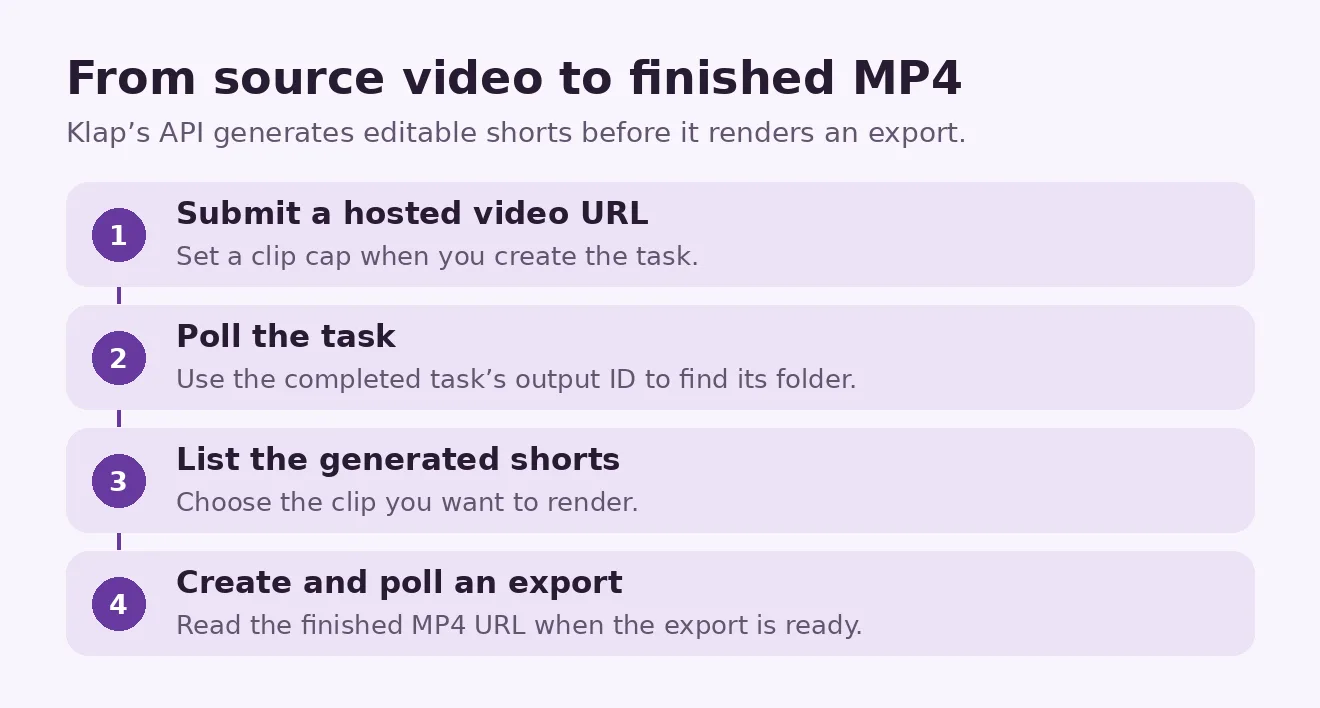
Obtain an API key from your Klap account and send the video URL to the video-to-shorts task endpoint. Set a maximum clip count to control generation costs. Poll the task until it finishes, list the resulting projects, then create and poll an export for the clip you choose. The Klap task documentation provides request examples and parameters.
For a production app, persist the task ID as soon as the request succeeds and resume polling it after restarts. Persist the export ID too. Since each POST creates a billable operation, treat a timed-out POST as an uncertain result and check for an existing job before submitting again. Keep the API key on the server and give users a review step before any automatic publishing.
No-code workflows with Zapier and n8n
To turn each new YouTube upload into captioned Shorts and TikToks, use a new-video trigger, send the video URL to Klap, wait for the clips, then route the best candidates to an approval step. After approval, export and queue the selected clips for the connected social accounts. Klap lists its Zapier app as a public beta and its n8n integration as a community node for self-hosted instances. The Sign in with Klap integration uses the connected user’s subscription allowance. Klap integrations · Klap OAuth billing and endpoints
Klap AI review: Is it worth it?
Klap Basic is a sensible starting plan if you have a weekly backlog and the trial turns your footage into several shorts you’d actually publish. With panel discussions or screen recordings, check some awkward speaker transitions and crowded slides before committing. For developers, Klap is the easiest of these three to budget from published per-operation rates. Choose OpusClip or Vizard if a completion webhook matters more than Klap’s billing model.
Try Klap on your next podcast, interview or webinar. Bring one recording, review the first five clips and see how many you’d publish. If you’re building an app, start with Klap’s video clipping API and run the same check on a small batch. For ideas for your source footage, see our video script template.
Frequently asked questions
Is Klap the best OpusClip API alternative?
Klap is our first pick if your main requirements are self-serve signup and published per-operation pricing. Choose OpusClip if signed webhooks, documented concurrency or inputs longer than five hours matter more to your workflow. Compare both on the number of shorts you would publish from the same source recordings.
Can ChatGPT or Claude cut long videos into finished shorts?
Connect Klap through its ChatGPT app, Claude connector or MCP server to have Klap do the clipping and rendering from a prompt. An assistant can also suggest timestamps from a transcript, which is useful if you want to handle the edit yourself. Klap MCP server and supported tools
Can I process 2,000 videos a month with Klap?
Klap’s public rates give you a budget estimate for that volume. Ask about your account’s throughput and run a batch at your expected peak load before committing to a processing deadline. Start with a low clip cap and render only what your users actually want.
Does Klap’s free trial let you download clips?
The free trial lets eligible new users preview and edit the clips from one video. Downloads and publishing require a paid plan. Klap’s free trial details
Keep reading


Reinforcement Learning Explained With a Worked Example
Reinforcement learning is a way to train an agent to choose actions that maximize expected cumulative reward. The agent interacts with an environment, receives...


What Is Biocomputing? How Biological Computers Work, Examples and Applications
In 2022, researchers connected living human and mouse neurons to a simulated Pong game and reported that the cultures changed their behavior with structured fee...


Gemini 4 Neon vs GPT-6.2 Sol: Speed Evidence and Three Practical Tests
Sol looks promising for turnaround, while Neon merits a trial when reasoning errors cause rework. Compare the published evidence and repeat three practical tests on your own work.