Gemini 4 Neon vs GPT-6.2 Sol: Speed Evidence and Three Practical Tests

In this story

Gemini 4 Neon vs GPT-6.2 Sol comes down to speed, cost and the checking your work needs. Published benchmarks favor Sol for task turnaround at the listed low and high settings. Neon reaches a higher top-setting intelligence score. Neither result proves which finishes your spreadsheet, brief or website change sooner.
We have not run the three matched tests below. This comparison uses published evidence checked on November 19, 2026, plus a repeatable test plan. Start with Sol when turnaround and base API cost matter. Trial Neon when deeper reasoning might reduce rework. Treat those choices as starting points, not measured task winners.
A spreadsheet can arrive before your coffee cools and still leave hours of checking. A missing transaction or broken mobile menu can erase that apparent time saving.
Google announced Neon on November 18. The important purchasing question is what happens after the first answer: can you use the result, or must you repair it?
Gemini 4 Neon vs GPT-6.2 Sol: what the speed evidence shows
The Artificial Analysis comparison separates reasoning settings. At the time checked, it reported:
| Published measure | Gemini 4 Neon | GPT-6.2 Sol |
|---|---|---|
| Intelligence Index at highest listed setting | 61, xhigh | 57, max |
| Inference time per Intelligence Index task, low setting | 3.7 minutes | 1.5 minutes |
| Inference time per Intelligence Index task, high setting | 14.8 minutes | 4.7 minutes |
These are independent benchmark measurements, not timings for our proposed workbook, brief or contact page. “High” is each provider’s setting; it does not establish equal computational effort. The intelligence scores and low-setting times also describe different configurations.
The useful signal is a tradeoff: Sol completes that benchmark workload sooner at the listed low and high settings, while Neon reaches the higher top-setting index score. That justifies testing Sol for turnaround and Neon for difficult work. It does not tell us which requires less human correction.
Google’s evaluation methodology adds another caution: some coding results use different provider environments, and its Antigravity environment can use subagents. A score can therefore reflect the surrounding tools as well as the model.
Our separate guide to what changed in GPT-6.2 Sol covers the upgrade question. Here, the focus is completing a particular job.
How to time a finished task fairly
Track four things: when output starts, when the first file arrives, when it passes inspection, and how much human effort it takes. Keep them separate. A quick first response can coexist with a slow, correction-heavy handoff.
For Gemini 4 Neon vs GPT-6.2 Sol, compare the actual assistant and tools you would use. Record whether each can edit files, browse sources, execute code and inspect the result. Different tools can change the outcome. Therefore, report which complete workflow you tested; do not attribute every difference to the model.
Run each task three times per model, ideally with three matched variants: 18 runs altogether. Start fresh sessions, reset inputs and alternate model order. Select the models explicitly, record reasoning settings and keep parallel agents out of the main experiment.
Start, check and stop the clock
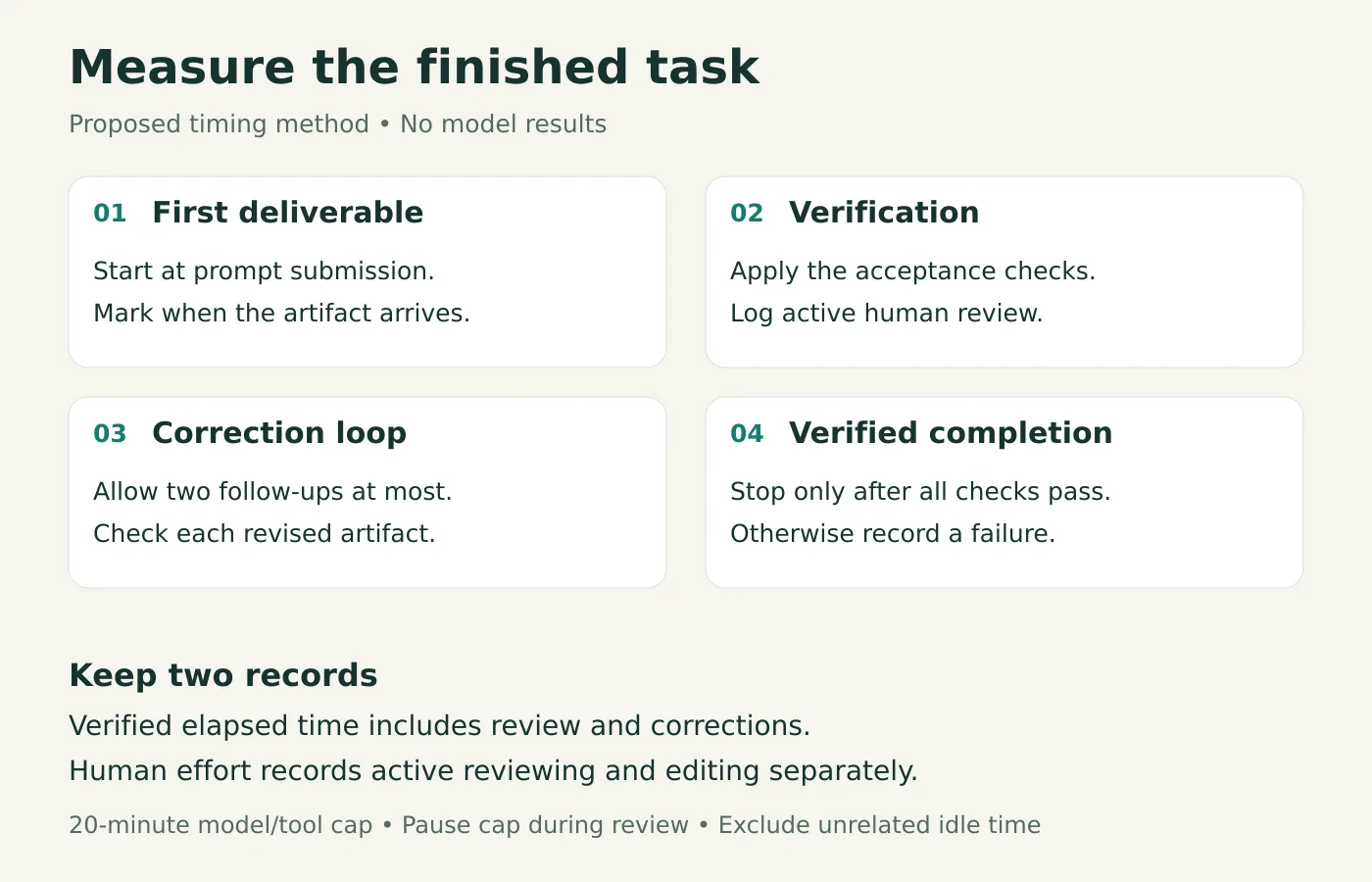
Use this timing rule:
Start when the full prompt and inputs are submitted.
Mark the first completed deliverable.
Apply the same acceptance checklist immediately.
Record review time, correction prompts and the final pass or failure.
Allow 20 minutes of model/tool execution and at most two corrective follow-ups per run. Pause that execution allowance during human inspection, but include inspection in verified completion time. Exclude initial setup and unrelated interruptions; log them separately. If no output passes, record a failure, not a conveniently short completion.
Report passes out of attempts before median times for successful runs. A workflow that passes once quickly and fails twice should not appear to beat one that passes three times.
Classify each root defect: critical means unusable or unsafe; major means materially wrong or broken; minor means presentation. Keep reviewer-discovered errors separate from self-corrections made before handoff. Use consistent correction prompts. Identify the failed requirement without handing one model an extra solution.
Spreadsheet repair: did the numbers actually add up?
A workbook can look convincing because its formatting survived. That tells you little about whether its totals did.
For the spreadsheet task in Gemini 4 Neon vs GPT-6.2 Sol, start with a synthetic service-business workbook containing 120 legitimate transactions across three months and three categories. Add a summary and chart, then preserve a clean reference copy before introducing errors.
Seed six defects: a total excludes the last transaction; an amount becomes text and drops out of a calculation; an exact transaction-ID duplicate is added; a lookup references the wrong cell; a margin divides by the wrong base; and the chart excludes month three.
Make the business rules explicit in both copies of the task instructions: keep one copy of an exact repeated transaction ID, flag conflicting duplicates, and calculate margin as profit divided by revenue. Otherwise, you are partly testing whether the assistant guesses your accounting rules.
Use the same spreadsheet prompt
Give both workflows this prompt:
Repair this workbook for a management meeting. Check formulas, transaction totals, duplicate transaction IDs, category summaries, profit margins and charts. Preserve the layout and original business data except where a documented repair requires a change. Return a working XLSX and a concise change log. Verify the result before handing it back.
Check the workbook before calling it finished
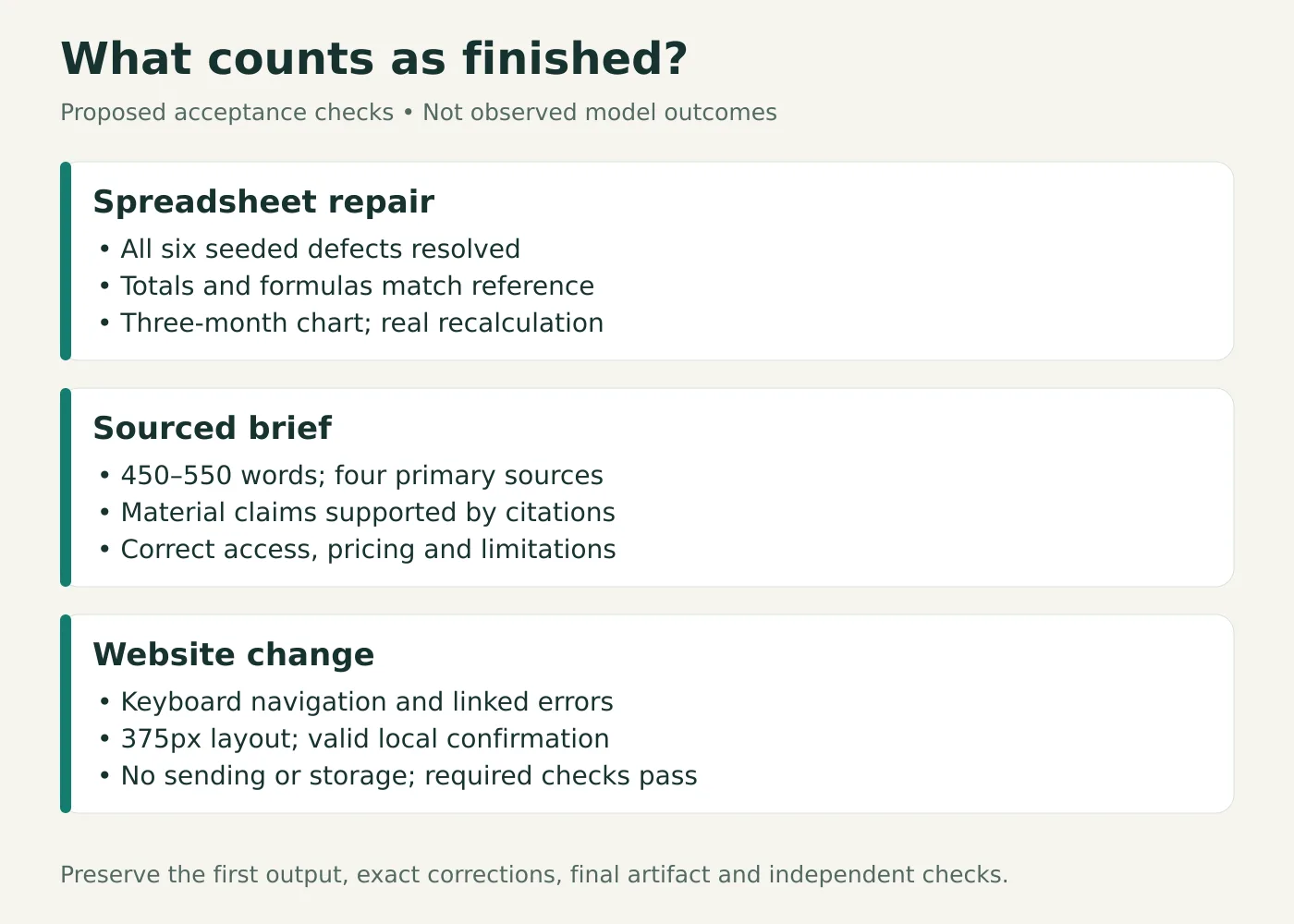
The acceptance test is more demanding than opening the file. All six defects must be resolved, totals must match the reference, formulas must remain functional, and the chart must cover all three months. Check for unrelated data changes too.
For an illustrative margin check, $1,000 revenue and $700 cost produce $300 profit and a 30% margin. Dividing profit by cost instead gives approximately 42.9%: markup, not margin. Either percentage could look plausible in a polished summary. This is an example, not an observed model error.
Recalculate the returned file in Excel, LibreOffice or another compatible spreadsheet engine. Inspect formulas and chart ranges alongside recalculated values. Reading old cached values with a script cannot establish that the repaired workbook works.
Choose the workflow that reliably returns a correct, editable workbook with less review effort. If it can only describe repairs, record that capability limit rather than treating instructions as a completed spreadsheet.
Sourced brief: how much checking did the answer need?
A research brief is finished when a reader can trust its consequential claims. Four blue links at the bottom do not establish that.
For the research task in Gemini 4 Neon vs GPT-6.2 Sol, give both assistants the same cutoff and comparable browsing access.
Use the same research prompt
Use this prompt:
Write a 500-word decision brief, within 10%, comparing access, standard API pricing, supported inputs and relevant limitations of Gemini 4 Neon and GPT-6.2 Sol as of November 19, 2026. Use at least four primary-source URLs, distinguish API access from consumer subscriptions, and cite every material factual claim. Finish with three practical next steps. If a fact cannot be verified, say so.
Audit the claims, not just the links
Before reading the answers, prepare a claim audit. For each consequential statement, record the cited URL, supporting passage, date and verdict: supported, unsupported, contradicted or unverifiable.
A useful test claim is whether a Google AI Plus subscriber can select Neon. The current Google model-availability table lists Neon for Pro and Ultra, while Plus lists Auto and Hydrogen. That is a specific, checkable distinction. “Available on paid Gemini plans” is too imprecise for someone deciding whether to upgrade.
Another is the difference between native model inputs and capabilities supplied by the application. OpenAI’s Sol documentation lists text and image inputs. Do not assume every feature in an assistant’s interface is a native capability of its selected model.
Accept the brief only if it contains 450–550 words, four genuine primary sources, supported material claims and three practical next steps. Count broken citations, factual errors, unsupported statements and material omissions separately. A correct sentence can still have an inadequate citation.
If one workflow cannot browse, give both the same frozen source pack and label the exercise a source-synthesis test. Do not quietly compare live research against an assistant working from memory.
For Gemini vs ChatGPT research, the decisive record is how long the brief takes to become safe to circulate. Keep the original output and exact corrective prompts so readers can inspect that judgment.
Website change: did it work on mobile and keyboard?
A contact form that looks finished may still reject valid input, hide its errors or send information somewhere unintended. Judge behavior as well as appearance.
For the website task in Gemini 4 Neon vs GPT-6.2 Sol, start from the same small service-business repository, dependency lockfile and runtime. Provide the existing build and test commands, then ask:
Add a mobile navigation toggle and a contact form with name, email and message fields. Validate required fields and email format, associate error messages with their fields, and show a local success confirmation after valid submission. Keep the existing design. The form must not send or store data. Verify keyboard operation and mobile layout, then return the code changes and a short verification note.
Check the page in a browser
Set a browser checklist before testing. Open the page at 375 pixels wide and at a desktop width. Use the navigation with a mouse and keyboard. Check that the toggle exposes its expanded state and the layout has no horizontal overflow.
Submit the form blank, then with an invalid email, then with valid data. Confirm that errors identify the relevant fields and the valid submission displays the promised local confirmation. Inspect the implementation and network behavior for accidental submission or storage.
An illustrative failure is a submit button whose click handler shows success while native form behavior also reloads the page. The interface might briefly look correct, yet the required interaction is broken. That example is a verification target, not a finding about either model.
Run existing required checks and inspect the changed page in a real browser. Preserve the diff, test output and genuine screenshots. A generated verification note saying “all tests passed” is not a substitute for the underlying evidence.
A practical Gemini 4 Neon vs GPT-6.2 Sol comparison includes the environment: can it run the project and inspect the browser, or does it stop at code suggestions? Our guide to ChatGPT Work and the former Agent Mode explains why tool access matters. Confirm current provider terms before testing. The published model benchmark cannot answer whether your selected plan supplies the tools this task requires.
Pricing and access: what does a usable result cost?
Google lists Neon access for Pro and Ultra subscribers in the Gemini app. OpenAI’s launch announcement lists Sol for Plus, Pro, Enterprise and Edu users in ChatGPT Work and Codex, with enterprise access subject to workspace controls. Availability and usage limits still require an account-specific check.
For Gemini 4 Neon vs GPT-6.2 Sol, compare subscription access and API billing separately. The documented headline rates are:
| Standard API text pricing, USD per million tokens | Neon | Sol |
|---|---|---|
| Input | $3.00 | $2.00 |
| Cached input | $0.15 | $0.10 |
| Output | $15.00 | $10.00 |
Sources: Google’s announcement and OpenAI’s model documentation. Sol’s listed base rates have important conditions: above 272,000 input tokens, input/cache rates double and output rates rise by 50% for the full request. Processing tiers also change prices.
A small API cost example
For an illustrative short-context request using 10,000 uncached input and 2,000 billable output tokens, those base rates give $0.06 for Neon and $0.04 for Sol. These are arithmetic examples, not measured task costs; they exclude tools, retries, additional reasoning usage and tier adjustments.
Record actual billing where available. In Gemini 4 Neon vs GPT-6.2 Sol, a higher token rate can still yield a cheaper successful job if fewer attempts are needed. For subscription users, include human checking time and usage allowances in the decision.
If ChatGPT feels unusually slow before you begin, use our steps for slow replies and typing lag. Resolve app or network issues before treating a delay as a model result.
Which should you choose for your everyday work?
Start with Sol if turnaround and base API rates are your priorities. Give Neon a matched trial when reasoning quality is the likely bottleneck. These are starting hypotheses from the evidence, not findings from our unrun tasks.
Use your own acceptance requirements to settle Gemini 4 Neon vs GPT-6.2 Sol for your work:
| Your situation | Sensible next step |
|---|---|
| You need frequent short, checkable deliverables | Trial Sol first; retain pass counts and review minutes |
| You repeatedly correct reasoning or constraint failures | Trial Neon against exactly those failures |
| One subscription already covers your workflow | Establish its baseline before paying for another |
| You need an actual repaired file or working page | Confirm editing, execution and inspection tools first |
| Either assistant passes inconsistently | Improve the task instructions and checks before switching |
Keep the result specific to your task
The result may split by task. You could prefer one assistant for briefs and another for file repairs. You could also find that the familiar workflow wins because transferring files and reviewing outputs takes less effort. Record that overhead in your Gemini 4 Neon vs GPT-6.2 Sol comparison. It affects real working time, even when it comes from the app.
Start with one representative task you already understand. Write down what passing means before submitting it. Keep the first output, corrections, final artifact and human minutes. If the improvement survives three matched attempts, you have a stronger reason to change your routine than a dramatic launch demonstration provides.
Keep a run log
For Gemini 4 Neon vs GPT-6.2 Sol, log each attempt before comparing averages. The blank CSV records settings, pass status, review time, corrections and evidence paths. It contains no test results.
Download the blank AI comparison run logDownloadFrequently asked questions
Does a higher reasoning setting always save time?
No. It may increase execution time while reducing errors, or add time without improving the result. Compare verified completion time and pass rate at recorded settings.
Can I repeat the comparison with my existing subscription?
Possibly. Confirm the exact model, remaining usage and required file, browsing and coding tools. Model access alone does not guarantee that the full workflow is available.
Do three successful runs prove a model is better?
They provide a small practical sample for the tested tasks and settings. Keep the recommendation narrow and repeat the check when the work or model changes.
Keep reading


Reinforcement Learning Explained With a Worked Example
Reinforcement learning is a way to train an agent to choose actions that maximize expected cumulative reward. The agent interacts with an environment, receives...


What Is Biocomputing? How Biological Computers Work, Examples and Applications
In 2022, researchers connected living human and mouse neurons to a simulated Pong game and reported that the cultures changed their behavior with structured fee...
What Is a Quantum Network and How Does It Work?
A quantum network connects devices that send quantum states or share entanglement. It uses photons to carry quantum information over links such as optical fiber...