We Tested the AI Video Clipper on a 27-Minute Video

In this story
Reviewed by What the tech. For this Katto review, we paid for Katto's Creator plan and tested it ourselves on November 15, 2026.
Katto is an AI video clipper that turns one long video into short vertical clips you can post on TikTok, Instagram Reels and YouTube Shorts. We paid for its Creator plan and ran a 27-minute NASA news conference through it: about 12 minutes later, Katto handed back nine captioned vertical clips, each with a score from 0 to 100 and a short note on why the moment works. This Katto review covers what we saw in that test, every feature that matters for a creator, and how Katto's per-video pricing works.
Katto review in short
What it does: finds the strongest moments in a long video, crops them to 9:16 so the speaker stays in frame, adds word-timed captions and ranks the clips by score.
What we saw: 9 ready clips from a 27-minute video in about 12 minutes, plus 6 more moments in reserve. The first pick scored 87 out of 100.
What makes it different: you pay per video, not per minute or credit, and every clip arrives with a score and an explanation.
Price: Free for 2 videos a month. Solo is EUR 8.90 a month for 10 videos, Creator EUR 14.90 a month for 25, with lower prices when billed yearly.
Best for: podcasters, interviewers, educators and streamers who want a ranked shortlist of clips instead of a timeline to scrub.
What is Katto?
Katto is a web app at katto.tech. You paste a link from YouTube, Twitch, Kick, Vimeo, Zoom, Google Drive or Dropbox, or upload an MP4, MOV, WebM or MKV file, and Katto does the rest: it transcribes the video, scores every candidate moment, reframes the best ones to vertical and burns in captions. Every clip then opens in a full editor, and paid plans can publish straight to seven platforms.
Katto's scoring engine is called Miru. It reads the whole transcript and rates each moment on four axes: Hook (do the first seconds grab attention), Flow (is the speech smooth), Value (does the clip stand on its own) and Trend (does it match patterns that tend to spread). The four combine into one score, and Katto tells you how that score compares with every clip it has scored so far.
How we tested Katto
For this Katto review we used What the tech's own Katto account on the Creator plan. Our test video was NASA's Artemis II Crew News Conference from April 8, 2026: 27 minutes and 35 seconds of astronauts answering questions from orbit, a public domain recording with several voices, pauses and emotional moments. That is the kind of material podcasters and interviewers clip every week.
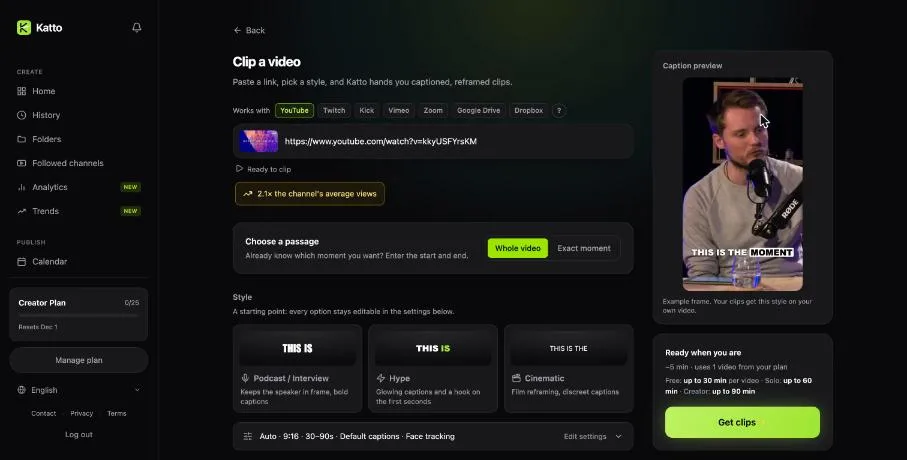
Before you start, Katto lets you clip the whole video or one exact passage, and pick a style.
We pasted the YouTube link, kept "Whole video", chose the Podcast / Interview style (9:16, clips of 30 to 90 seconds, bold captions, face tracking) and pressed Get clips. Katto showed every step while it worked: downloading the video (2 minutes 8 seconds), extracting the audio (8 seconds), transcribing with Whisper, detecting the best moments (about 2 minutes) and then creating the clips and captions. You can close the tab and get an email when the clips are ready, and there is a button to cancel and get the video back on your quota. The whole job took about 12 minutes, in line with Katto's own estimate of around 10 minutes for a video under 30 minutes.
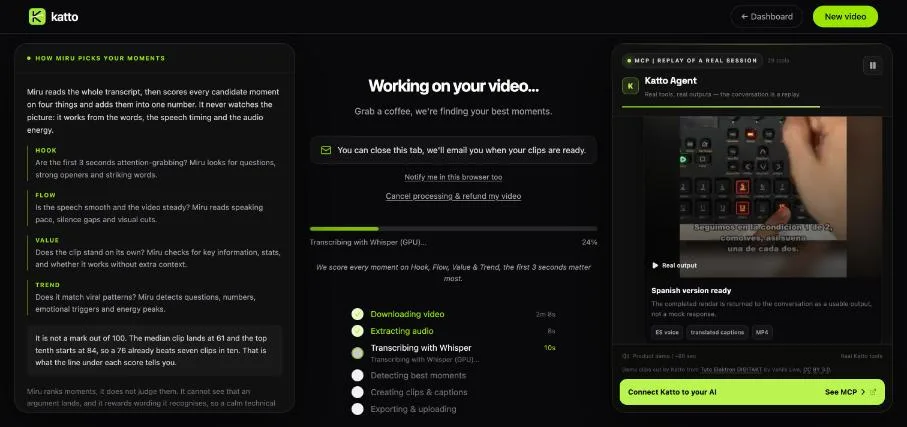
Katto explains each step while it works, and how its scores are calculated.
What Katto gave us
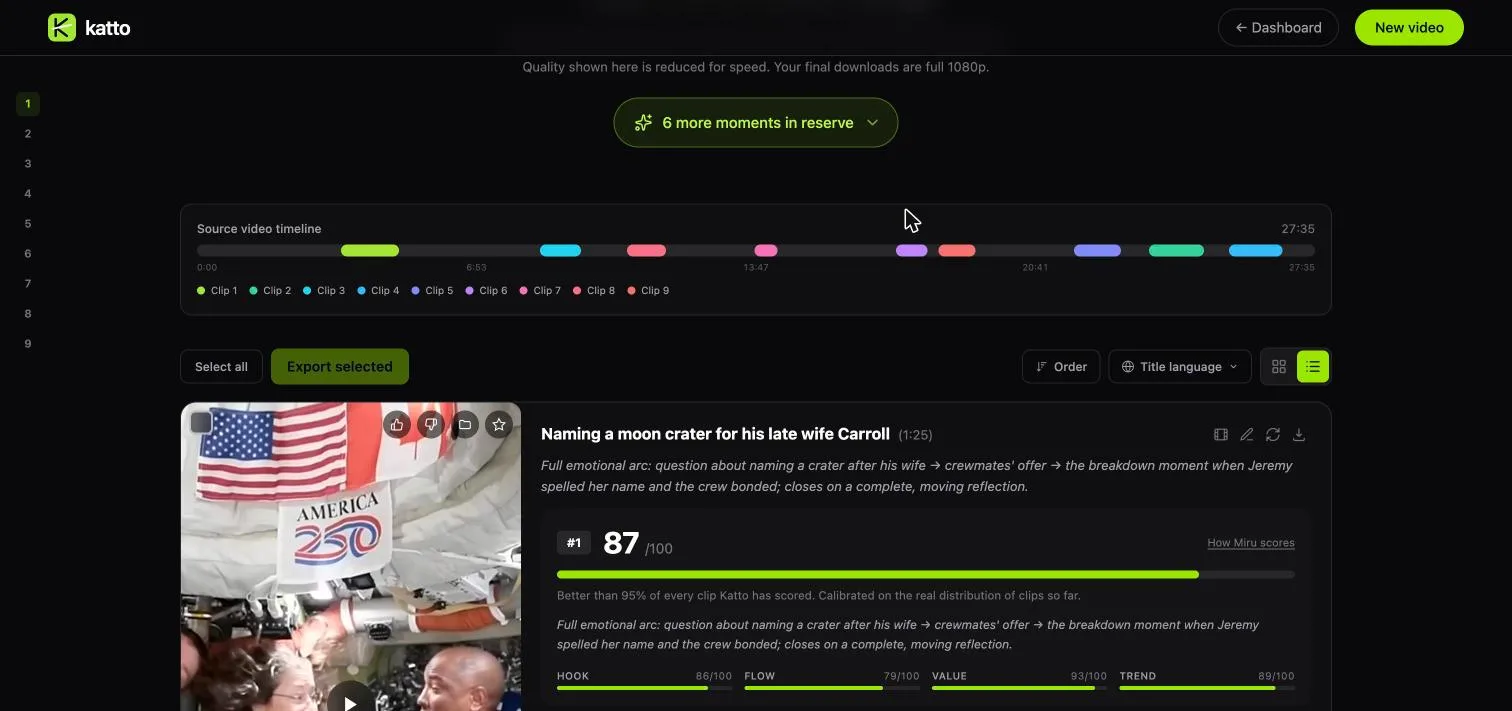
Katto returned nine clips between 34 seconds and 1 minute 25 seconds long, plus six more moments in reserve that you can render if you want more choice. A timeline at the top shows where each clip sits in the source video.
The picks were the moments a human editor would choose. The first clip, scored 87, is an astronaut describing the moment his crewmates named a lunar crater after his late wife. Katto cut it as a complete arc, from the question to the end of his answer, and its note reads "Full emotional arc ... closes on a complete, moving reflection." Its sub-scores were Hook 86, Flow 79, Value 93 and Trend 89, and Katto said it was better than 95% of every clip it has scored. The second clip, scored 84, describes watching Earth disappear behind the Moon. The third, scored 76, is about riding "a fireball through the atmosphere" on the way home.
Each clip arrives with a score, sub-scores and a note on why the moment works.
Each clip comes with a title, the full word-timed transcript (with pauses marked), the time range in the source, the framing mode Katto used, and buttons to export, edit, change the captions or adjust the length. The preview on the results page plays at reduced quality for speed; downloads are full 1080p on paid plans.
Editing a clip
Opening a clip leads to Katto's editor. The transcript sits on the left, the vertical preview in the middle and the tools on the right: brand kit, captions, text, B-roll, sound effects, dubbing, AI Boost, thumbnail and audiogram. A timeline runs along the bottom with slots for an intro and an outro.
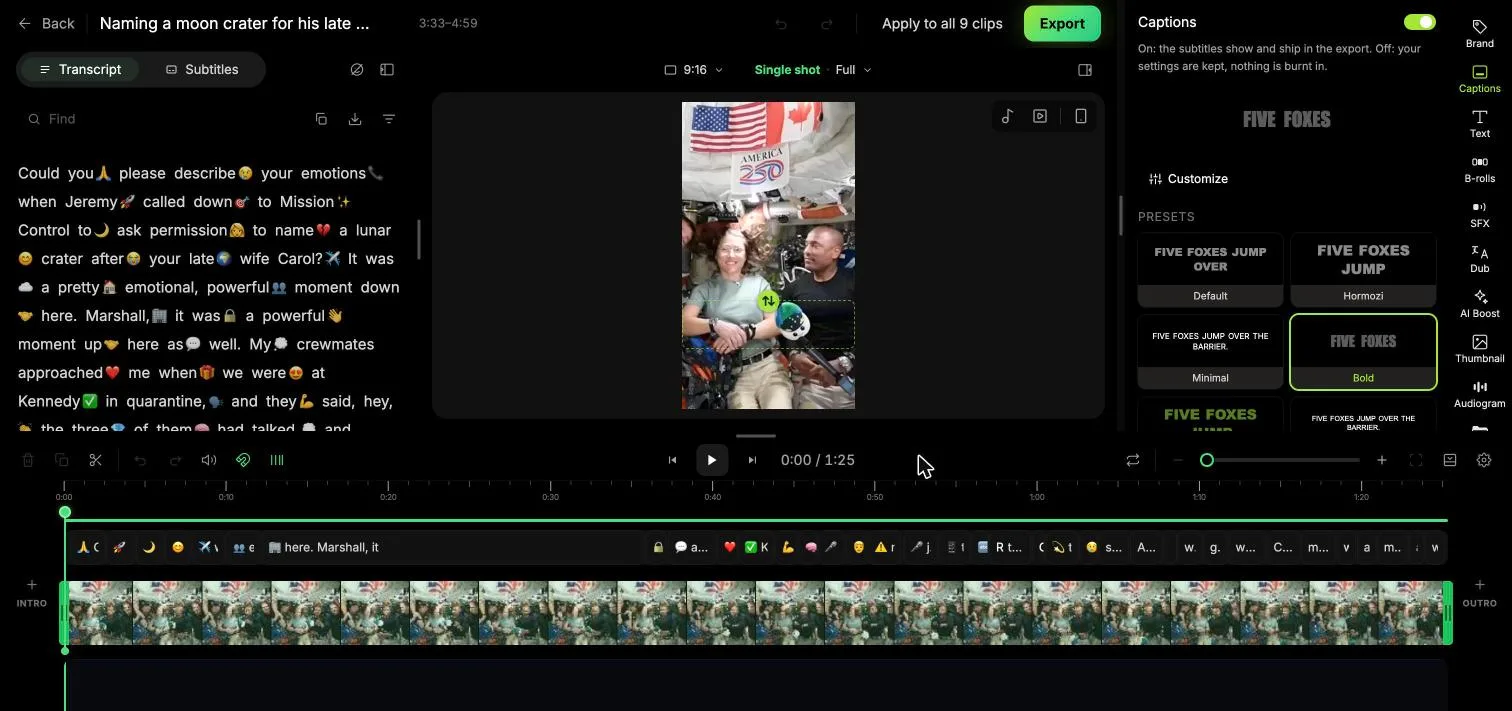
In the editor you cut by deleting words in the transcript, and every change previews before you render.
Editing works like editing a document: delete a sentence in the transcript and the cut follows. Caption styles switch with one click, from plain to bold animated presets, and a single change can be applied to all clips from the same video at once. You can reframe shot by shot, add your own images, videos and sounds, and re-render as often as you like.
Katto features that matter
Moment scoring: every clip is scored on Hook, Flow, Value and Trend, so you know what to post first.
Miru AI reframe: Katto decides how to fit a 16:9 shot into 9:16 shot by shot, following speakers, faces and action. Exports also come in 1:1, 4:5 and 16:9.
Speaker detection and split screen: in conversations Katto frames whoever is talking; Creator adds a split screen for two speakers.
Captions in 99 languages: word-synced captions with highlighting, word-level timing in 41 languages, AI correction of proper nouns, and SRT export.
AI dubbing: Creator translates a finished clip and gives it a new voice in 105 languages (86 of them in beta), 20 dubs a month.
Hooks, B-roll and emojis: Katto can add a scroll-stopping line at the start of a clip, drop in relevant cutaways and punctuate big moments with animated emojis.
Clean audio: remove silences and filler words, and on Creator clean up the voice.
Publishing: paid plans export in one click to YouTube, TikTok, Instagram, LinkedIn, Threads, Bluesky and Mastodon, and Creator schedules posts on a calendar.
Long streams: paid plans take whole Twitch and Kick streams of up to 10 hours.
For developers and AI agents: every plan, the free one included, comes with a REST API (described by an OpenAPI 3.1 document), signed webhooks, a command-line tool, a Chrome extension and a hosted MCP server that lets Claude, ChatGPT, Cursor or Gemini CLI create and fetch clips for you.
Katto pricing and plans
Katto counts videos, not credits or minutes. One YouTube link or one upload is one video, whatever its length, so a 90-minute podcast on Creator costs the same as a 10-minute clip. Your quota resets every month. Prices are published in euros, and checkout charges in your local currency.
Free (EUR 0): 2 videos a month, up to 30 minutes each, no card needed. You get the 5 highest-scored clips per video at 720p with a small Katto watermark, auto captions in 99 languages, 16 caption styles and Miru AI reframe. Free clips stay available for 72 hours.
Solo (EUR 8.90 a month, or EUR 4.90 a month billed yearly, EUR 58.80 a year): 10 videos a month, up to 60 minutes each, 1080p without a watermark, 51 caption styles, one brand kit, B-roll, music, the AI hook and one-click export to seven platforms.
Creator (EUR 14.90 a month, or EUR 11.90 a month billed yearly, EUR 142.80 a year): 25 videos a month, up to 90 minutes each (about 37 hours of source video a month), uploads up to 5 GB, AI dubbing, split screen, voice cleanup, scheduling and a publishing calendar, priority processing, five brand kits and email support. Creator starts with a 7-day free trial.
Paid plans count a long Twitch or Kick stream as one video for every 90 minutes started. In some countries Katto also sells one-off packs that open Solo for 30 days without a subscription: 3 videos for EUR 2.99 or 10 for EUR 7.99. A Studio plan with 50 videos a month, 4K export and three team seats is announced for late 2026.
Who Katto is for
Podcasters and interviewers who record long conversations and want several clips a week without scrubbing a timeline.
Educators, coaches and churches who turn talks and sermons into short lessons.
Streamers who want to clip whole Twitch or Kick streams.
Marketing teams and agencies who publish to several platforms and want posts scheduled from one place.
Creators reaching other languages, with captions in 99 languages and dubbing on Creator.
Developers and AI agent users who want to clip videos programmatically through the API or MCP server.
How Katto compares
Most AI clippers charge by the minute or by credits. Opus Clip and Vizard both bill in credits tied to the length of what you upload, and Submagic sets credit pools and caps the length of each video by plan. Katto's per-video pricing is simpler to plan around if you publish from long recordings: four hour-long episodes use four videos, whatever their length.
In our AI clip generators ranking, Katto's Solo plan covers the whole test workload (four 60-minute recordings a month and 12 clips at 1080p without a watermark) and places among the Hidden gems. See the full AI clip generators ranking and Katto's plans and features in AI Compare.
Tips to get the most out of Katto
Start on Free with one real recording. Two videos a month are enough to see how Katto handles your kind of content.
Pick the style that matches your video. Podcast / Interview keeps the speaker in frame with bold captions; Hype adds glowing captions and a hook; Cinematic keeps captions discreet.
Use "Exact moment" when you already know the passage, so Katto clips exactly that part.
Read the notes, not only the scores. Each clip explains its arc, which helps you choose what fits your audience.
Apply a caption style to all clips at once in the editor to keep a series consistent.
Choose the plan by videos, not minutes: Solo covers 10 videos of up to 60 minutes, Creator 25 of up to 90 minutes with dubbing and scheduling. Billing yearly lowers the monthly price.
Privacy and ownership
Katto's terms say the clips you generate belong to you, and its privacy policy says Katto never trains AI on your content, including videos sent through its API, CLI or MCP server. Source videos are deleted within seven days, Katto uses no advertising trackers, and you can ask for an export of your data.
The team behind Katto
Katto is built by Anthony Papoti, a French web developer based in Japan, who made the first commit in March 2026 and runs the company as a bootstrapped solo founder. It ships at a fast pace: the public changelog lists new features almost every day. Read how Katto grew to more than 1,700 accounts in our sister site's Katto case study, and see the key facts in the Katto company profile on WeCaseStudy.
Katto review: final verdict
Katto does the part of clipping that takes the longest: finding the moments worth posting. In our test it picked complete, self-contained answers from a 27-minute press conference, ranked them, captioned them and framed the speakers in about 12 minutes, and its editor made changes as easy as editing text. Per-video pricing keeps the cost predictable for long recordings, the free plan is enough to try it on your own content, and the API and MCP server let an AI agent run the whole job for you. If you turn long videos into short ones every week, Katto is worth a try.
FAQs
Is Katto free?
Yes. Katto Free gives 2 videos a month, up to 30 minutes each, with no credit card. You get the 5 highest-scored clips per video at 720p with a small watermark, available for 72 hours.
How much does Katto cost?
Solo is EUR 8.90 a month, or EUR 58.80 a year, for 10 videos a month up to 60 minutes each. Creator is EUR 14.90 a month, or EUR 142.80 a year, for 25 videos up to 90 minutes each, with a 7-day free trial. Katto charges in your local currency.
How long does Katto take to make clips?
Our 27-minute video took about 12 minutes from start to finished clips. Katto says a video under 30 minutes typically takes around 10 minutes and a 90-minute video up to about an hour, and it emails you when the clips are ready.
How many clips does Katto make from one video?
Katto says a video typically produces 8 to 20 clips depending on length and content. Our 27-minute test produced 9 clips plus 6 more moments in reserve. Free renders the 5 highest-scored clips per video.
Does Katto add a watermark?
Only on the Free plan, which exports at 720p with a small Katto watermark. Solo and Creator export at 1080p without a watermark.
Can Katto post clips to TikTok and YouTube?
Yes. Paid plans export in one click to YouTube, TikTok, Instagram, LinkedIn, Threads, Bluesky and Mastodon, and Creator can schedule posts on a calendar.
Does Katto train AI on my videos?
No. Katto's privacy policy says it never trains AI on your content, and its terms say the clips you generate belong to you.
Keep reading


Reinforcement Learning Explained With a Worked Example
Reinforcement learning is a way to train an agent to choose actions that maximize expected cumulative reward. The agent interacts with an environment, receives...


Gemini 4 Neon vs GPT-6.2 Sol: Speed Evidence and Three Practical Tests
Sol looks promising for turnaround, while Neon merits a trial when reasoning errors cause rework. Compare the published evidence and repeat three practical tests on your own work.
GPT-6.2 Sol vs GPT-6.1 Sol: Pricing & What Changed
GPT-6.2 Sol vs GPT-6.1 Sol comes down to what you run. At max effort, 6.2 Sol scored higher on Artificial Analysis’s general benchmark and had a lower estimated...