GPT-6.2 Sol vs GPT-6.1 Sol: Pricing & What Changed

In this story
GPT-6.2 Sol vs GPT-6.1 Sol comes down to what you run. At max effort, 6.2 Sol scored higher on Artificial Analysis’s general benchmark and had a lower estimated cost per task, while 6.1 Sol scored higher in its separate Codex coding-agent benchmark.
Start with GPT-6.2 Sol for new general-purpose API workflows. It keeps GPT-6.1 Sol’s Standard API rates, and Artificial Analysis’s max-effort benchmark shows a higher general score, a lower cost per task, and a shorter estimated time per task. Keep GPT-6.1 Sol as your baseline for existing Codex work until you test 6.2 Sol on your own repository. Artificial Analysis’s separate coding-agent benchmark gave 6.1 Sol the higher score at max effort.
OpenAI introduced GPT-6.2 Sol on November 17, 2026. The comparison below uses OpenAI’s published specifications and a November 18 snapshot of Artificial Analysis’s results. The model you should choose depends on the effort setting, how you run it, and what you count as a finished job.
Which Sol model fits your work?
Your situation | Where to start |
A new document or data workflow | Try 6.2 Sol at medium or high, then measure how often the result passes review. |
A working Codex setup | Keep 6.1 Sol as your control. Try 6.2 Sol on the same fixes and repository questions. |
A workflow that runs on long inputs | Price a representative request. Both models have the same 272K input pricing threshold. |
A tight response-time target | Measure first answer and completion separately. Keep the processing tier fixed. |
Read More:
What the benchmarks say about speed and quality
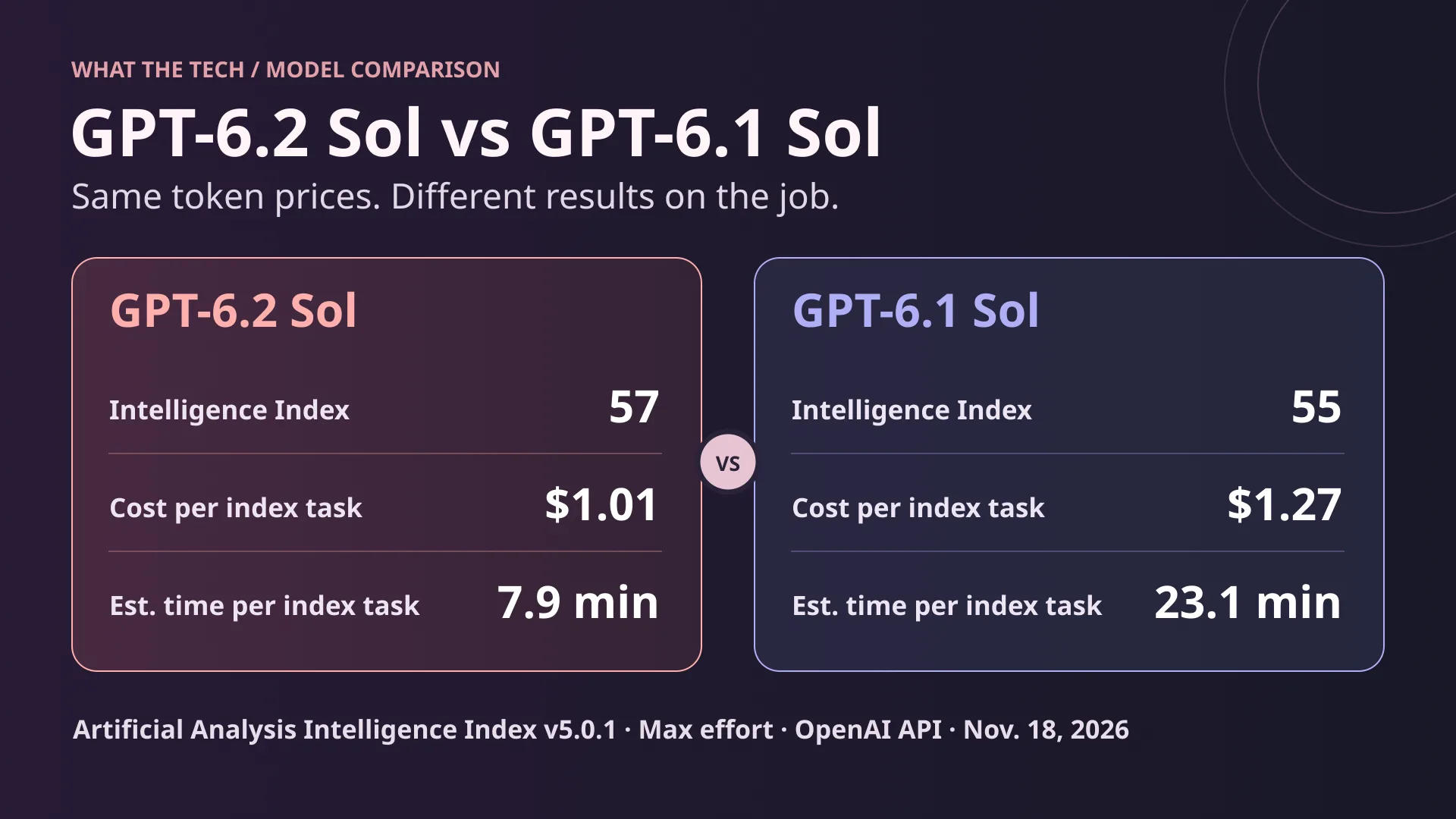
Artificial Analysis’s Intelligence Index v5.0.1 combines nine evaluations covering coding, science, document work, and other tasks. At max effort on OpenAI’s API, 6.2 Sol scores 57 against 55 for 6.1 Sol. The weighted benchmark cost drops from $1.27 to $1.01 per task, about 20%. This cost includes multiple token categories, so you can’t derive it from the drop in output tokens alone.
OrcaRouter’s launch-day comparison flagged 6.2 Sol’s timing as unpublished. Artificial Analysis now lists 7.9 minutes for 6.2 Sol and 23.1 for 6.1 Sol in the same OpenAI provider table at max effort. These are weighted estimates based on the suite’s output volume and endpoint speed. To estimate the wait in your app, measure a real run from request to finished result, including tool time and retries.
Medium and high effort change the comparison
On the same provider table, 6.2 Sol at medium scores 53 and costs $0.41 per benchmark task. At medium, 6.1 Sol scores 46 and costs $0.36. The newer model costs five cents more on that particular row. At high, 6.2 Sol scores 55 at $0.56, matching 6.1 Sol at max on the aggregate score for less than half the $1.27 cost. Use high as a test candidate if you currently run max. Check the tasks you care about before lowering effort in production.
OpenAI reports a 5.3 percentage-point gain for 6.2 Sol over 6.1 Sol on GDPval v2, its internal benchmark of longer professional workflows. That is a separate result from the two-point increase on Artificial Analysis’s index. If your work involves turning several source files into a deliverable, judge whether the output covers the required facts and preserves their source references.
The Codex result points the other way
Artificial Analysis reports a three-point drop for 6.2 Sol in its separate Coding Agent Index, using the Codex harness at max effort. It attributes the drop to weaker answers on repository questions, where the newer model was more likely to leave out important facts. That makes questions about an unfamiliar codebase worth testing alongside bug fixes. A passing test suite only covers the patch part of that comparison.
GPT-6.2 Sol vs GPT-6.1 Sol pricing and context
OpenAI API specification | GPT-6.2 Sol | GPT-6.1 Sol |
Standard input / cached input / output per 1M tokens | $2 / $0.10 / $10 | $2 / $0.10 / $10 |
30-minute cache writes per 1M tokens | $2.50 | $2.50 |
12-hour cache writes, short context, Standard | $5 per 1M tokens | No rate listed on model page |
API context window / max output | 1,050,000 / 128,000 | 1,050,000 / 128,000 |
Input and output | Text and image in, text out | Text and image in, text out |
Knowledge cutoff | June 1, 2026 | April 30, 2026 |
The shared rate card is why cost per job matters. A model can use fewer reasoning and answer tokens yet still cost more if it takes extra turns or reads more input. Estimate cost from the complete run, including follow-up calls and any separate tool charges. For the broader rate comparison, see our guide to AI API costs.
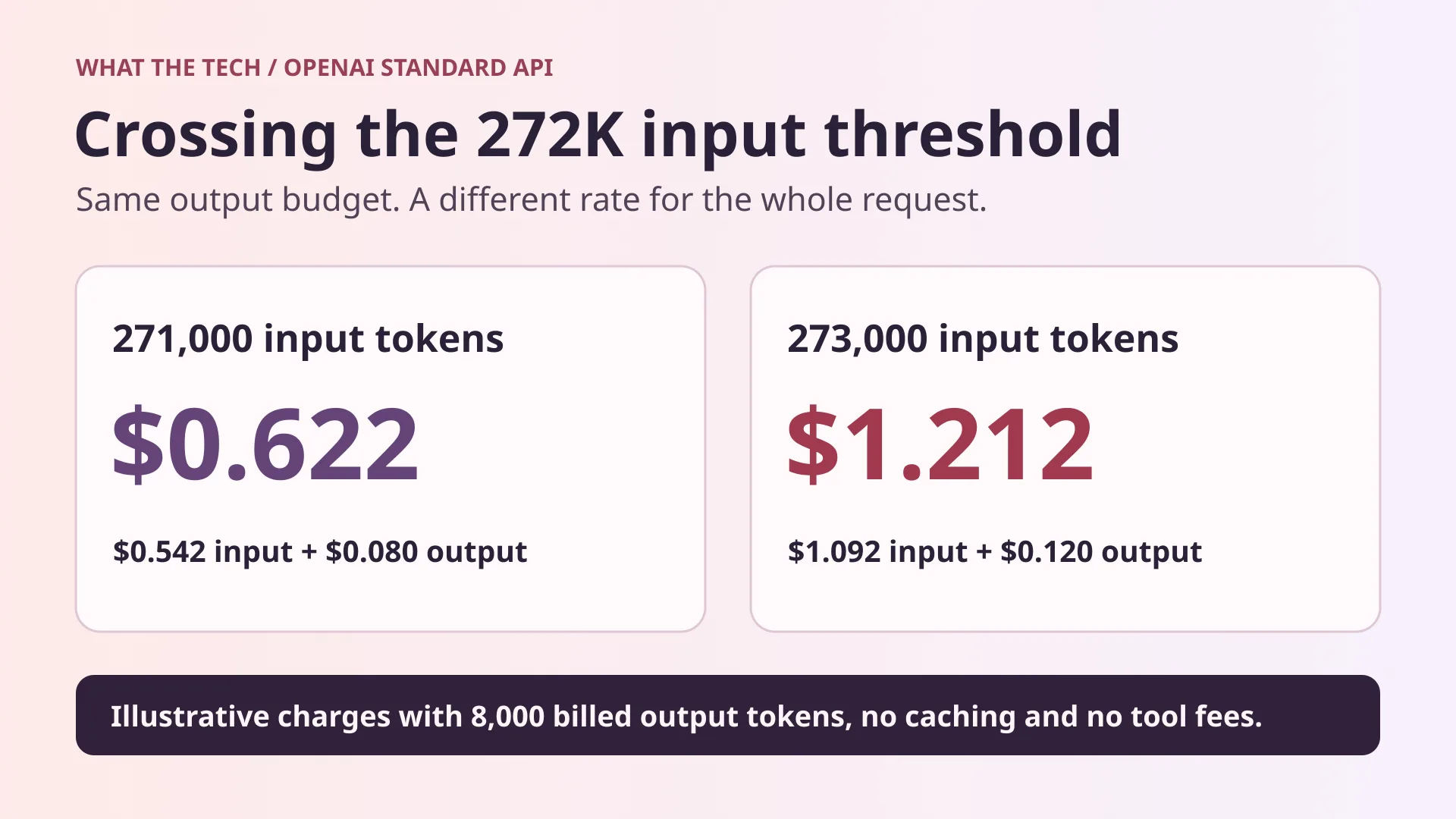
Above 272,000 input tokens, OpenAI doubles input and cache rates and charges 1.5 times the output rate for the full request on both models. In the illustration, 2,000 more input tokens move the request into the higher band. With 8,000 billed output tokens and uncached input, the total rises from $0.622 to $1.212. Count the input actually sent, including tool results and history, before pricing a workflow near that line.
If you have a large, stable prefix, track cache writes and hits separately. A write has its own price. The 12-hour option documented for 6.2 Sol can help when the same prefix gets reused beyond 30 minutes. Whether it pays off depends on the hit rate and how often the prefix changes.
What changes in Codex and ChatGPT Work
OpenAI’s launch announcement lists GPT-6.2 Sol for Plus, Pro, Enterprise, and Edu in ChatGPT Work and Codex, with eligible workspace access subject to admin controls. Check the model picker in the workspace where you’ll use it. Work and Codex can have different defaults from regular ChatGPT conversations. Our ChatGPT plan guide explains the wider product tiers.
For API integrations, use the explicit model IDs gpt-6.2-sol and gpt-6.1-sol in your comparisons. Use the Responses API when you need tool calling. Both models support low, medium, high, xhigh, and max effort. Select an effort explicitly so a change in your integration’s default doesn’t become part of the test.
Ultrafast changes what you pay for speed
For API usage, OpenAI lists 6.2 Sol Ultrafast at three times Standard through February 28, 2027, and six times Standard starting March 1, Pacific time. The 6.1 Sol model page lists six times Standard. Compare Standard with Standard when isolating a model change. Then test Ultrafast separately if waiting time is expensive enough to justify it.
Codex subscription allowance and purchased credits have their own rules. OpenAI’s Help Center lists Ultrafast for 6.2 Sol on Pro $200 in Codex, while 6.1 Sol Ultrafast isn’t included on that plan. Check the applicable allowance or credit rate before costing a run. The API’s per-token dollar rates don’t describe how fast a subscription allowance will run down.
How to switch an existing integration
Keep a rollback path to the working model. Verify that your provider and project can serve both IDs. For each task, keep the same tools, files, system prompt, and retry rules. If the new model stops early or reports that a task finished after a tool failed, capture the failure as part of the result. A shorter answer can still leave more work for your team.
If you use a router, record the actual provider and processing tier for every run. If you compare two Codex sessions, start both from the same commit in separate copies and match their available permissions. For more on choosing the surrounding tool, see our AI coding tool comparison.
Run a side-by-side test on your own work
Use a small set of recent jobs with outcomes you can verify. Include a routine edit, a change that crosses files, a repository question with known answers, and a document task with source requirements. Repeat jobs where results vary. Use the same effort and tier in the first pass. In a second pass, try the cheaper effort setting if both models pass.
Measure | What to record |
Correctness | Tests passed, required facts included, or claims supported by the supplied files. |
Review time | Minutes a person spends checking and fixing the result. |
Response time | Time to first usable answer and time to completion, including tools. |
Cost per accepted job | Spend across all runs and retries divided by accepted results. |
Failure details | Missing evidence, skipped tests, wrong tool calls, and requests that timed out. |
For example, suppose ten runs on one model cost $4.80 and eight pass, while ten runs on the other cost $5.10 and nine pass. The cost per accepted result is $0.60 versus about $0.57, even though total spend is lower on the first model. These figures are illustrative. Count review time separately so you can see whether the apparent saving survives a manual check.
Set a rule for cases where averages are misleading. If the model usually finishes a repository task faster but sometimes omits a breaking change, give that failure its own pass criterion. For a document workflow, check key figures and source references separately from writing quality. That lets you switch the simple work while keeping a human check on the mistakes with the highest cost.
Switch first on tasks where 6.2 Sol meets the same quality bar at a better cost or completion time. Keep 6.1 Sol on the jobs where it delivers more complete answers. A split is particularly useful if you run both document work and repository analysis through the same integration.
Sources
OpenAI’s launch announcement and ChatGPT Work and Codex access
OpenAI’s GPT-6.2 Sol model specifications and GPT-6.1 Sol model specifications
Artificial Analysis’s OpenAI provider table and launch benchmark analysis
OrcaRouter’s launch-day comparison
Keep reading


Reinforcement Learning Explained With a Worked Example
Reinforcement learning is a way to train an agent to choose actions that maximize expected cumulative reward. The agent interacts with an environment, receives...


What Is Biocomputing? How Biological Computers Work, Examples and Applications
In 2022, researchers connected living human and mouse neurons to a simulated Pong game and reported that the cultures changed their behavior with structured fee...


Gemini 4 Neon vs GPT-6.2 Sol: Speed Evidence and Three Practical Tests
Sol looks promising for turnaround, while Neon merits a trial when reasoning errors cause rework. Compare the published evidence and repeat three practical tests on your own work.