Antivirus Software How to Choose the Right Protection

In this story
Antivirus software detects, blocks, and helps remove malicious software, including viruses, ransomware, spyware, and other threats. For a supported Windows 11 PC, the built-in Microsoft Defender Antivirus is a sensible free starting point. Consider a paid security suite when you need specific extras, such as protection across several devices, parental controls, or support—not simply because a website says your computer is infected.
The best choice depends on your device, the features you will actually use, and the renewal cost. A Mac, Android phone, and iPhone do not need the same kind of security app.
What antivirus software does
Modern antivirus combines several methods. It can recognize known malicious files, assess suspicious characteristics, and watch for behavior that resembles an attack. Real-time protection checks activity as it happens; an on-demand scan examines files when you ask it to.
When a threat is found, the software may block it, quarantine it so it cannot run normally, or remove it. A detection still needs attention: check the threat history and any recommended actions rather than assuming that every alert means the problem is fully resolved.
Antivirus is broader than its name suggests, but its limits matter. It cannot guarantee that a convincing payment request is genuine, restore every encrypted file, or prevent someone from accessing an account with stolen credentials. Website filtering can help with phishing, but you still need to check where you sign in.
A VPN serves a different purpose. It protects traffic traveling through its tunnel and changes the public IP address websites see; it does not automatically make a downloaded program safe. Our guide to what a VPN does explains where that protection begins and ends.
related posts:
Which protection fits your device
Use this table before comparing subscription offers.
Your device or situation | Sensible starting point | When another product may help |
Supported Windows 11 PC | Microsoft Defender Antivirus in Windows Security | You want additional controls, support, or one subscription for several devices |
Mac running a supported macOS release | Updates plus Gatekeeper and XProtect | You want additional scanning or web protection with independent Mac test results |
Android with Google Play | Keep Play Protect enabled and install updates | You want verified extras such as scam filtering or family controls |
iPhone or iPad | Current software, secure account settings, careful app and profile choices | You want web filtering or breach alerts, rather than a desktop-style virus scanner |
Employer or school device | The organization’s approved security tools | Ask IT before replacing, disabling, or adding software |
Windows already includes antivirus
Windows Security is the dashboard; Microsoft Defender Antivirus is the malware protection engine. You do not need to buy Microsoft 365 just to use the antivirus included with Windows.
For a personal Windows 11 PC, start by checking that protection and updates are active. If you install a compatible third-party antivirus, Defender normally disables its active antivirus protection automatically. Windows Security continues to show the protection status. Do not force two real-time antivirus engines to run together; use the vendors’ supported configuration.
Macs have built-in defenses too
Macs can get malware. Apple’s macOS security documentation describes Gatekeeper, notarization, and XProtect as layers that help prevent, block, and remediate malicious software.
That makes “Macs have no antivirus protection” inaccurate. Additional antivirus can still be useful, but choose based on the Mac app’s actual features and Mac-specific tests. A Windows lab result does not establish how the same brand performs on macOS.
Phone security apps work differently
Google Play Protect checks apps during installation and periodically scans the device for potentially harmful apps. Keep it enabled, including when you use another security app.
On iPhone, app sandboxing prevents an ordinary third-party app from freely inspecting other apps and the entire operating system. Security apps may offer useful web filtering, scam protection, or account alerts, but a subscription does not turn them into full-device malware scanners. See our iPhone antivirus guide before paying for a mobile license.
Free antivirus software versus paid protection
Free protection can be a reasonable long-term choice. Paying more does not automatically mean better malware detection; much of the difference may be extra services, convenience, and support.
Microsoft Defender is the simplest free option for many Windows users because it is already integrated. Avast Free Antivirus is another option to compare if you want a different interface or features. Download it from the official vendor and read the installation prompts so you understand which optional apps and paid trials you accept.
For paid protection, Bitdefender Total Security and Norton 360 Deluxe are useful candidates to shortlist. They are examples with current independent Windows test results, rather than a universal ranking for every device.
What independent tests actually show
In AV-TEST’s July–August 2026 Windows 11 evaluation, Avast Free Antivirus, Bitdefender Total Security, and Norton 360 each earned 6 out of 6 for protection, performance, and usability. Microsoft Defender earned 6 for protection, 5.5 for performance, and 6 for usability.
Those are category scores from a specific test period and product versions, not a promise of perfect protection. Several products tied, so this evidence does not justify naming one clear detection winner. AV-TEST performed these tests; they are not hands-on tests conducted by What the tech.
Choose paid extras by platform
Bitdefender Total Security covers Windows, macOS, Android, and iOS, with different capabilities on each. Its standard bundled VPN has a 200 MB daily traffic allowance; do not mistake that for unlimited VPN service.
Norton 360 Deluxe covers up to five devices and includes a VPN and 50 GB of PC cloud backup. The backup feature is limited to supported Windows configurations, and Norton’s parental controls are not available on macOS. Check the exact platform requirements before buying a family subscription.
If you only need antivirus on one Windows laptop, a larger bundle may add little value. If you need a backup service or parental controls, compare those features separately instead of counting every item in the marketing list as equally useful.
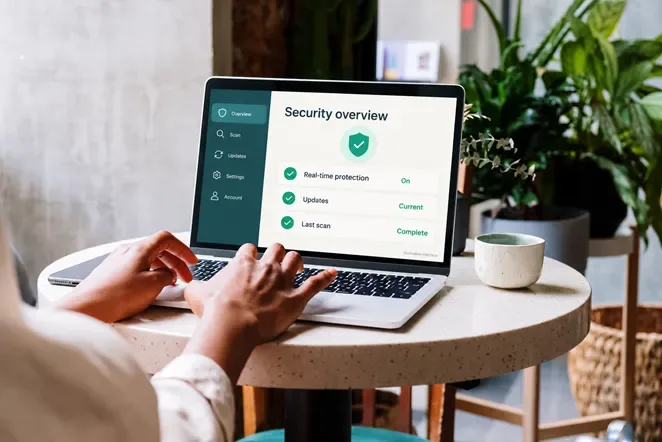
A security dashboard is useful when it clearly shows active protection, current updates, and scan results. Interface shown is illustrative.
How to choose antivirus software without overpaying
Start with the computers and phones you own. Record their operating systems, versions, and processor types, then check the product’s current compatibility page. A license that covers five devices is poor value if the features you need work on only one of them.
Next, compare recent independent tests for the exact platform. Look beyond detection: performance affects everyday use, while usability results can reveal false alarms. A false positive is a legitimate file or action incorrectly flagged as harmful.
Before checkout, check these five details:
1. Protection type: Is this real-time protection, an on-demand scanner, or a temporary trial?
2. Platform features: Which tools work on each device, including Windows on ARM if relevant?
3. Total cost: What is charged today, what is the renewal price, and is sales tax extra?
4. Subscription terms: Is renewal automatic, when is payment taken, and what is the refund window?
5. Privacy and permissions: What data may be sent for cloud analysis, and are optional browser extensions or services necessary for your use?
Worked example: Suppose a hypothetical five-device plan costs $40 for year one and $100 at renewal. Two years cost $140 before tax, averaging $70 a year. If you use only two eligible devices, that is $35 per device per year. Compare that with the value of the extras you will actually use. These figures illustrate the calculation; they are not a provider’s advertised offer.
Download from the developer’s official site or a verified app-store listing. A pop-up claiming to have found infections is not a trustworthy reason to install the app it promotes or call its phone number.
Check your Windows antivirus in a few minutes
This process is for a personal Windows 11 PC using Microsoft Defender. If another antivirus is active, follow its own scan instructions. On a managed computer, contact IT.
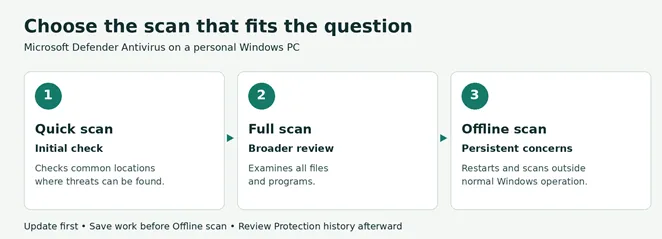
1. Open the real app. Search Start for Windows Security, then open Virus & threat protection. Do this directly rather than following a browser alert.
2. Check the provider. Confirm that an antivirus product is active and resolve any protection warnings. If a preinstalled trial has expired, decide whether to renew it or uninstall it, then verify that Defender becomes active.
3. Update before scanning. Install Windows updates and check for protection updates under Virus & threat protection updates. Restart if required.
4. Choose the scan. Use Quick scan for an initial check. Under Scan options, choose Full scan for a broader examination or Custom scan for a particular file or folder. Do not open a suspicious file to “see what happens.”
5. Review the outcome. Open Protection history, check the detected item and action, and complete any remaining steps. Do not restore a quarantined file simply because you recognize its name.
Microsoft’s scan guidance also explains Defender Offline. It restarts the PC and scans in the Windows Recovery Environment, which can make it harder for persistent malware to hide. Save your work before running it. Afterward, review Protection history.
A clean scan is reassuring, but it does not prove that an account is secure or explain every slowdown. If warnings persist, seek help from the security vendor. If files suddenly become encrypted or there are signs of active compromise, disconnect the affected device from the network and get qualified help before reconnecting backup drives.
What antivirus cannot replace
Operating-system updates: Antivirus cannot repair every vulnerability in an unsupported system. Standard Windows 10 support ended on October 14, 2025. If you still use it, check your edition’s support status and current Microsoft upgrade or ESU options; continued antivirus updates alone are not a substitute for operating-system security fixes.
Recoverable backups: Keep a separate, protected backup and confirm that you can restore important files. A synchronized folder can copy unwanted changes too, so understand its version history and recovery limits. Keep an offline copy disconnected when it is not being updated.
Account protection: Use unique passwords or passkeys and multifactor authentication. If you entered credentials on a fake site, change them from a trusted device and review account sessions even if the antivirus scan is clean. If you cannot access your verification app, our Microsoft Authenticator troubleshooting guide explains recovery routes and steps to avoid losing access.
For most home users, the practical goal is straightforward: one active, updated antivirus where the platform supports it, a supported operating system, recoverable backups, and secure sign-ins. Buy additional software when its specific features solve a problem you have.
Keep reading


Best NordVPN Alternatives in 2026: 5 VPNs Compared
Compare five NordVPN alternatives for free browsing, unlimited devices, privacy, and monthly pricing. See upfront costs, renewal terms, and switching tips.


Free VPN for PC Which App to Choose and How to Set It Up
For a free VPN for PC, start with Proton VPN Free if you want everyday browsing without a data cap. Choose Windscribe Free if selecting a server country matters...

VPN for iPhone How to Choose and Set It Up
For a free VPN for iPhone, Proton VPN Free is a sensible starting point for everyday browsing because it has no data cap. Consider NordVPN if you want a paid se...