What the tech

Search

/ opens search from anywhere. Esc closes it.

Tools

Get the newsletter
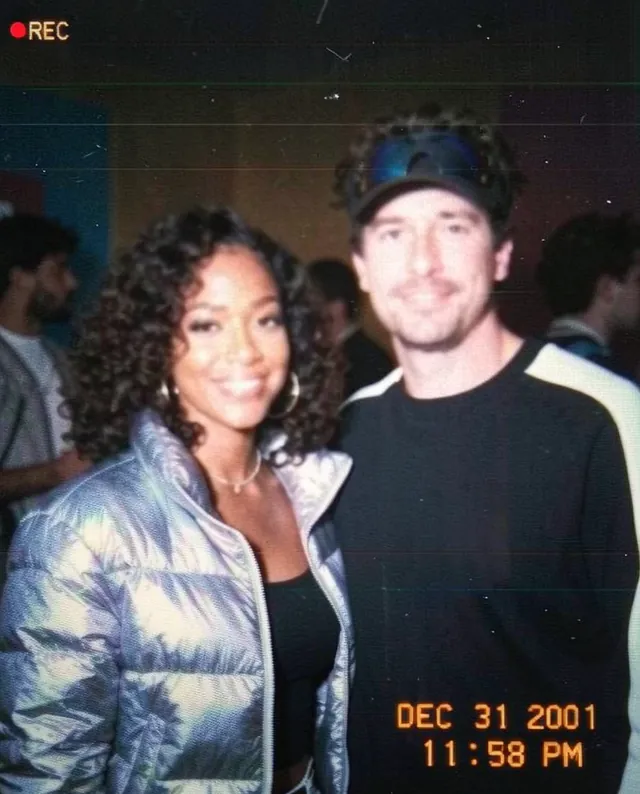
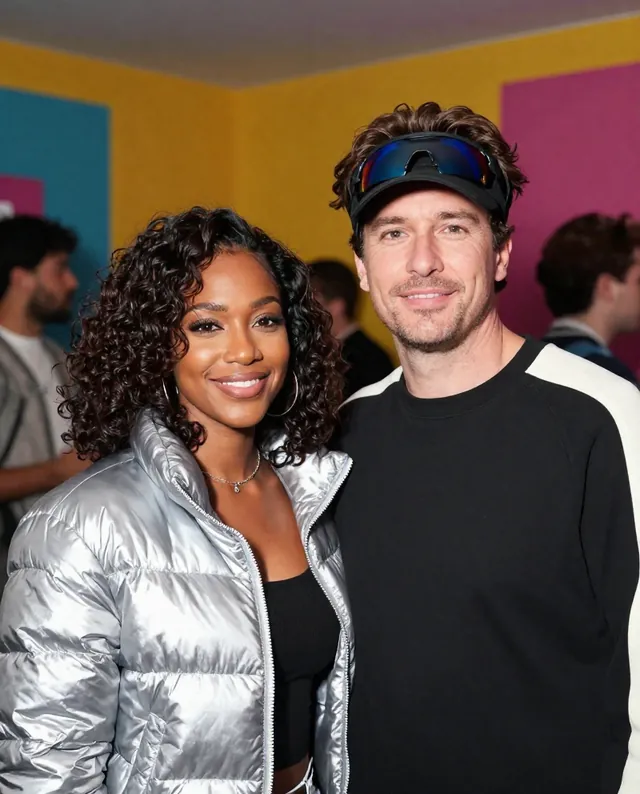
Example result of this prompt The made-up input photo InputExample result

Example Example made on our own Mac with open models: Z-Image made the made-up input photo, FLUX.2 klein ran this prompt on it. Your result in the AI above will look different. How we make examples

Y2K camcorder still from your photo

Your photo turned into a grainy early-2000s camcorder frame, with a date stamp and flash glare. You need one photo.

You need
1 photo of yours
Written for
Gemini, ChatGPT
Result
Image

Prompt

Turn my attached photo into a still frame from an early-2000s home camcorder. Keep the people and pose, but make it look like a paused video: low resolution, slightly washed-out colors, a bit of motion blur, soft video noise and faint horizontal lines. Use the on-camera light so faces are bright and the background falls into darkness. In the bottom right corner, add an orange-white digital date stamp that reads "date", and in the top left a small "REC" with a red dot. Keep every person's face exactly as it is: same identity, features, skin tone, age and proportions.

Fill in, or keep the brackets and change them later

date

How to use it

  1. Open Gemini or ChatGPT and choose the image model.
  2. Attach a photo (a night out or party photo suits it) and paste the prompt.
  3. Too clean? Add 'lower quality, more noise and blur' and run it again.
What to expectThe overlay text may come out slightly wrong, and low-quality looks can blur or change faces a little.

Tips

  • Night photos taken with flash give the most convincing result.
  • Ask for a 4:3 frame to match old camcorders.
  • Your photo is uploaded to Google or OpenAI. Read their data policy before you share a face.

Editor: Ali Dezhami · Updated November 18, 2026

Similar prompts

All trend styles