Example Example page built by Claude for this page, not by the AI named above. How we make examples
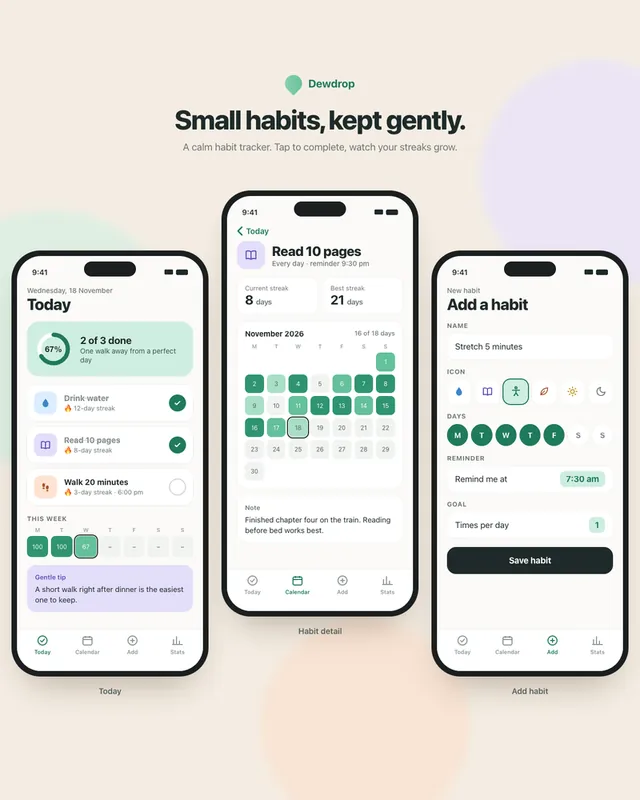
Mobile app screens for a habit tracker
Get four clickable habit tracker screens as a working prototype, or as one polished mock-up image for a pitch.
You need
Nothing but the prompt
Written for
Claude, ChatGPT, Lovable, Gemini
Result
Website
Prompt
You are a mobile product designer. Design and build a clickable prototype of a habit tracker app called app name as one HTML file with inline CSS and vanilla JavaScript, shown in a phone-sized frame (390 x 844).
Four screens with a bottom tab bar:
1. Onboarding: one friendly sentence, three example habits to pick from (example habits) and a "Start" button.
2. Today: a checklist of habits, tap to complete, a small streak count and a progress ring for the day.
3. Habit detail: a monthly calendar heatmap, the current and best streak, and a note field.
4. Add habit: name, icon choice, days of the week and a reminder time.
Save everything in localStorage so it survives a reload. Style: visual style, large touch targets (at least 44 px), clear labels, gentle motion that respects reduced-motion settings. No real brand names or logos.
Create an image of four smartphone screens standing side by side on a soft neutral background, showing a habit tracker app called app name. The first screen is a friendly welcome page with three example habits: example habits. The second shows today's habits as a checklist with small streak counts and a progress ring. The third shows one habit with a monthly calendar where completed days glow in the accent color. The fourth is a simple form to add a new habit. The look is visual style, with rounded cards, short readable labels and plenty of breathing room, and no real brand names or logos.
Build a habit tracker app called app name for phones. Screens: onboarding with three example habits (example habits), Today checklist with streaks and a daily progress ring, habit detail with a monthly calendar heatmap and best streak, and an Add habit form with icon, days and reminder time. visual style style, large touch targets, data saved on the device.
Fill in, or keep the brackets and change them later


 Claude, ChatGPT, Lovable