What Is VPN Passthrough and When Should You Enable It?
Learn what VPN passthrough does, when to enable IPsec or PPTP helpers, and how to troubleshoot router VPN connections without changing every setting.


In this story
VPN passthrough is a router feature that helps a VPN connection from your device reach a remote VPN server through the router’s network address translation, or NAT. It is most relevant to older connection methods that need special handling. The VPN software at the endpoints provides encryption; passthrough does not create a VPN subscription, encrypt your browsing, or protect every device automatically.
If your VPN already works, you usually have no reason to change this setting. If it fails, identify the protocol first. That tells you whether a passthrough option is relevant or whether you should investigate the app, firewall, or server instead.
Updated October 22, 2026
What is VPN passthrough on a router
Think of passthrough as a compatibility helper. A laptop starts a VPN connection, the home router forwards its traffic, and a remote VPN server receives it. The router may need extra logic to keep track of that connection and return packets to the right device.
TP-Link’s passthrough explanation makes the key distinction: letting VPN traffic cross a router does not make the router a VPN endpoint. A product listing that says “VPN passthrough supported” therefore does not establish that the router can run a VPN client or host a VPN server.
For example, you might need a work VPN on your laptop but have no VPN installed on the router. Passthrough concerns the laptop’s connection. It does not add your television or another person’s phone to that tunnel.
Read More:
How does VPN passthrough work
On many IPv4 home networks, NAT lets several devices share one public address. The router records connection information and often translates port numbers so replies reach the correct internal device.
Some VPN traffic needs more than ordinary TCP or UDP tracking. PPTP carries data in GRE, which has no TCP or UDP ports. Native IPsec ESP also has no such ports. Depending on the protocol and router, passthrough can use a protocol-aware helper to track sessions and handle the return traffic.
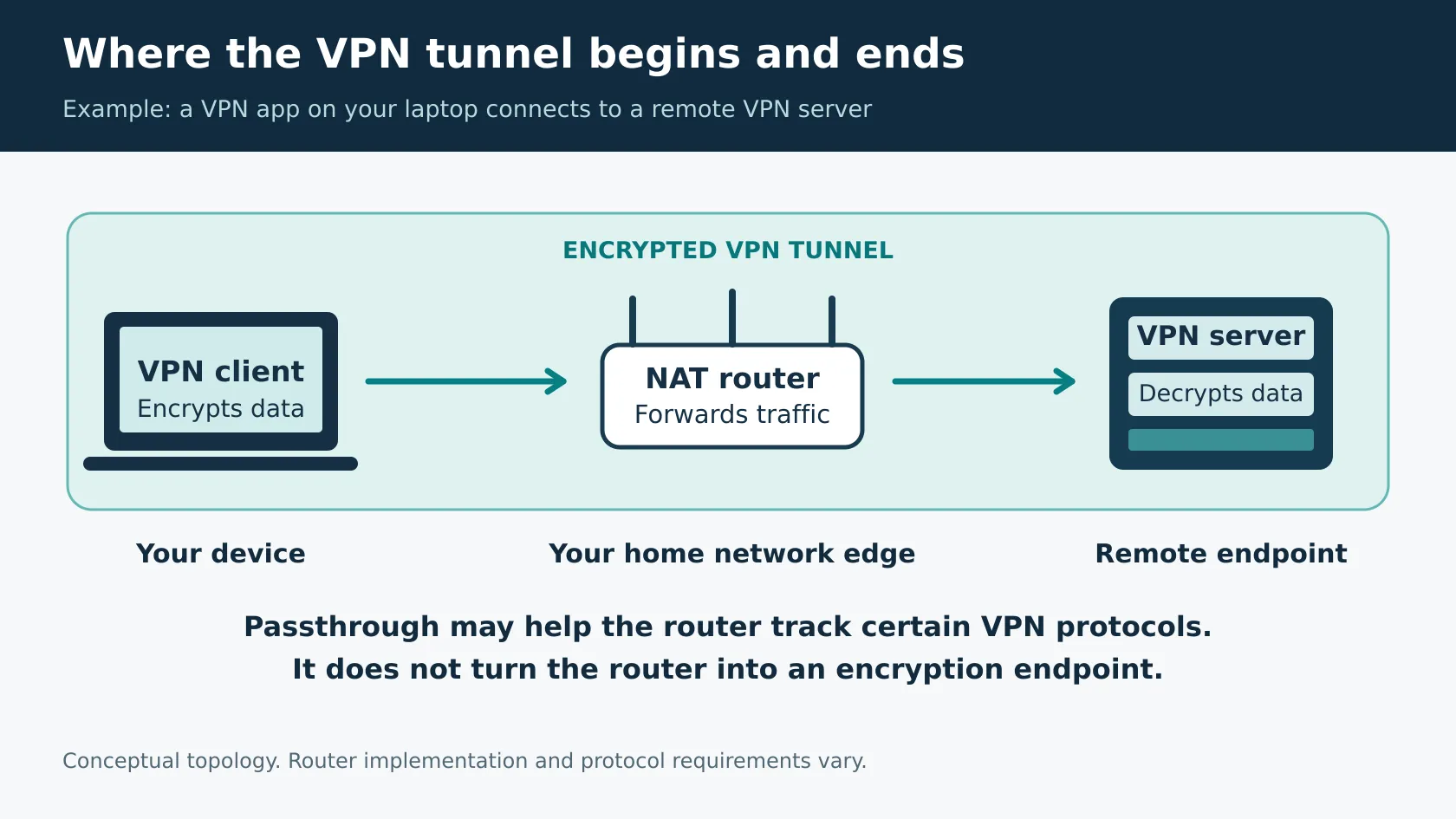
The encrypted payload stays protected between the VPN endpoints in this example. Passthrough does not require the router to decrypt it. Nor does the feature simply “turn NAT off.” The actual mechanism varies across router firmware and VPN protocols.
What is IPsec passthrough
IPsec passthrough is the IPsec-related part of a router’s compatibility features. A similarly named switch can control different helper behavior on different products, so treat the model’s documentation as the authority.
Modern IPsec deployments often use NAT traversal, or NAT-T. This wraps ESP traffic inside UDP so NAT devices can track it more easily. RFC 3948 defines UDP encapsulation of ESP. IKEv2’s NAT traversal rules describe NAT detection and use of UDP 4500. NAT-T requires suitable endpoint support; a router checkbox cannot add missing capabilities to the VPN server.
What is PPTP passthrough
PPTP passthrough helps with PPTP’s control and GRE data traffic. The PPTP specification describes TCP port 1723 for control and a separate GRE-based data path. Supporting that legacy traffic does not make PPTP a good choice for a new setup.
What is L2TP passthrough
L2TP passthrough concerns Layer 2 Tunneling Protocol traffic. L2TP alone does not provide payload encryption; it is commonly paired with IPsec. As the L2TP specification explains, packet-level confidentiality requires additional protection. For L2TP/IPsec, IPsec and NAT-T compatibility also matter.
Do you need VPN passthrough for your VPN protocol
Use this as a starting point, then check your actual VPN profile and router manual.
Connection | Legacy helper usually needed | Traffic to recognize |
OpenVPN | Normally no | Configured UDP or TCP port; 1194 is the standard default |
WireGuard | Normally no | Configured UDP endpoint port |
IKEv2 with IPsec and NAT-T | Normally no special legacy helper; vendor behavior varies | Commonly UDP 500 and UDP 4500 |
L2TP with IPsec | Depends on NAT-T, endpoints, and router implementation | IPsec traffic externally; L2TP is protected inside the tunnel |
PPTP | Often depends on a compatible PPTP helper behind NAT | TCP 1723 plus GRE, IP protocol 47 |
Sources: OpenVPN’s reference manual, WireGuard’s quick start, and the protocol specifications above. Port numbers describe connection requirements, not instructions to create inbound forwarding rules.
GRE protocol 47 and ESP protocol 50 are IP protocol numbers, not TCP or UDP ports. An instruction to “open port 47” is therefore not an adequate description of allowing GRE. Equally, an IKEv2 VPN still uses IPsec: labeling all IPsec obsolete while calling IKEv2 unrelated is misleading.
VPN passthrough on or off
Leave a working configuration alone. Enable a particular helper when your documented VPN setup requires it. For a managed work connection, follow the IT team’s requirements rather than enabling every legacy option experimentally.
IPsec passthrough on or off
With a functioning NAT-T connection, there may be no benefit from changing a legacy IPsec helper. If the connection fails only behind one router, check firmware and model guidance. Some implementations can interfere with NAT-T; OpenVPN’s passthrough troubleshooting guide notes that testing the helper in either state can be useful. Record the original state and change one setting at a time.
PPTP passthrough on or off
If nobody needs PPTP, there is no operational reason to enable its helper. If an old work system depends on it, ask IT about a supported replacement. Microsoft advises against PPTP and L2TP and no longer accepts them by default in new Windows Server 2025 RRAS setups. That server change does not mean every Windows VPN client has stopped supporting them.
Is VPN passthrough safe
The setting’s name is not a security rating. Consider the VPN protocol, the router’s firmware, the endpoints, and your organization’s policy together.
Enabling an outbound VPN helper is different from deliberately exposing a server through port forwarding. It can still activate additional protocol-handling code, and implementation details matter. Keep firmware current, use supported VPN protocols, and retain your normal firewall protections.
Disabling passthrough is also not a complete way to block VPN use: ordinary UDP- or TCP-based VPN traffic may still work. Network administrators who need application restrictions require controls designed for that purpose.
How to enable VPN passthrough
1. Identify the VPN protocol. Check the app’s connection details, profile, or your IT instructions. “VPN” alone is not enough.
2. Find the correct router. Use the gateway address shown in your device’s network settings or the manufacturer’s documented app. An ISP gateway and a second router may both be on the path.
3. Record the current settings. Note the model, firmware version, and existing helper states before editing.
4. Find the protocol controls. Check the model’s documented VPN, NAT, firewall, or advanced settings. Menus vary.
5. Change only the relevant option and save. Restart equipment only if the firmware requests it.
6. Reconnect and verify. Test the work resource or traffic that failed, not just the app’s connected icon. Restore the original setting if the change provides no benefit.
TP Link VPN passthrough settings
TP-Link’s FAQ uses an Archer C7 example and says passthrough is enabled by default on most of its routers. Check the instructions for your exact hardware and firmware; that example is not a universal menu path for every TP-Link or Deco device.
ASUS NAT passthrough settings
ASUS documents WAN then NAT Passthrough in its web interface, followed by Apply. Its menu contains other helpers as well, so change the relevant VPN option rather than assuming every passthrough control is related.
If your router has no visible switch, consult its documentation. For instance, eero confirms VPN passthrough support while distinguishing it from network-wide VPN support. A missing toggle alone does not prove incompatibility.
VPN passthrough not working
Start with a comparison that narrows the problem. On the same device, try the same VPN profile and server on home Wi-Fi and, if available, a mobile hotspot.
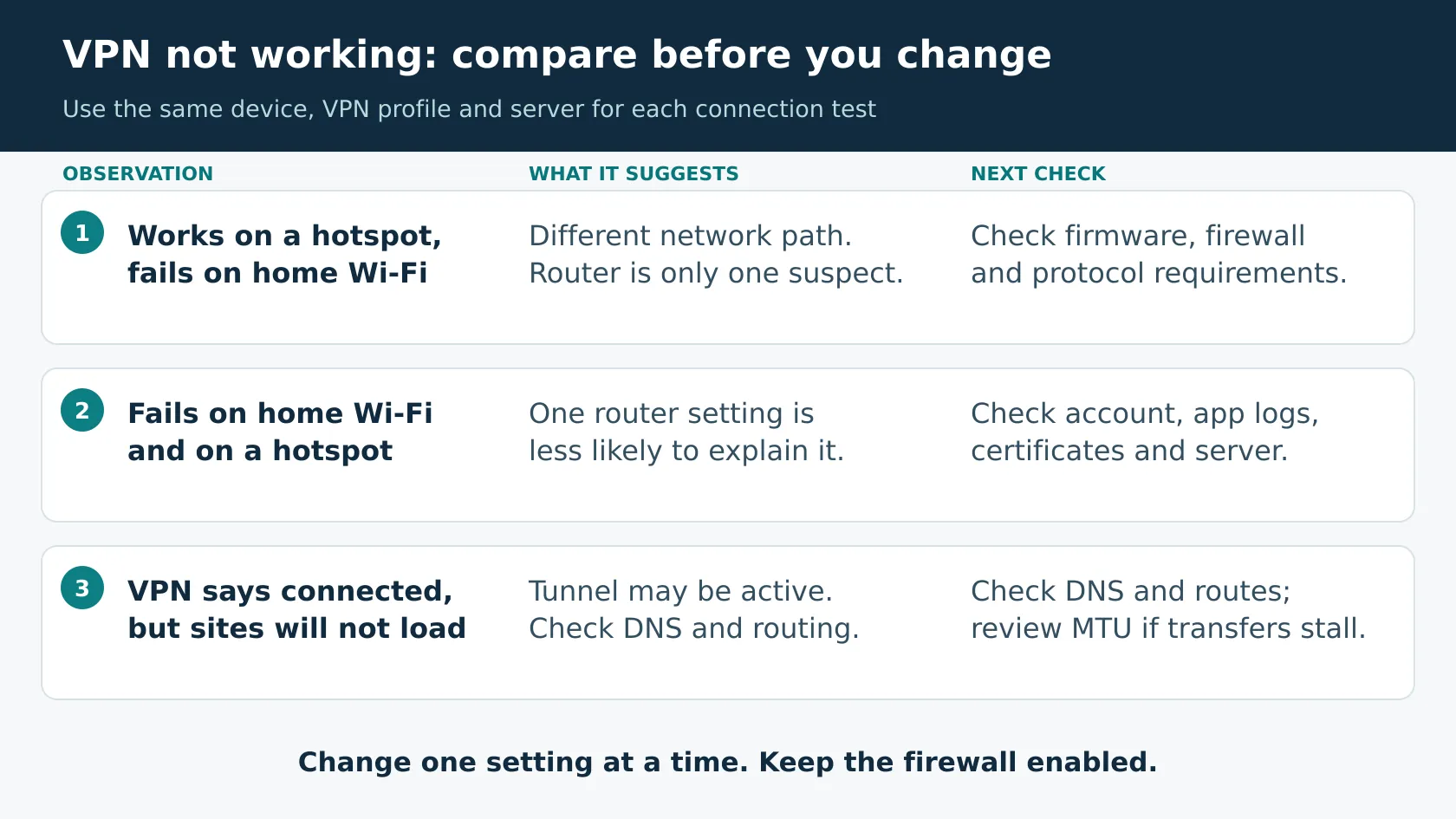
· Works on a hotspot only: investigate the home network path, router firmware, protocol helper, and firewall policy. Different DNS or ISP routing can also explain the difference.
· Fails on both: check the account, credentials, certificate validity, device time, server availability, and client logs before changing router settings.
· Connects but cannot browse: inspect VPN DNS and routes. If small requests work but larger transfers stall, ask your administrator to investigate packet size and MTU.
OpenVPN’s connectivity troubleshooting documentation distinguishes connection failures from routing, DNS, and MTU problems. Follow the provider’s instructions rather than applying every internet troubleshooting command.
For IPsec, have IT confirm NAT-T and the required network policy for UDP 500 and 4500. For OpenVPN, changing to TCP 443 only helps when the server actually supports that transport and port. A passthrough switch cannot fix an unreachable or incorrectly configured server.
If two routers create double NAT, check both devices before considering a topology change. An ISP’s carrier-grade NAT is especially relevant when hosting an inbound server; it does not automatically stop an ordinary outbound VPN client. Do not factory-reset a router or disable its entire firewall as a first troubleshooting step.
VPN passthrough versus a VPN router and IP passthrough
Feature | What it does | When it matters |
VPN passthrough | Helps another device’s VPN traffic cross the router | An outbound VPN has a protocol compatibility issue |
Router VPN client | The router establishes the VPN connection itself | You want selected or all routed device traffic to use a VPN |
VPN server with port forwarding | Directs incoming connections toward a hosted VPN endpoint | You are hosting a server behind a NAT gateway |
IP passthrough or bridge mode | Changes gateway or public-address handling; exact behavior differs | You are integrating another router or changing network topology |
Split tunneling | Chooses which destinations or app traffic use a VPN tunnel | You need selective routing, not a legacy protocol helper |
ASUS’s VPN capability documentation explicitly separates passthrough support from VPN client and server functions. And AT&T’s IP Passthrough instructions describe assigning its WAN address to a downstream device. That is a different task and can change the gateway’s firewall protection for that device.
If you are hosting a VPN server, use the server’s deployment guide. OpenVPN’s initial connectivity guide covers inbound reachability and forwarding. Turning on an outbound helper does not publish a server through every upstream gateway.
Frequently asked questions
Does VPN passthrough hide your IP address
Not by itself. It helps an existing VPN connection work. Whether a website sees a VPN exit address depends on the active VPN and which traffic enters its tunnel.
Does VPN passthrough improve speed or gaming
It is a compatibility setting, not an internet accelerator. If a needed helper fixes a failing tunnel, connectivity may improve. It does not guarantee lower latency or faster downloads. Server distance, congestion, Wi-Fi quality, and the chosen VPN setup still matter.
Can several people use a VPN behind one router
Often yes, but legacy protocols and router helpers can impose limitations. DrayTek documents limits for IPsec without NAT-T. Check concurrent-session support on the exact model instead of assuming the passthrough label promises unlimited tunnels.
Sources and router documentation checked October 22, 2026. Start with your VPN protocol, preserve a working configuration, and use the exact router manual when a change is needed.
Keep reading


Best VPN Services 2026: 5 Top VPNs Compared
If you want the best VPN services 2026 shortlist without reading through ten near-identical recommendations, start with these five. NordVPN is our best overall...