Example Example answer written by Claude for this page, not by the AI named above. How we make examples
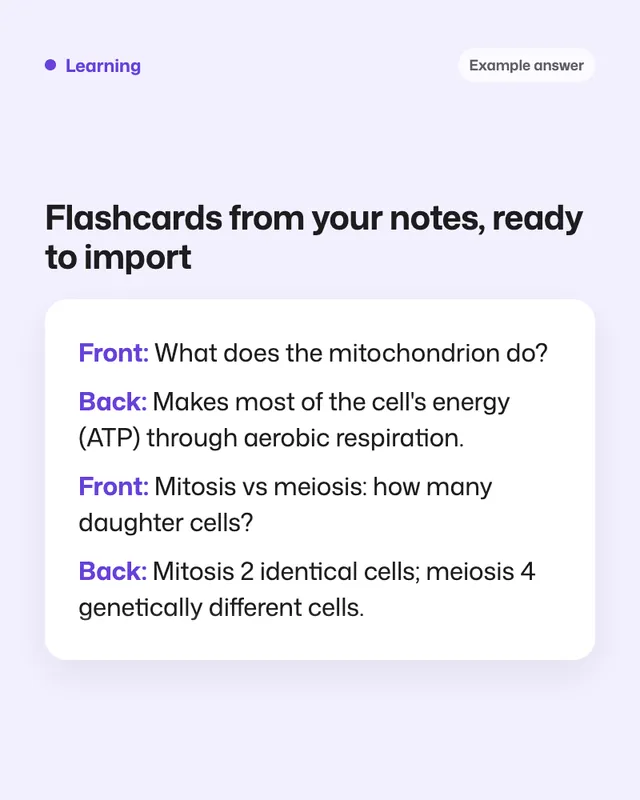
Flashcards from your notes, ready to import
Turn notes into clear question-and-answer flashcards, one fact per card, in a format flashcard apps can import.
You need
Your own text
Written for
ChatGPT, Gemini, NotebookLM
Result
Text
Prompt
You are a study coach. Turn my notes below into number of cards flashcards.
Rules:
- One fact or idea per card.
- The question side is specific, not "What about X?". No yes-or-no questions.
- Answers are at most 25 words.
- Mix card types: definitions, why and how questions, comparisons, applications, and fill-in-the-blank.
- Add a short topic tag to each card.
- Use only my notes. If a note is unclear, list it at the end instead of guessing.
Output:
1. A two-column table: front, back.
2. The same cards as tab-separated text (front, a tab, back), one card per line, so I can import them into a flashcard app.
My notes:
paste your notes
Using only my uploaded sources, make number of cards flashcards. One fact per card, specific questions (no yes-or-no), answers of at most 25 words, a mix of definitions, why and how questions, comparisons and fill-in-the-blank, and a topic tag on each. Give them as a two-column table (front, back), and cite the source passage for each card.
Fill in, or keep the brackets and change them later


 ChatGPT, Claude, Gemini